
We pulled 27 accounting, bookkeeping and tax pages that were paying for Google Ads clicks, and read all of them. These 7 are the ones worth your time. Everything we found is on this page, free.


These are real accounting / tax services pages spending actual money on Google Ads right now.
From real accounting / tax services Google Ads campaigns in the US
The landing pages actually worth stealing from
So you know exactly what to avoid

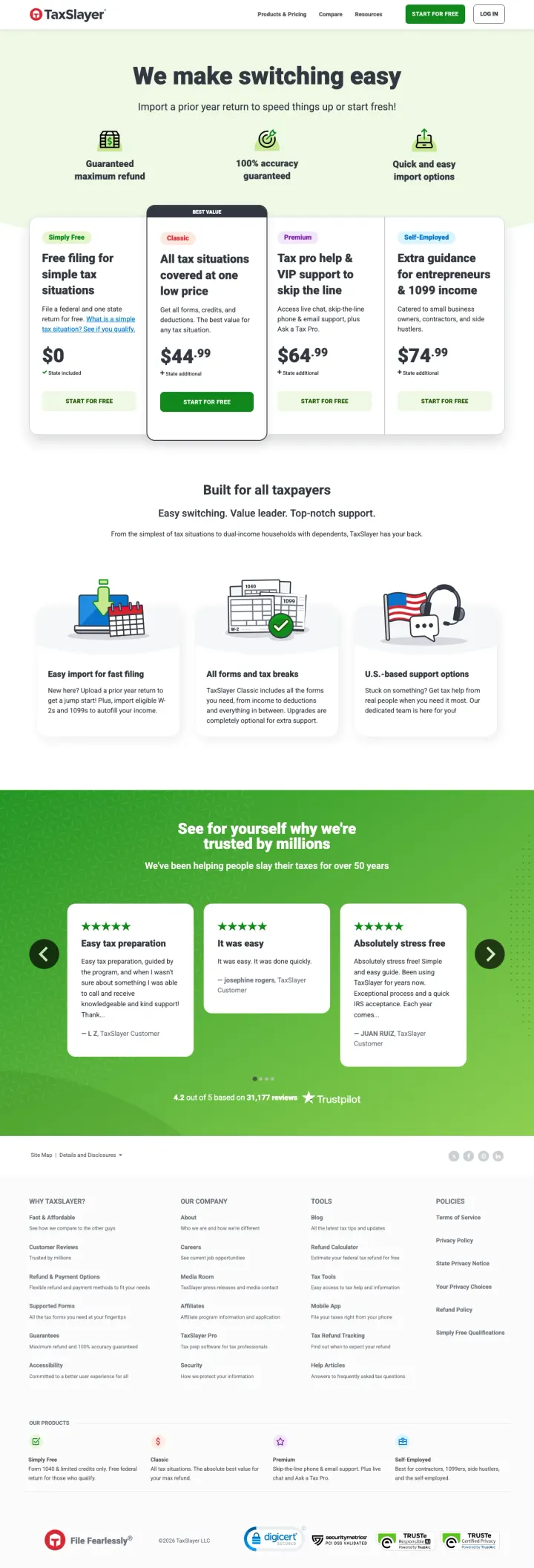
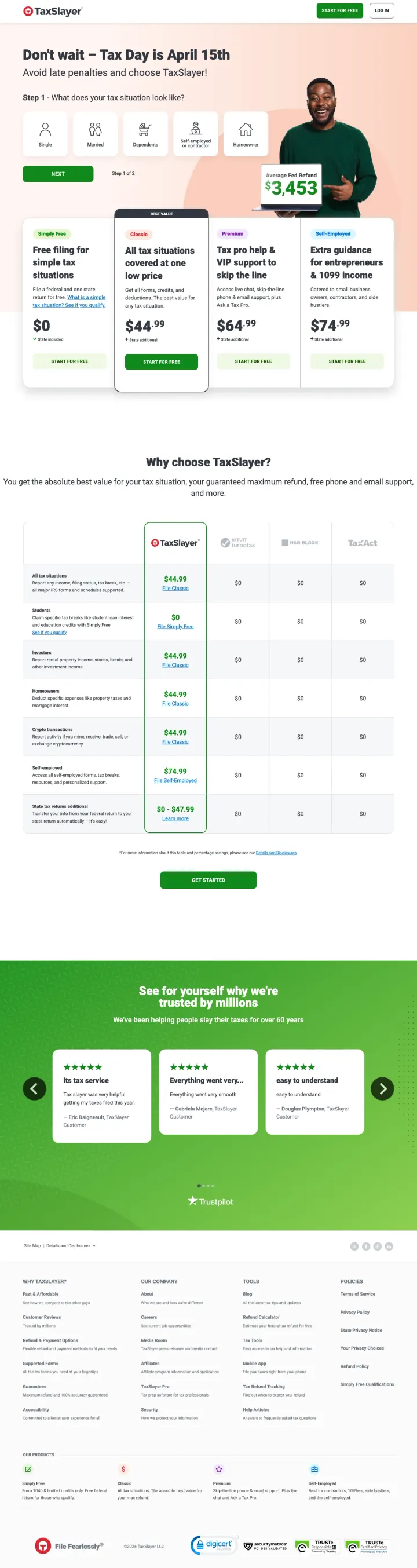
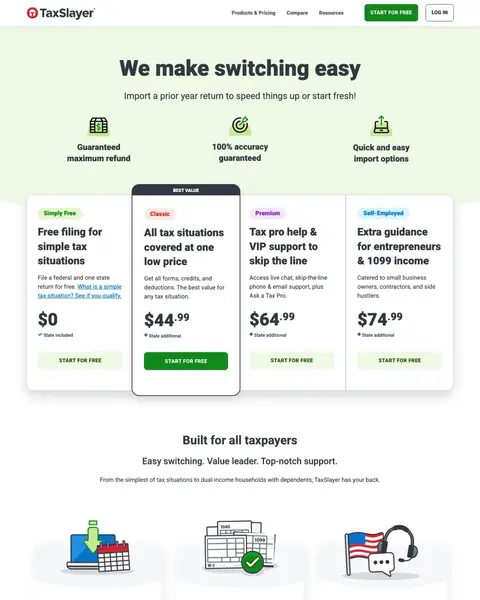
TaxSlayer built this page for people who already file somewhere else, and the headline and the line under it are about the move rather than the software. The tier prices sit in the first screen, from the free option up to self-employed, so the cost of switching is answered without a call and without a scroll. What the page never explains is how to get your old return out of the product you are leaving.
Build your entire landing page around the switching experience, not the product features. TaxSlayer's headline is 'We make switching easy' - not 'File your taxes' - because they know the visitor has already decided to switch; they just need reassurance that the transition is painless.
Every tier prices itself in the first screen, from free up to self-employed, and a line under each price says whether the state return is included or extra. A visitor can hold the cost of switching against what they pay now, before they scroll. Put your own tiers side by side with the price on each, and you remove the question that otherwise sends people back to the search results.
Somebody leaving a tax product they already trust is not worried about features, they are worried about getting it wrong. TaxSlayer answers that right under the headline with a row of icons: guaranteed maximum refund, accuracy guaranteed, quick and easy import options. Every icon answers a worry about switching, and they all land before the prices start. If you carry a guarantee, put it where the hesitation happens, not on a page nobody opens.
The quotes sit in a green band near the foot of the page, each with a name under it, and the same word keeps coming back through them: easy. That is the exact promise in the headline, so the customers are making the argument instead of the copywriter. Search your own reviews for the word you are selling on and put those ones near your button, not near your footer.
Switching is the whole promise, and the page tells you to import a prior year return without saying how to get that file out of TurboTax or H&R Block. Your visitor is already nervous about moving. Name the product they are leaving and show the export in a couple of steps, because the person who cannot picture the move does not make it.
Nothing here says what happens to the years you already filed somewhere else. That is the second thing anybody asks before they switch, right after the price, and this page leaves it hanging. Answer it in a line beside your switch button and you keep the people who would otherwise close the tab and stay where they are.
Classic says it covers all tax situations and Premium sells tax pro help, and a first-time filer cannot tell which sentence describes them. When your tiers are named after your product instead of after the customer, the nervous buyer picks nothing at all. Label each tier with the person it suits and let the feature list sit underneath.

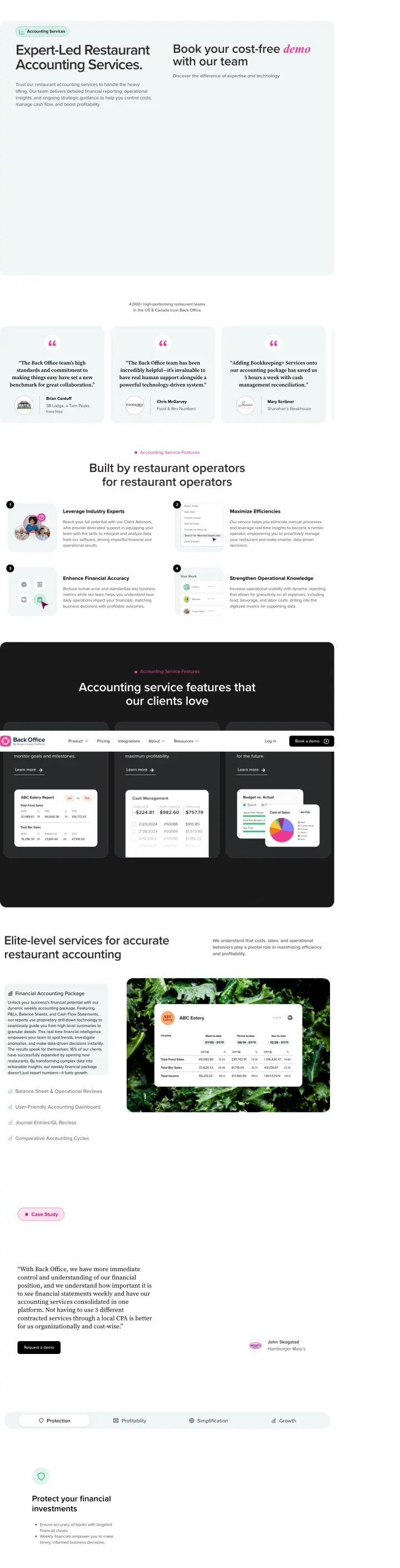
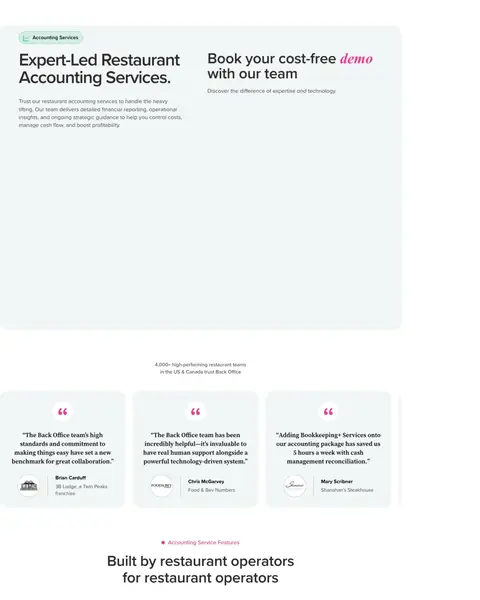
Restaurant accounting is all Back Office does, and that narrowness is what put it in the file. Under the hero runs a row of quote cards from named operators with their venues attached, which is proof a generalist firm cannot assemble. Their ad sells a flat monthly rate and the page never says what it is.
Position your accounting service around the reporting cadence, not just the deliverables. 'Weekly financials so you know your numbers while they still matter, not 45 days after close' reframes speed-to-insight as the competitive advantage, making monthly accountants sound obsolete by comparison.
A generalist firm can only say it serves small businesses. This says restaurants, and it counts them, in the line right under the hero, above the quote cards. An owner reading it knows they are not going to be the experiment. If there is a trade you genuinely dominate, count your customers in it and print the number where the doubt is.
Every quote card carries a person, their logo and the venue they run: a Twin Peaks franchise, a steakhouse, a restaurant numbers firm. Nobody can fake a row like that, which is exactly why it lands. Ask your best clients for a line each and print the business name under it, because a first name on its own reads like you wrote it yourself.
The strongest sentence on this page sits inside a closed FAQ row near the bottom, so a visitor only reads it if they scroll past everything and then click. An owner who did read it could hold it against their own takings and work out whether the fee pays for itself. Steal the claim and move it: yours belongs beside the demo button, not folded away.
The first screen holds a headline, a paragraph and a request for a demo. The operator count, the named venues and the weekly reports all start below the fold, so the only thing above it is the ask. Somebody who clicked an ad for restaurant accounting has given you one screen to earn the call. Lift one proof into it, and let the paragraph go.
Their own ad sells a single flat monthly rate for full-service bookkeeping across every location, and nothing on this page says what that rate is. Somebody who clicked because of the words flat rate now has to sit through a demo to hear a number. If your ad names a pricing model, put a figure on the page it points at, even a starting-from one.
Below the quotes come numbered feature blocks, a dark product section, a case study, a tab bar and a long stack of closed FAQ rows, which is a page built for organic search. Somebody who typed restaurant accounting services and clicked a paid ad wants the price and the form. Keep the depth on your site and cut the version behind your ads down to the decision.

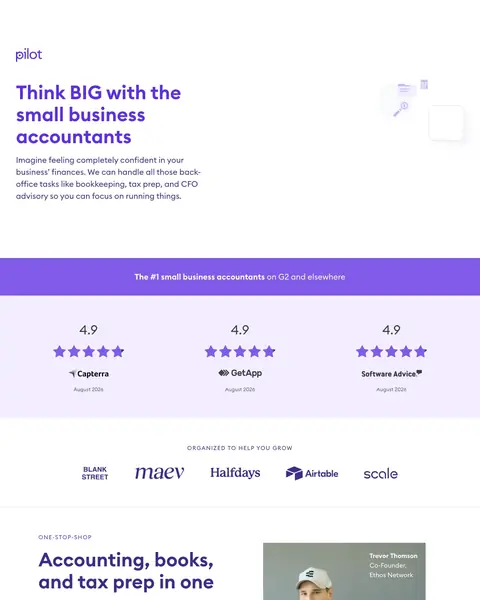
Pilot sells bookkeeping to funded startups and asks for the lead straight away, with the form in the hero rather than at the bottom of a long scroll. The client logos are doing a job most pages never think about: they say who this is for and, quietly, who it is not. The ad feeding it promises flat rate pricing that the page puts no figure to.
Name the city where your accounting team is based and make it part of the brand identity. 'A smart team of financial experts based in Nashville' does three things: proves the team is real people in a real place, signals US-based (not offshore), and creates a sense of knowing exactly who handles your books.
Capterra, GetApp and Software Advice all carry the same score, each one dated, and they sit in a row just below the first screen. A visitor can dismiss a single badge as bought. Three separate boards agreeing takes real work to disbelieve. Collect your rating somewhere other than your own website and show them as a set, then drag the set up above the fold, where Pilot does not have it.
Airtable, Scale, Blank Street, Maev and Halfdays are venture-backed names, and running them is a filter as much as a boast. The bargain hunter reads that row and leaves, which is the point: they were never going to be profitable for you. Choose the logos that look like the client you want more of, not the biggest ones you have ever billed.
Accounting, bookkeeping, tax prep and CFO services sit in a short stack of ticks under the heading, so nobody has to work out whether they still need to go and hire somebody else afterwards. That is the real objection from a business owner who already has a bookkeeper. Write your list as the jobs they get to stop doing, not as the services you happen to sell.
The ad that brought you here says flat rate affordable pricing, and the page puts no figure to either word. Affordable means something different to a solo consultant and to a funded startup, and the visitor has to book a call to find out which you meant. Match the page to the ad, or stop making the claim in the ad.
The purple band at the foot of the page ends in a Get in Touch button, and the link on it points back up at the hero rather than doing anything itself. Below that there is an email address in the footer and no phone number at all. Somebody who read all of this and decided yes is the most valuable visitor you will get today. Repeat the form at the bottom rather than making them scroll back up to find it.
A CFO at a startup and a product manager at another one are the people quoted, and the search that brought this visitor here was small business accountant. A sole trader reads those job titles and quietly decides the service is not aimed at them. Quote the customers who look like the person your keywords are actually buying.

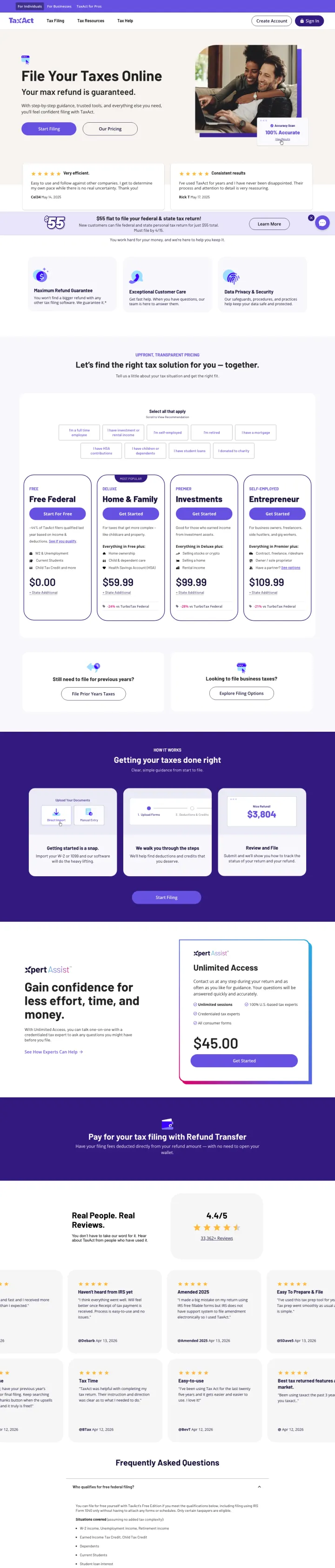
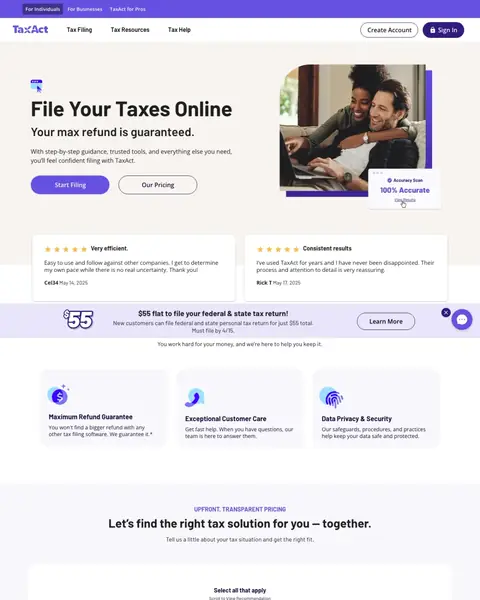
The guarantee comes before the price here, which is unusual for a tax product and it is why TaxAct made the list. Customer reviews sit in the first screen with a name and a date on each, and hardly anybody else in this file manages that. A flat-rate band in that same screen then promises a single price for federal and state, while the tier table further down prices them apart.
Lead with the guarantee ("Your max refund is guaranteed.") rather than the price. Then show transparent tier pricing below: Free ($0), Deluxe ($29.99), Premier ($49.99), and Self-Employed ($64.99) with clear feature differentiators. The guarantee removes the risk of trying a new tax platform.
Under the headline, before the buttons and before any price, TaxAct answers the fear that a cheaper product leaves money on the table. The price turns up further down the same screen, in a purple band, doing its job second. If your category has a standard worry, answer it in the line under your headline and let the number come after it.
Ahead of the pricing cards there is a bank of chips: full time employee, self-employed, rental income, student loans. Select all that apply, says the line above them, then scroll to view the recommendation. That is a salesperson's first question, asked without a salesperson in the room. Build the same thing if your pricing needs explaining before anybody can buy it.
The review cards in the first screen carry a name and a date, which almost nobody else here does. Then read the dates: the pair up top is nearly a year older than the wall of reviews further down the same page. A quote with no date could be from any year, and readers treat it that way. Print the date next to the stars, then put your newest ones where the visitor lands.
A couple hugging on the sofa over a laptop is the picture every tax product uses, so it says nothing, and it fills half the first screen. The only product in the shot is a small Accuracy Scan chip pinned to the corner of it. Turn that round: make the product the picture and drop the hug. Anything that could sit unchanged on a competitor's page is wasted room on yours.
Free, Deluxe, Premier and Self-Employed sit in a row, each with a feature list, a price and a state add-on line, and the paid ones carry a discount against TurboTax as well. The page does flag Deluxe as most popular, and that flag is the only help anybody gets. Let the ticked chips choose the tier and fold the rest away, because a person who has told you their situation should not have to read the other columns.
A coloured band in the first screen promises a single flat price covering federal and state. Scroll on and the tier table prices the tiers separately, with state added on top of each. The first number a visitor sees is not the number they end up paying, and that is the surprise that gets a checkout abandoned. Pick the offer your ad traffic should see and make everything else agree with it.

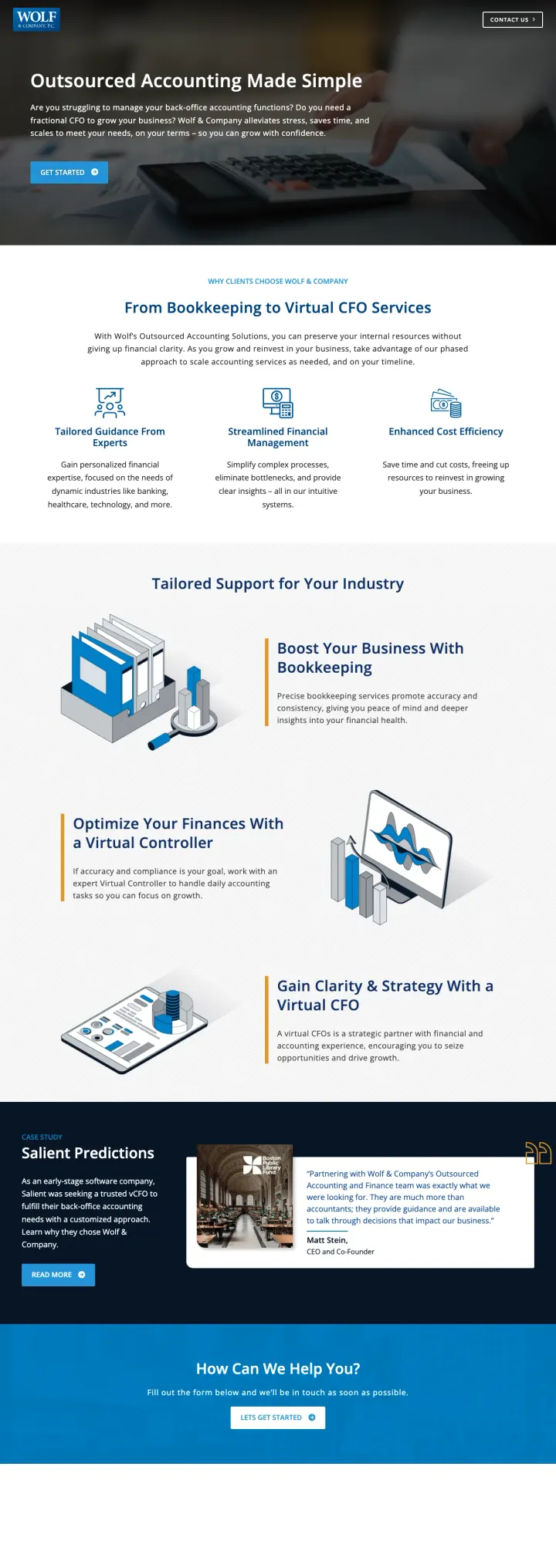
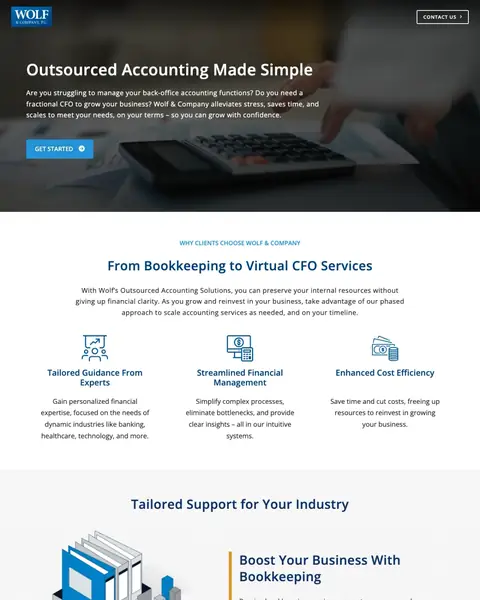
Wolf & Company is a CPA firm rather than a software product, and it earns its place with the ladder it draws from bookkeeping up to a virtual CFO. A visitor can see where they get on and where they would end up, which makes the first step feel small. Nothing from the hero down to the closing form hints at what any rung costs.
Frame outsourced accounting as "getting your business back" rather than "cutting costs." Wolf opens with "Outsourced Accounting Made Simple" and the value proposition "so you can grow with confidence." Then show three service tiers (Bookkeeping, Virtual Controller, Virtual CFO) that scale with the client's growth, making it feel like a partnership rather than a vendor relationship.
Bookkeeping, then a virtual controller, then a virtual CFO. A business owner can see where they get on and where they would end up, which turns the small first purchase into a start rather than a commitment. Draw the same ladder for your own services and let people join at the bottom rung, because the bottom rung is what they can say yes to today.
Tailored Guidance From Experts, Streamlined Financial Management and Enhanced Cost Efficiency are the worries an owner has before handing over the books: will they understand my business, will this be a mess, will it cost more than the bookkeeper I have. Name your headings after the worry rather than after the feature and the same block starts doing work.
Banking, healthcare and technology get named in the opening block, and a reader in any of them stops skimming. Everybody else keeps skimming, and that is the trade you are making on purpose. If your ad group targets an industry, name that industry on the page the ad points at.
Outsourced accounting runs from a few hundred a month up to a serious retainer, and this page will not hint at which end it sits at. The visitor with a small budget books a call, takes your time and leaves disappointed. The visitor with a real budget wonders whether you are big enough. A starting-from figure sorts both of them before they reach you.
Started with what, and what happens after I press it. The label answers neither, and on a page selling a professional service the unknown next step is exactly what stops the click. Say what the button does: book a call, get a quote, see the pricing. That change alone moves your click rate before you touch anything else.
Salient Predictions gets a heading, a paragraph of setup and a READ MORE button, so the story starts here and finishes on another page. The panel beside it carries a quote signed with a job title and no company, over a photo badged for a library fund, and a reader cannot tell whether those warm words are Salient's or somebody else's. A case study that costs a click is a case study most visitors never read. Put the outcome in the block itself, in a line, and keep the link for the people who want the detail.

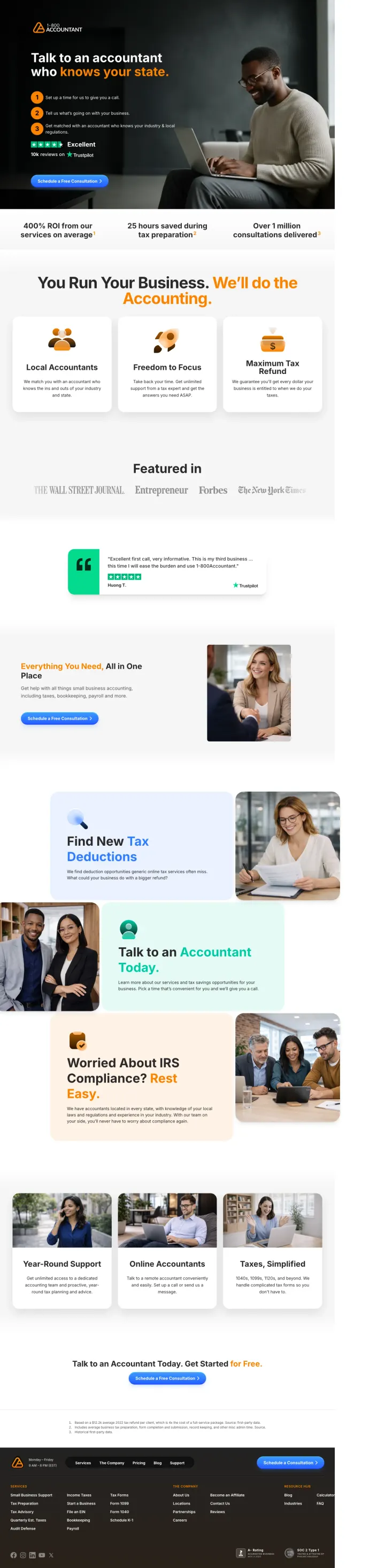
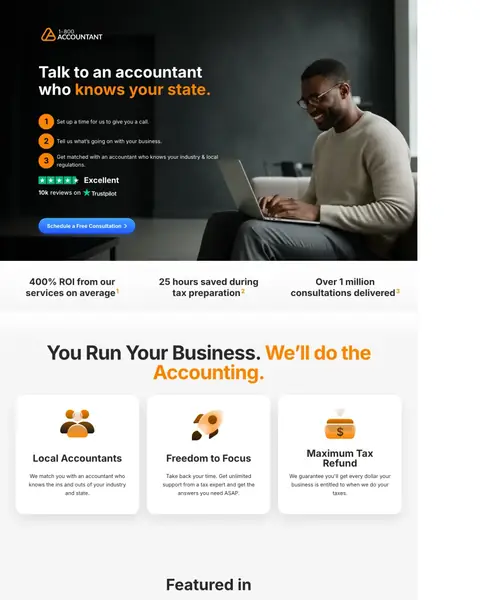
A national service that reads as a local one is a hard trick, and this page pulls it off in the headline alone. The Trustpilot rating sits in the first screen where the doubt is, not down near the footer where most of this file keeps its reviews. The catch is that the same template answers a San Diego search and every other city too.
Lead with "Talk to an accountant who knows your state" to create localized relevance from a national service. Then show a 3-step process (Set up a call, Tell us about your business, Get matched with a state-specific accountant) to make the conversion path feel simple and structured.
The ads behind this page are bought on city and state terms, and the headline answers what a local search is really asking: will this person know my rules. It costs nothing to write and it beats a national tagline every time. Put the searcher's own words at the top of the page you send them to.
The rating sits in the first screen, under the steps, and it comes from a board this company does not control. That is the difference between a score and a testimonial you wrote up yourself. Almost every other page in this file keeps its reviews below the fold or off the page altogether, so putting yours up top is cheap ground to take.
Return on the fee, hours saved at tax time, consultations delivered. The band sits straight under the hero, every claim is countable, and every claim carries a small marker pointing at a footnote at the foot of the page. Read the footnotes and the source is their own data, which is thinner than it looks. They still printed it, and that is the part most people skip. If you claim a result, say what it was measured against.
The promise is strong and the page never backs it up: no state is named, no accountant is named, no office appears anywhere, and the faces in the photographs are stock. A visitor from San Diego has to take all of it on faith at the exact moment they are deciding. Name the people, or at least the places, and the claim stops reading as a slogan.
The ad says San Diego and the page says your state, which is a national template doing the work of a local page. It converts worse than a real one and it always will, because your visitor can tell. If you are buying city keywords, build the city page: a local number, local names, local review quotes, and the city in the headline.

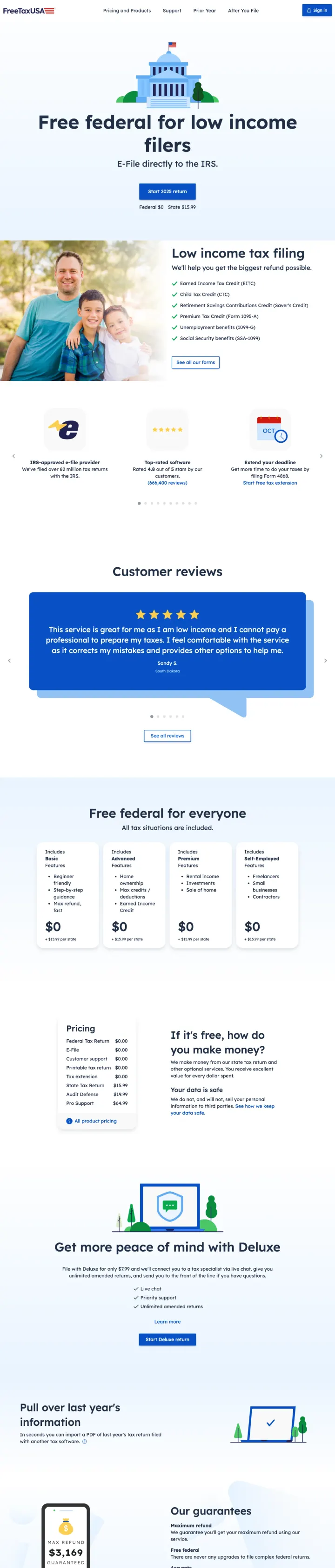
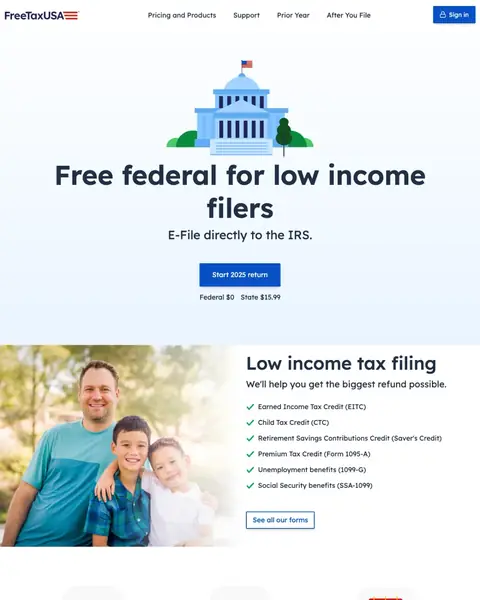
FreeTaxUSA leads with a price and lets the price do the whole job, which is how it sits in this file beside pages carrying far more. Federal costs nothing, the state fee is printed right beside it, and a line further down promises there will never be an upgrade to file a complex federal return. The page then widens the same free offer to everybody, which quietly undoes the targeting in its own headline.
Why this breaks the rules: Every other tax software page in this set uses tiered pricing to capture value at multiple levels. FreeTaxUSA leads with 'Free federal for low income filers' and means it - $0 federal, $14.99 state. This radical price transparency eliminates the entire pricing objection and the entire comparison-shopping behavior because there is nothing cheaper than free. The page does not need testimonials, credentials, or a badge wall because the price IS the proof.
Everybody who has used a free tax product has been walked into a paid one halfway through a return. This page says flatly that it will not happen. If your free tier really is free, say what you will never charge for. A promise about what you will not do beats another feature bullet, because it is the thing the reader was already suspicious about.
The review carousel opens on a customer using the exact words the page is bidding on: low income, cannot pay a professional. Her first name and her state sit under it. That is ad copy written by somebody with nothing to gain from writing it. Search your own reviews for the phrase you are buying, and put those ones where the visitor lands.
The page asks that question about itself and answers it in a sentence, with a plain price list sitting right beside it: federal, e-file, support and a printed return at nothing, then the state return, audit defence and pro support with a figure on each. The optional Deluxe tier is priced further down. Nobody is left hunting for the catch. If you sell a free tier, write the question your visitor is already thinking and answer it in the next line, before somebody else answers it for you.
Up top the offer is free federal for low income filers. Further down the same page it is free federal for everyone. Both are true, and together they undo the targeting: the visitor who clicked because the ad spoke to them learns the deal was never theirs in particular. Keep the wider offer for your general page and let the targeted page keep its promise.
The block under the hero lists the credits it covers, from the earned income credit to Social Security benefits, and never says what counts as low income. Somebody on a middling wage cannot tell whether the headline is about them until they are halfway through a return. Doubt at the moment of choosing is what loses you the click you already paid for. Put the qualifying line under the offer, even roughly, and let people rule themselves in.
Pricing and Products, Support, Prior Year, After You File, and a Sign in button. The header on this paid landing page is the site's whole top menu, and every item is a way out before the visitor has started anything at all. Somebody arriving from an ad has a single job to do. Cut the header back to your logo and the start button and let them do it.
Pages that break the playbook in interesting ways

Why This Is Interesting: Pilot's form asks for First Name, Last Name, Email, Phone, Company Name, Business Journey Stage, Monthly Expenses, and "How Can Pilot Help?" - 9+ fields. For a consumer tax product this would be conversion suicide. But for a B2B accounting service targeting startups spending $10K-$500K/month, aggressive qualification makes sense because each lead is worth $3K-$50K/year in revenue. The form IS the qualifying mechanism.
"The accountants who give you your business back" headline reframes accounting from a cost center to a value enabler. The visitor thinks "I am losing my business to bookkeeping" and this page says "we give it back."
"What's your business journey?" and "Estimated Monthly Expenses" dropdown fields pre-qualify the lead for the sales team, ensuring the conversation starts at the right level
Triple review platform display (Trustpilot, Clutch, G2) below the fold with star ratings from three independent B2B review platforms creates enterprise-grade trust
9+ form fields will produce a high abandonment rate. Even for high-value leads, fields like "Estimated Monthly Expenses" may feel invasive before any relationship is established.
No pricing or pricing range visible. Startup founders comparison-shopping bookkeeping services want at least a ballpark before committing to a sales call.
"Talk to Sales" CTA button feels transactional rather than consultative. "Schedule a Free Strategy Session" would better match the advisory positioning.

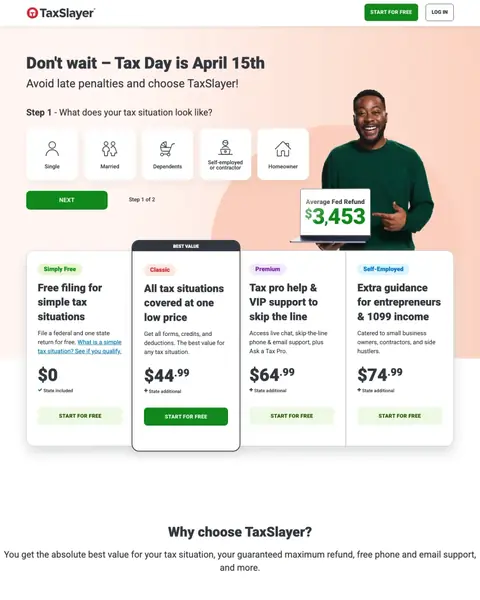
Why this breaks the rules: Most tax software landing pages open with a three-column Simply Free / Classic / Premium plan table. This page opens with five persona icons (Single, Married, Dependents, Self-Employed, Homeowner) and asks 'What does your tax situation look like?' The persona picker front-loads qualification so the recommendation feels custom, not sold. It also lets the $3,453 average refund figure appear once, centrally, rather than being repeated per-plan.
Persona icons (Single / Married / Dependents / Self-Employed / Homeowner) replace the generic plan comparison. The visitor's life situation is more memorable than a feature matrix, and the click that follows self-segments them into the right plan path
A single central stat ('$3,453 average refund') with a photo of a happy filer anchors the page emotionally in a way that the usual three-tier price table cannot. Repeated stats across plans become noise, one central stat becomes a promise
The Step 1 of 2 progress indicator at the bottom reframes the landing page as the first step of the product, not a marketing page. The commitment to continue feels smaller because the visitor is already inside the experience
Hero headline 'Don't wait, Tax Day is April 15th' sells the deadline, not what you get. A benefit headline ('Find the filing option that matches your life in 30 seconds') would serve the persona-picker design better
The plan cards below the persona picker (Simply Free / Classic / Premium / Self-Employed) reintroduce the feature-matrix logic the persona picker was trying to replace, which dilutes the wildcard approach
The same questions asked of every winner, so you can find the row that matches the traffic you are already buying.
| Page | Entry path | Named offer | Rating in the first screen | Phone in the first screen | Standout move |
|---|---|---|---|---|---|
| #1TaxSlayer | Straight into filing | Yes | No | No | Tier prices in the hero |
| #2Back Office | Book a demo | No | No | No | Quotes from named venues |
| #3Pilot | Lead form in the hero | No | No | No | Logos that pick the buyer |
| #4TaxAct | Start Filing button | Yes | Yes | No | Guarantee before price |
| #5Wolf & Company | Get Started button | No | No | No | Bookkeeping to CFO ladder |
| #61-800Accountant | Schedule a free consultation | No | Yes | No | Local promise, national page |
| #7FreeTaxUSA | Start the return | Yes | No | No | Free federal, priced state |
Read the keywords you are buying, then find the row that matches them. Somebody typing a brand name and the word login is already a customer, and the page they land on should get out of the way and start the job. Somebody typing accountant near me has not chosen anybody yet, so they want a name, a place, a credential and a price. You paid the same for both clicks.
Lines lifted word for word from the pages above. We tell you whose page each came from, and one click copies it.
GET STARTED
Get in Touch
Book your cost-free demo with our team
3 pages burning ad spend with fundamental issues
Every click to these pages costs real money. We found pages with no reviews or badges anywhere, headlines that ignore what the searcher actually typed, and CTAs that give no reason to click. Here is what to avoid.

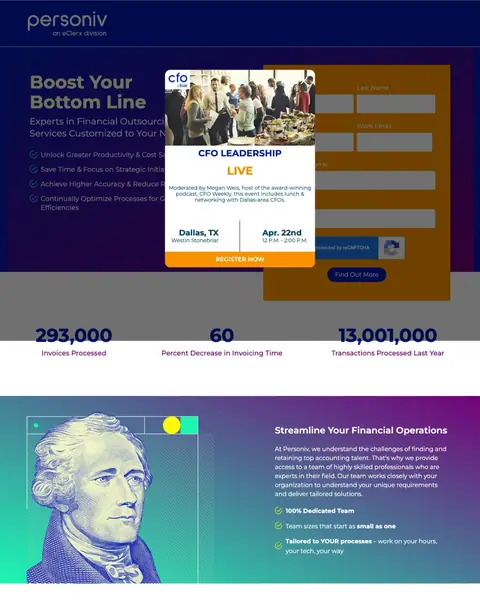
At $15-40 per click for accounting keywords, sending traffic to a page with a dark blue/purple/gold color scheme, a stock photo of a US dollar bill with Benjamin Franklin, and a headline that says 'Boost Your Bottom Line' is paying premium CPCs for a page that looks like it was built in 2015 and says nothing specific about what the service actually does.
The hero section uses a dark gradient with a stock image of US currency (Benjamin Franklin on the $100 bill) that looks like a 2010-era financial services template - this visual execution actively undermines any trust the page tries to build because it signals 'we have not invested in our own marketing'
The headline 'Boost Your Bottom Line' could apply to literally any business service - it communicates zero about what Personiv does, who they serve, or why their accounting outsourcing is different from any other provider
'100% Dedicated GAAP Compliant' appears mid-page as a highlighted banner but GAAP compliance is the legal minimum, not a differentiator - advertising GAAP compliance is like a restaurant advertising that they wash their hands

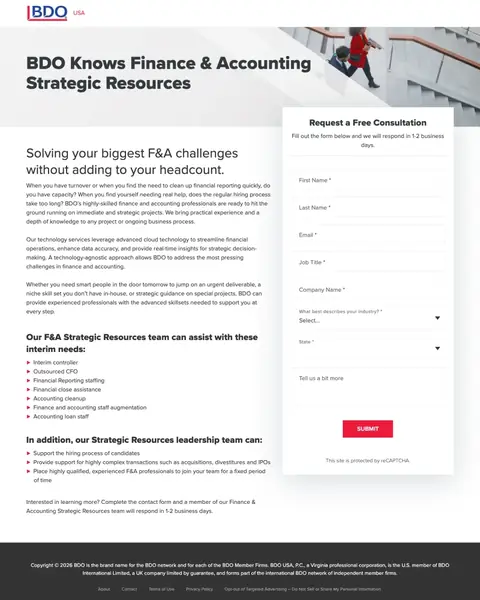
At $15-40 per click for bookkeeping keywords, BDO sends traffic to a single-page form with dense paragraph text and zero visual proof of capability. The page asks for first name, last name, email, job title, company name, industry, and state before the visitor has any evidence that BDO can solve their problem. This is a lead capture page, not a landing page.
The page is a single-column form with dense paragraph text and one stock photo of a woman jogging up stairs - there are no testimonials, no client logos, no case studies, no credentials, and no evidence that BDO has ever successfully delivered F&A services to anyone
The form demands 8 fields (name, email, job title, company, industry, state, description) before the visitor has seen any proof of BDO's capability - this is asking for maximum information while providing minimum value in return
The ad targets small business queries like 'bookkeeper for shopify' but the page language is enterprise B2B ('F&A challenges,' 'headcount,' 'strategic resources') creating a jarring mismatch between the visitor's context and the page's tone

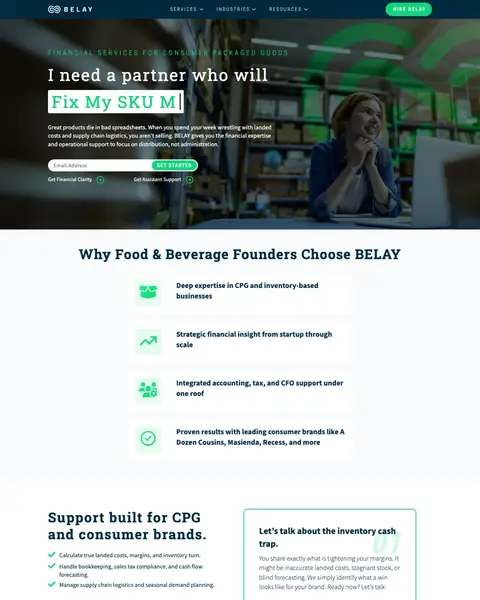
At $15-40 per click, the page targets 'retail accounting help' and 'CPG inventory experts' but leads with a dark hero asking visitors to 'Book a consult' before explaining what BELAY actually does differently. A CPG brand owner searching for accounting help gets industry buzzwords ('multi-warehouse reports,' 'SKU-level cost accounting') without any evidence of outcomes or pricing.
The page uses alternating dark green/teal panels with light sections creating a fragmented visual experience - the visitor's eye has no clear path from headline to value proposition to form, and the dark panels make body text difficult to scan
The hero section says 'Financial Services for Consumer Packaged Goods' but the ad copy promises 'Multi-Warehouse Reports' and 'CPG Inventory Experts' - the page headline is generic category labeling while the ad makes specific capability claims that are not immediately visible on the page
The form appears mid-page but is preceded by multiple content sections that explain what CPG accounting involves rather than why BELAY is the right provider - the visitor already knows they need CPG accounting (they searched for it); they need to know why BELAY specifically
The strongest tax software pages display 3-4 pricing tiers side by side (Free / Classic / Premium / Self-Employed) with feature bullet points under each tier. This works because the Blue-dominant accounting buyer needs to compare options systematically, and pricing tiers let them do that comparison on YOUR page rather than opening a competitor tab. Pages that hide pricing behind 'Get a quote' or 'Talk to an expert' force the methodical buyer to leave and find a competitor who shows the numbers.
When someone searches 'restaurant accounting services' and lands on a page headlined 'Expert-Led Restaurant Accounting Services' with restaurant-specific metrics (food cost, labor percentage, 13-period accounting cycles), the message match is immediate. When the same person lands on 'Boost Your Bottom Line' with generic outsourcing language, they have to determine whether this firm even understands their industry. The restaurant-specific page (bepbackoffice.com) has 4,000+ restaurant operators as clients; the generic page (personiv.com) claims 293,000 transactions but in what industry?
Pilot.com shows a named co-founder testimonial ('I never have to think about it' - Trevor Thomson, Ethos Network) and names their team as 'financial experts based in Nashville.' 1800accountant.com leads with 'Talk to Your Advisor' and shows a photo of a specific person. In accounting, you are trusting someone with your financial records and tax filings. A named person with a location makes the relationship feel real; a faceless brand with client logos makes it feel like a call center.
TaxSlayer's entire landing page is built around 'We make switching easy' with a 3-step process (import prior return, upload W-2, start filing). This is brilliant because the biggest barrier in accounting is not finding a new provider, it is leaving the old one. The Green-secondary persona in accounting dreads the transition and will stay with a mediocre accountant for years rather than face the perceived hassle of switching. Pages that explicitly address the switching process convert the large segment of visitors who have already decided to leave but have not yet overcome the inertia.
Winners lead with specific guarantees (max refund, flat-rate pricing, state-specific expertise) and transparent pricing tiers that let visitors self-select. Losers send paid traffic to generic content pages, gated whitepapers, or educational articles that explain accounting concepts without enabling the visitor to take action.
Building pages like the winners is half the job - our accounting PPC team handles the other half, the traffic.
The pages that work here pick the question the visitor actually came with (what does it cost, will you know my rules, can I trust you with my books) and answer it in the first screen. The ones that struggle sell a demo instead, and the price the ad promised turns up nowhere on the page.
Put the price on the page, or stop promising it in the ad. Back Office and Pilot both bought clicks with the words flat rate, then made the visitor book a call to hear a number. That is the most expensive gap in this file: you pay for the click, you match the ad, and then you break the promise in the first screen. A starting-from figure costs nothing and it filters out the people who were never going to pay it.
Not a single page here puts a phone number in the first screen. A company in this file carries a toll-free number inside its own logo, and even that page prints nothing you can ring. These firms are asking for your bank feeds, your payroll and your tax records. A business owner handing that over wants to know a human picks up. Put a real number in the header at a size you can read, give it its own tracking, and you will find out quickly how much of this traffic wanted to talk rather than fill in a box.
Show something a stranger could go and check. A review score is the only proof anybody here puts up top. Not a first screen in this file carries a practice licence, a state registration or an accreditation, and where one turns up at all it is a small badge in the footer. Most of what sits down there is a padlock anyway: DigiCert, PCI, TRUSTe. Those say the connection is encrypted, not that anybody is qualified. Your licence takes a line, and that line is the difference between a claim and a fact.
Move the reviews above the fold. Most of these pages have plenty of reviews and keep them a long scroll down. TaxSlayer runs a review carousel and a Trustpilot score right down beside the footer, and gives the first screen to guarantee icons and price cards instead. Accounting is bought on trust before it is bought on price, so the score belongs beside the button.
Every line below came off a screenshot somebody sat and counted. Open your own page beside it and tick what it already does.
Accounting clicks cost $15-40 each. Personiv pays that, then lands people on a stock photo of Benjamin Franklin and a headline reading 'Boost Your Bottom Line'. That headline could be a gym, a law firm, anyone. So what's yours doing? Give postclick the URL your accounting ads point at. It reads that page cold, the way someone who just clicked does, names what's costing you the enquiry, and draws new versions you can build.