
We read 20 airline and flight pages that were paying for Google Ads clicks, top to bottom. These 4 are the ones worth your time. Everything we found is here, free.


Flight searchers have 4 tabs open and whoever shows them a real fare first gets the booking. Two seconds without a price and they're on the next tab. Most airlines still haven't figured out that their brand alone isn't enough to win that race anymore.
From real flights / airlines Google Ads campaigns in the US
The landing pages actually worth stealing from
So you know exactly what to avoid

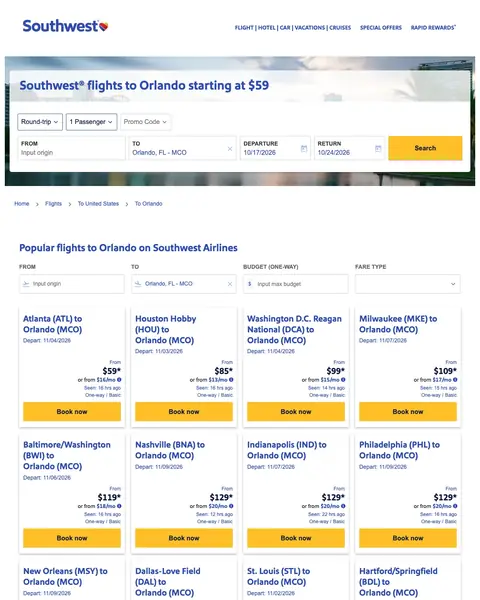
Southwest takes the top slot because the fare, the destination and the search box all land in the same screen. The headline names Orlando and a starting fare, the booking widget sits under it with Orlando already filled into the TO field, and the searcher only has to say where they are flying from. Under the widget the page stops being a search box and becomes a price list: route cards from Atlanta, Chicago Midway, Houston Hobby and a dozen more, each with its own fare and a Book now button.
Pre-fill the destination field in your booking form from the ad keyword so the visitor who clicked 'flights to orlando' sees 'Orlando, FL - MCO' already entered. Then show popular origin-to-destination routes below the form so visitors who have not committed to a departure city can self-select.
The biggest line on the screen names the city from the ad and a starting fare in the same breath, set in blue over a photograph of the waterfront. A flight searcher is deciding in seconds whether yours is the expensive one. Give them the number early.
The TO field already reads Orlando, FL - MCO with a clear cross beside it, so the only thing left to type is the airport you fly from. The visitor told you the destination when they clicked the ad. Pass the keyword through and let them start halfway done.
Under the widget sits a wall of cards, one per departure city, each with its own fare, a departure date, a Seen line and a yellow Book now button. Somebody searching a destination has not always fixed the origin. Build the same grid from the routes you actually sell.
Below the fares the page turns into a travel guide: which airport beats which, getting to the theme parks, the best time to visit, then a weather strip. The person who clicked your advert wanted a fare, and has scrolled three screens of prose to reach the next widget.
Nothing on this page says why today beats next week. No sale window, no seats remaining count, no date the fare stops. The whole page works to make the number look real, then gives the visitor no cost for sleeping on it. Put a window on the fare.
No star rating, no score, no review count in the first screen, and the strongest third party mark is a Freddie Awards footnote in small print further down. A brand this size can carry that. You cannot. Put a rating and a clickable source near the fare.

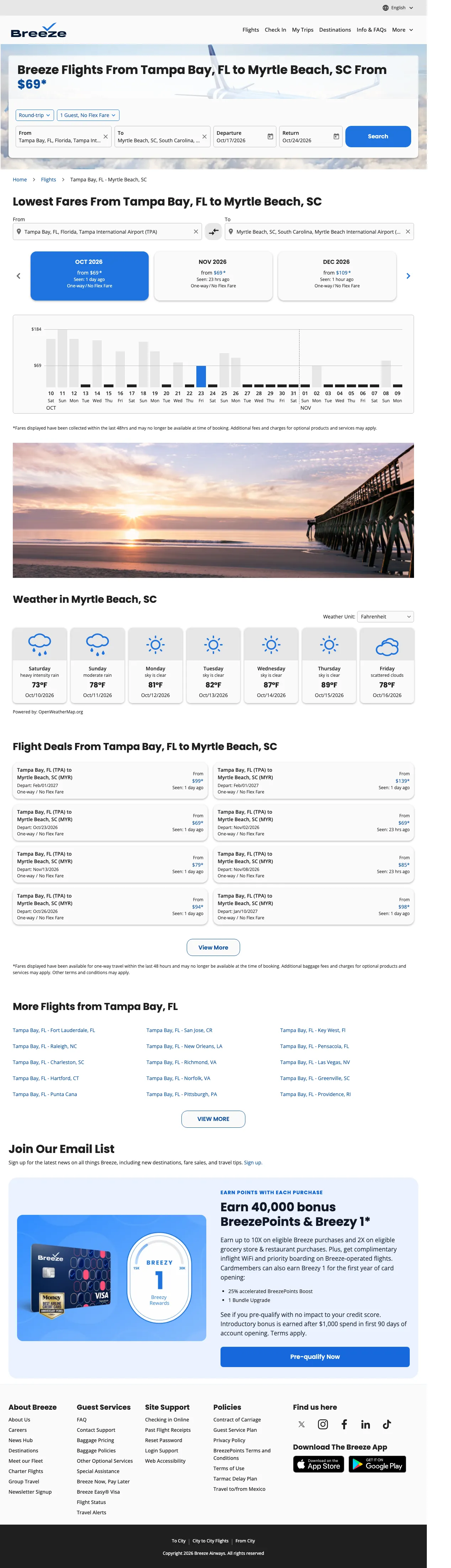
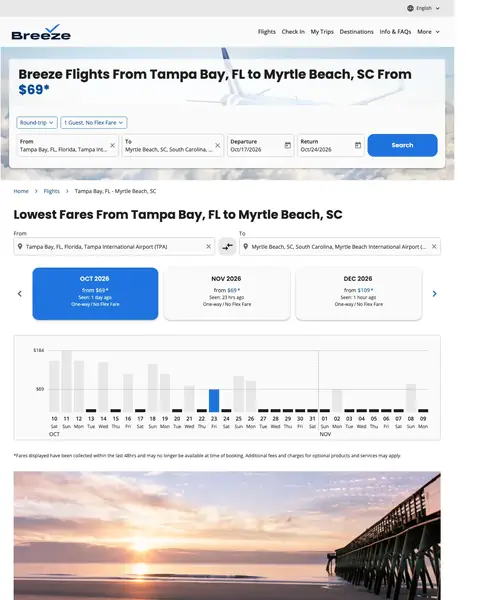
Breeze Airways gets in on the strength of a hero that does the one thing this category keeps missing. The headline names both airports and the fare in a single line, and the price is set in blue so the eye finds it first. Then the capture falls apart. Below the widget the page renders a white gap, a breadcrumb of raw template keys and a run of grey placeholder blocks that never loaded, and the widget labels themselves print as code rather than English.
Build route-specific landing pages with the origin AND destination in the H1 headline and the booking form pre-filled with both cities. Breeze shows 'Flights From Tampa Bay, FL to Myrtle Beach, SC From $59' which eliminates all ambiguity about what this page offers.
Origin airport, destination airport and a starting fare, all inside one headline, with the price set in blue so it reads first. Somebody who typed both city names sees both city names back, which is the cheapest reassurance on the internet. Let the fare carry the colour.
Both ends of the journey sit in the widget when the page opens, each with a cross to clear it, and the dates are filled too. The visitor can hit search without touching a field. Every keystroke you remove between the ad and the results is one nobody abandons on.
A logo, six nav items and a language switch. No banner, no chat bubble, no cookie wall covering the fare. The headline gets the whole width of the screen and the widget gets the rest. Count what sits between your visitor and your price, then take half away.
Every field label in the widget prints its key: fc-booking-origin-label, fc-booking-destination-label, fc-booking-journey-type-options-rt. Even the search button reads as a key. A visitor just promised a good fare is looking at a form that appears broken, and a broken form is a broken airline.
Under the widget the capture shows a tall band of white, then a breadcrumb reading anchor--breadcrumb-level-root, then rows of grey placeholder blocks running most of a screen deep. Whatever was meant to sit there, the visitor never sees it. Load your own page cold.
The header carries a logo and nav, the footer carries link columns, social icons, app badges and a copyright line. Between them, no licence and no rating body. Find the body your category trusts and put its badge next to the price.

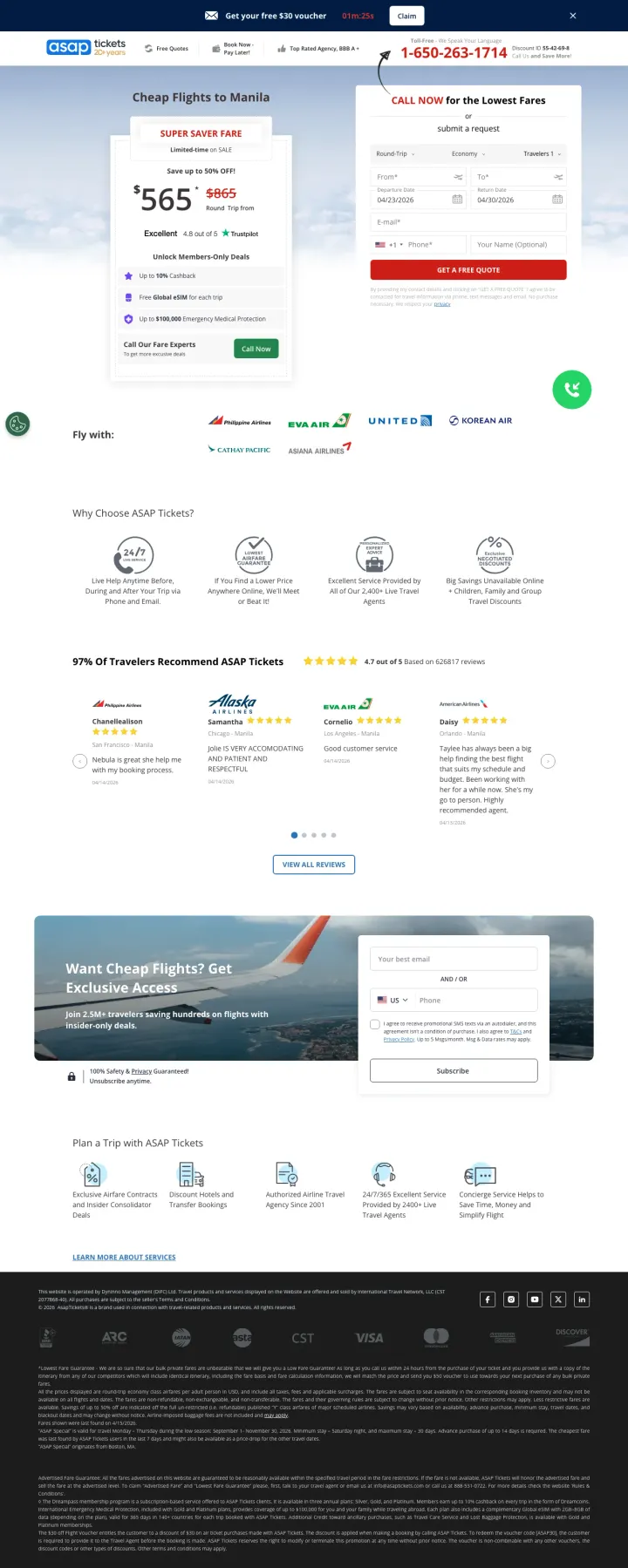
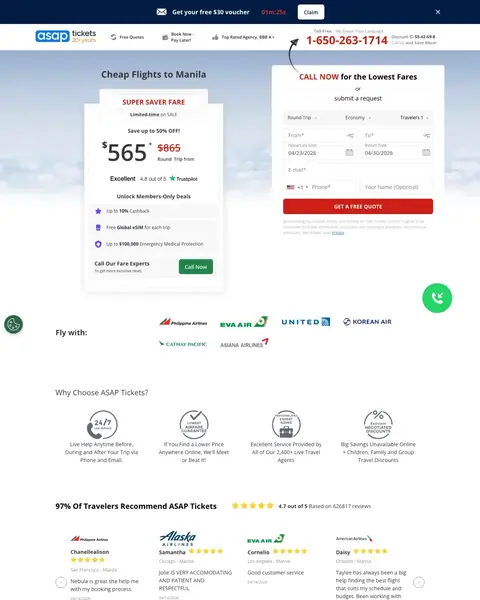
ASAP Tickets is built for a phone call rather than a search, and it is the most complete sell in the file. A crossed out fare, a Trustpilot score, a members' benefit list and a quote form all fit above the fold, with a toll free number in red at the top right and a hand drawn arrow curving up to point at it. It is a travel agency selling human help against a booking engine, and the page argues that case in the first screen.
If you sell complex international flights to price-sensitive travelers, lead with a phone number and a crossed-out 'was' price showing the discount. The $865 crossed out to $565 creates a concrete savings anchor that motivates a call, and the phone-first model works because multi-leg international itineraries benefit from human agent routing.
The new fare prints huge in dark type with the old one struck through in red beside it, and Round Trip from underneath so nobody mistakes it for a one way. Said both ways, the discount reads as a real reduction. Show the price you came down from.
The toll free number sits in red at the top right, twice the size of anything around it, and a curved arrow starts near the form and points straight up at it. If a call is the conversion you want, make the number loudest and point at it.
Each review carries the airline logo, the traveller's name, the route they flew, the date, and the agent they dealt with named in the text. Somebody flying to Manila can find their own city. A wall of anonymous gold stars proves nothing. Tag yours with the job you did.
The dark strip across the top runs a voucher offer beside a clock counting down in minutes and seconds. Everything below it is real work: a dated fare, a Trustpilot score, a guarantee to beat any price. The timer drags the rest down. Put a date on the voucher.
Trip type, cabin, travellers, from, to, two dates, email, phone and name, all before anything is submitted. It is the longest form in this file, and it asks for a phone number on a page whose pitch is that you should ring them. Get the rest on the call.
The accreditation marks and the licence number sit in grey on black at the very bottom, below three screens of page, where almost nobody arrives. Those are the strongest reasons to trust an agency you have never heard of. Move a couple up beside the phone number.

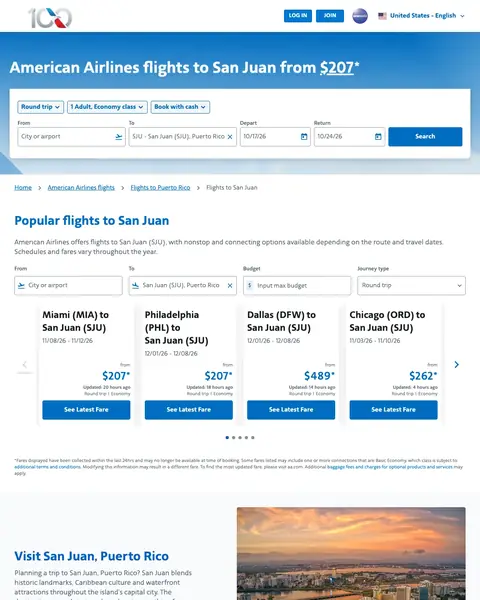
American Airlines is here for the fare grid, and it is on this list in spite of its own hero. The booking widget floats on a blue sky with San Juan already in the TO field and nothing else beside it: no headline, no fare, no reason to stay. Scroll past it and the page turns into the best route table in the file, with departure cities, date pairs, fares and a line saying how long ago each one was checked.
Build destination-specific landing pages that combine a booking form (pre-filled with destination) with practical travel content (airport info, popular routes, weather) so the page serves both ready-to-book and still-researching visitors from the same paid click.
Every route card carries a departure city, a date pair, a fare and a line saying how recently that fare was checked, some down to the minute. Anybody who has watched a price change between the search and the checkout reads that line first. Stamp your own prices.
Near the bottom sits a plain three column list of city pairs into San Juan, each one a link. It costs nothing, it catches the visitor whose airport was not in the grid above, and it sends them to a page written for their own route. Build the same list.
Three plain bullets say what the better seat gets you: legroom, an earlier boarding group, a drink. No marketing name left doing the explaining alone. If you sell a tier above the basic one, describe how a passenger experiences it. Then price it, which this page never does.
The whole first screen is a booking widget floating on a blue sky. No headline above it, no fare, no line naming San Juan, nothing between the logo bar and the form. The source carries a headline with a fare in it. Load your page cold and check it renders.
Straight under the widget comes a paragraph about the destination, then advice to book ahead, be flexible on dates and travel off peak. That is guidance for any flight anywhere, from the airline that wants to sell you this one. Move the fare up instead.
No rating, no review count, no certification anywhere, and the only badge is an alliance mark in the header that means nothing to a holiday traveller. A hundred year old airline gets away with that because the name does the work. If yours does not, add a rating.
Pages that break the playbook in interesting ways

If your OTA targets price-sensitive travelers who are flexible on destination, lead with a 'Popular flights near you' grid showing specific routes with starting prices. This turns the overwhelming 'fly anywhere' experience into a browsable deal catalog that rewards exploration.
'Find cheap flights to any destination' with 'Trusted by millions' and 'Kiwi.com Guarantee for stress-free travel' and 'One search, all the best deals' as sub-bullets stacks three reassurances in a single line above the search form. Before the fold a stranger learns who already uses it, what happens if a booking goes wrong, and why to search here
Popular flights grid with destination photos, route names, and 'from' prices (Dublin to Bristol from 13 GBP, Dublin to Manchester from 13 GBP) turns a generic flights homepage into a browsable deal catalog. The geo-localized routes (showing Dublin departures for a UK visitor) demonstrate that the page adapts to the visitor's location
'Kiwi.com Guarantee' is mentioned above the fold without explanation, creating curiosity that encourages scroll. Below fold, the guarantee is explained as a service promise - this is an unusual trust mechanism for an OTA where guarantees typically refer to price matching
The ad was triggered by 'flights barcelona to dublin' and 'flights cluj napoca' - specific route queries that land on a completely generic 'cheap flights' page. The visitor who searched a specific route gets a blank search form. This is the OTA equivalent of sending someone to the homepage
The 'From' field is pre-filled with 'Swansea' (geo-detected) but the destination is blank. For an ad triggered by 'flights barcelona to dublin,' neither the origin nor destination matches the search query
Full navigation bar with Cars, Hotels, Magazine, Extras, and Last minute tabs gives the visitor 5 exit paths to non-flight content. For a paid click on a flights keyword, every non-flight link is a leak

If you have a co-branded credit card, run ads on your brand name + 'credit card' keywords that land on a dedicated comparison page showing all card tiers side by side. Alaska/Atmos shows three cards with different point offers and benefits in a single viewport, letting the visitor self-select based on their spending level.
Three credit card tiers shown side by side (80,000 points, 100,000 points, 80,000 points + $99 Companion Fare), one clearly meant to lead. The center card (100,000 points) is raised above the other two as the recommended option. This tier comparison format lets the visitor self-select based on their spending capacity and travel frequency
'50% Flight Discount upon approval' is a powerful instant-gratification incentive. Most credit card offers promise future rewards (points after spending $X). The immediate 50% discount on the next flight gives a traveler with a trip already planned a reason to apply before they book
Clean dark navy design with card renders creates a premium financial product aesthetic. The page does not look like an airline page - it looks like a fintech product page, which signals that this is a financial decision, not a travel decision
This is a credit card page appearing in ads for 'alaska air credit card' - it is correctly matched to the keyword. But the page is hosted under 'atmosrewards' rather than 'alaskaair,' and the branding says 'ATMOS REWARDS' not 'Alaska Airlines.' Visitors searching for the Alaska Airlines credit card may not recognize 'Atmos Rewards' as the rebrand and bounce thinking they are on the wrong site
Cookie consent banner at the bottom covers the lower portion of the card comparison. On the highest-value page element (the 3-card comparison), the bottom card details are partially obscured
No application CTA visible above the fold. The three cards show benefits but the 'Apply now' or 'Learn more' buttons require scrolling. For a visitor who searched specifically for this credit card, the application path should be immediately accessible

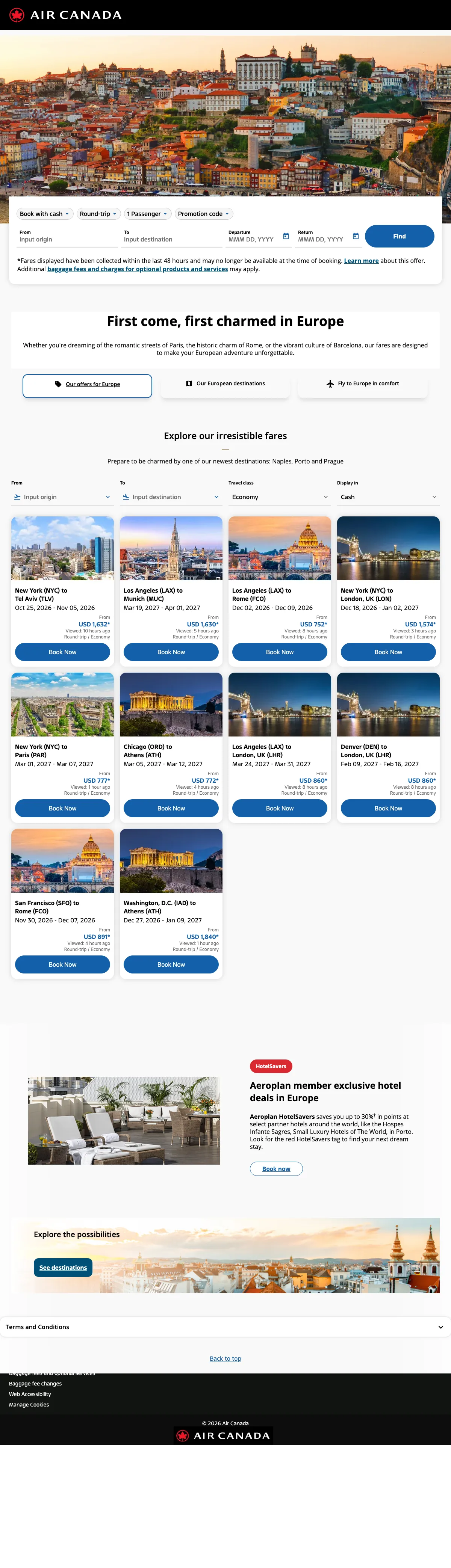
For continent-level flight pages, use aspirational destination photography (European rooftops, coastal towns) to create emotional pull alongside the booking form. The imagery does the selling that price cannot - 'imagine yourself here' is more compelling than '$499 to London.'
'First come, first charmed in Europe' headline with aspirational European cityscape photography creates emotional pull that commodity flight search cannot - the visitor imagines the trip, not just the fare
Three filter buttons ('See offers for Europe', 'Our European destinations', 'Fly to Europe in comfort') give the visitor choice without creating decision paralysis - each button serves a different buying stage
Destination gallery with photos of European cities at the bottom provides inspiration for visitors who know they want to visit Europe but have not chosen a city yet
No specific fares visible anywhere on the page - a visitor searching 'flights to Europe' wants to know what it costs, and the page provides zero price context
The booking form at the top has no destination pre-filled despite this being a Europe-specific page - pre-filling with a popular European destination (London, Paris) would save a step
Hotel cross-sell (Aeroplan exclusive hotel deals in Europe) appears before the destination gallery, prioritizing ancillary revenue over the primary flight booking
The same questions asked of every winner, so you can find the row that matches the traffic you are already buying.
| Page | The hook | Form fields | Fare named up top | Credential you can check | Standout move |
|---|---|---|---|---|---|
| #1Southwest | A destination and a starting fare | No form | Yes | None | Route cards priced from every city |
| #2Breeze Airways | Both airports and the fare in one line | No form | Yes | None | The price set in blue inside the headline |
| #3ASAP Tickets | A crossed out fare and a phone number | 10 | Yes | Up top | An arrow drawn up at the number |
| #4American Airlines | A search box and a blue sky | No form | No | None | Fares stamped with when they were checked |
Read the keywords you are buying, then find the row that matches them. Somebody typing flights to orlando has already chosen the city and wants a fare from their own airport, which is what a route grid answers. Somebody typing cheap flights to manila is pricing a route with three connections and may want to speak to a person about it. You paid the same for both clicks, and a search box on its own answers neither.
Lines lifted word for word off the pages above. We tell you whose page each came from, and one click copies it.
Visit San Juan, Puerto Rico
Tips for finding cheap flights to San Juan
Which airport in San Juan does American Airlines fly to?
GET A FREE QUOTE
3 pages burning ad spend with fundamental issues
Every click to these pages costs real money. We found pages with no reviews or badges anywhere, headlines that ignore what the searcher actually typed, and CTAs that give no reason to click. Here is what to avoid.

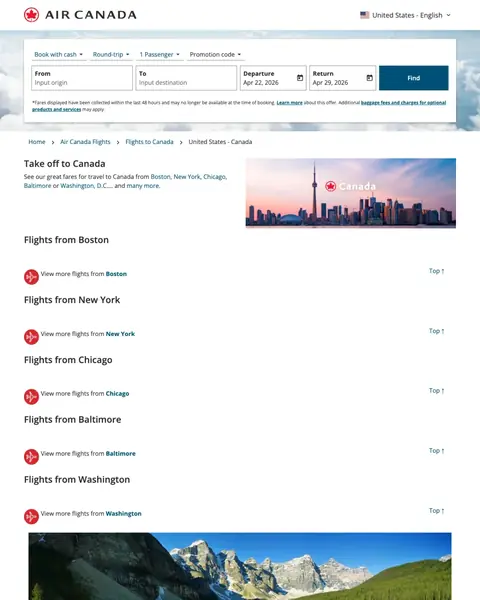
Every paid click costs money, and this page requires at least 2 additional clicks (select origin city, then search with dates) before the visitor can see a single flight option or price. The empty booking form, missing prices, and link-list layout mean the paid visitor gets a worse experience than if they had just gone to aircanada.com directly and searched from the homepage.
Booking form has BOTH origin and destination fields empty. The visitor searched 'flights to canada' or 'flight to quebec city canada' and clicked an ad - the destination should already be populated with the Canadian city from the ad. Instead, the visitor has to manually enter their destination despite having already told Google what they want
Hero sells 'Take off to Canada' with a list of US origin cities (Boston, New York, Chicago, Baltimore, Washington) as plain text links, no prices, no calendar, no inventory. A visitor who clicked a fare-search ad lands on a text menu rather than a booking widget, adding a click between intent and conversion.
No pricing information anywhere on the page. Not a single fare, not a 'starting from' amount, not even a 'deals from' range. The visitor comparing Air Canada against United or Delta on price has zero information to work with

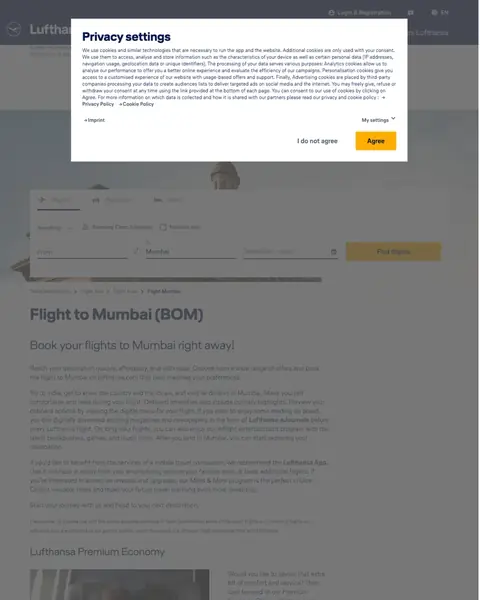
The privacy popup converts a paid click into a legal compliance interaction. The visitor arrived to book a flight and instead reads about cookie categories, personalization cookies, and data retention policies. By the time they dismiss the popup, they have already been frustrated by the experience. Adding a possibly wrong currency (SAR) and pre-filled wrong destination (Mumbai) makes this a complete paid traffic failure.
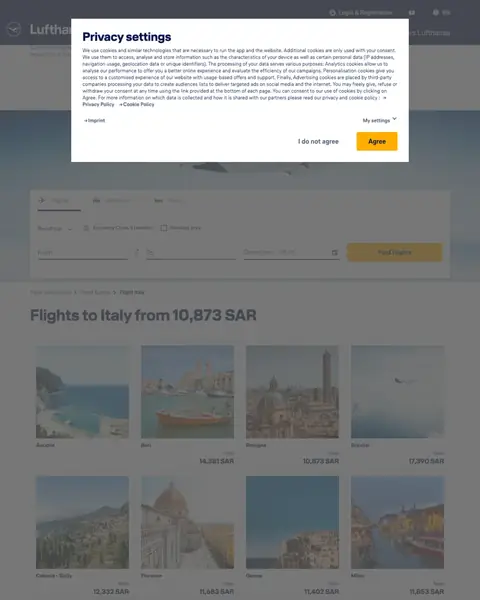
The full-screen 'Privacy settings' popup covers the entire page content on first load. The visitor cannot see the booking form, the prices, or any destination content without first reading and clicking through a GDPR cookie consent wall. For a paid click, this is the worst possible first impression - the airline paid for the click and the visitor sees a legal document
The page URL suggests South Africa targeting (/lhg/za/en/) but the ad was found on US keywords ('flights to sicily italy', 'ewr to rome flights'). If the page serves prices in South African Rand (the screenshot shows '10,873 SAR'), US visitors see irrelevant pricing that does not match their currency or departure market
No specific flight prices visible even behind the popup. The page is a destination guide with city cards, travel inspiration photos, and general information about Italy - not a booking page. The visitor who searched 'ewr to rome flights' wants departure times and prices, not a tourism brochure

Lufthansa is bidding on 'flight usa to india', 'flights from us to india', and 'tickets to india' (5,400 monthly searches each, 32,800 total breadth across 11 keywords). The paid visitor lands on a booking page where a full-width GDPR privacy modal with 8 paragraphs of cookie policy covers the hero, the Mumbai destination imagery, and the 'From / To / Dates / Find flights' search widget. The visitor who clicked an ad promising 'Book your flight now' cannot book anything until they agree, decline, or configure cookie settings. At international airline CPCs, every visitor who bounces off the privacy modal is a lost high-value booking.
Full-width privacy consent modal covers the entire hero including the destination photo, the 'Flight to Mumbai' headline, and the From/To search form, so the first interaction a visitor has is with a legal disclaimer, not a booking widget
No starting-price anchor visible anywhere in the hero; competitors like Southwest and American Airlines show starting fares ($49, $97) at the top of their destination pages, while Lufthansa forces the visitor to complete a search just to see any price
The booking form above the fold is the only conversion path visible, but it is buried behind the modal; there is no secondary 'view deals' or 'call to book' path for the visitor who rejects cookies and still wants a Mumbai flight
Southwest shows '$58 starting' in the ad and on the landing page. American Airlines shows '$127 from' in both. ASAP Tickets shows crossed-out pricing with deal prices. When a traveler clicks an ad showing a specific fare and lands on a page showing that same fare, the conversion path feels continuous rather than starting over. Airlines that show fares in ads but hide them on landing pages (Air Canada, Lufthansa) break this continuity and force the visitor to search again.
Southwest's Las Vegas page and Air Canada's Toronto page both pre-fill the destination in the booking form. This saves the visitor from typing 'Las Vegas' or 'Toronto' and simultaneously confirms they landed on the correct page. It sounds trivial but in a category where the conversion action is a flight search, eliminating one form field is eliminating one abandonment point. Lufthansa's Germany page has no form at all, which is a much larger problem.
American Airlines shows Miami flights from Dallas $109, New York $138, Charlotte $149. Southwest shows Las Vegas flights from Chicago $98, Denver $62. These route grids let visitors from different origins find their specific fare without running a search. For destination-specific keywords ('flights to Miami'), the visitor has already decided WHERE - they need to know HOW MUCH from their specific city.
ASAP Tickets prominently displays a phone number with '2100+ Live Travel Agents' for Philippines flights. This works because US-to-Philippines routing is complex (connections through Tokyo, Seoul, or Taipei on multiple airlines) and a human agent can find combinations that booking engines miss. For simple domestic routes, self-serve booking engines win. For complex international itineraries, phone conversion outperforms.
Winners show specific fares in the hero, pre-fill the booking form with the destination, and provide route pricing grids from multiple departure cities. Losers send paid traffic to destination galleries with tourism content but no fares, or block visitors with cookie consent popups and captchas before the booking form loads.
Flights is the one category where the visitor can price you against everybody else in about forty seconds, and the pages that win here know it. They put a fare on the screen and then spend the rest of the page proving it. The ones that lose hand over a search box and hope the brand does the rest.
Put a fare in the first screen, and say where it goes from. A search box asks the visitor to do the work of finding out whether you are expensive. A starting fare answers it for them, and a route card answers it for their own airport. Southwest prints a fare on every card in a grid of departure cities, and American prints a grid just as good. What American never prints is a headline, so the whole first screen is a form on a blue sky.
Date the fare and it stops being a marketing number. Every route card on Southwest carries a Seen line saying how many hours ago that price was checked, and American stamps its grid the same way, some rows down to the minute. Anybody who has ever chased a fare that vanished at checkout knows why that matters. It costs you nothing but the field, and it turns a claim into a reading.
Fill in what the ad already told you. Somebody who clicked an advert for flights to Orlando has already named the destination. Southwest has Orlando in the TO field before the page finishes loading, and American has San Juan in its own. The visitor types where they are flying from and nothing else. Every field you make them fill in twice is a field they can abandon on.
Load your own page on a cold browser and watch what paints. The Breeze capture has a strong headline over a widget whose labels read fc-booking-origin-label, a breadcrumb of raw template keys, and grey blocks the length of a screen that never filled in. The hero is good enough to be on this list, and everything under it is a page halfway through loading. It is the cheapest fault here to find and the most expensive to leave.
If a human is your advantage, sell the human. ASAP Tickets is the only page in this file that argues for talking to somebody, and it argues hard: a toll free number in red type at the top right, a curved arrow drawn up at it, a Call Now button inside the fare card and a guarantee to beat any price found online. Nobody would build that for a Chicago to Orlando hop. For a route with three connections it is worth the whole page.
Every line below came off a screenshot somebody sat and counted. Open your own page beside it and tick what it already does.
American Airlines bought the click on 'air fare puerto rico' with an ad reading 'San Juan Fares From $247'. Then the page opened with no fare on it at all. Your searcher has four tabs open. Two seconds without a price and they're on the next tab. postclick reads your page the way that searcher does, tells you what's costing you bookings, then draws you new versions you can actually look at. Pick one and we build it as a page you own.