
We read 47 business software pages that were paying for Google Ads clicks, top to bottom. These 9 are the ones worth your time. Everything we found is here, free.


These are real B2B enterprise software pages spending actual money on Google Ads right now.
From real B2B enterprise software Google Ads campaigns in the US
The landing pages actually worth stealing from
So you know exactly what to avoid

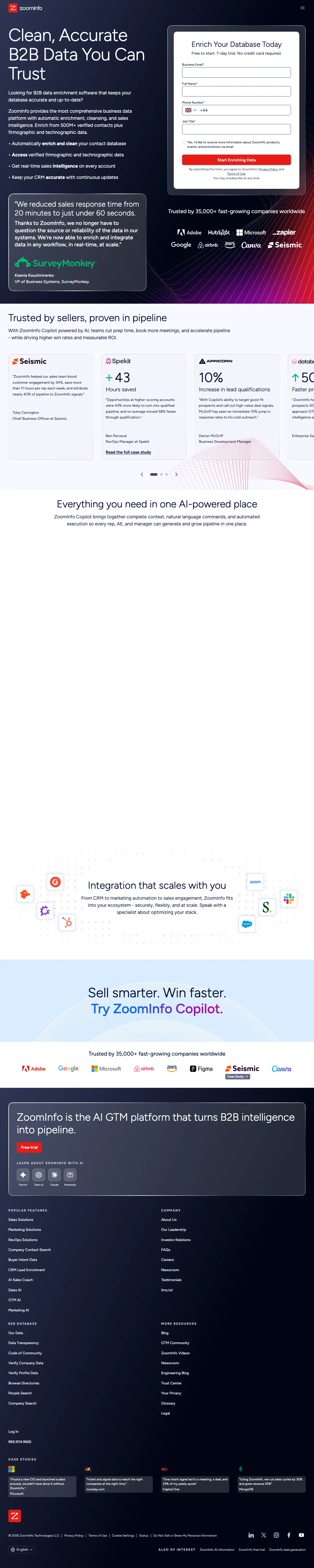
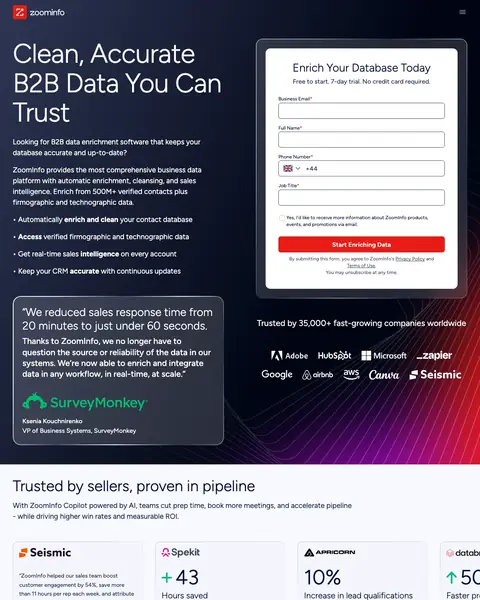
ZoomInfo took the top slot by putting the form and the proof on the same screen. The right half of the first screen is a short form headed Enrich Your Database Today, with the trial terms printed under the heading, and the left half carries the headline, the bullets and a named customer quote from a VP at SurveyMonkey with a response time figure in it. Scroll past that and the page goes to a long stretch of white where a section failed to render, which is a shame given how well the top works.
Place a named customer quote with a specific metric ('reduced response time from 20 minutes to 60 seconds') directly beneath your hero copy, so the visitor sees the promise AND the proof before scrolling.
One short line sits between the form heading and the first input, killing the three objections a stranger has about a work email: cost, length and whether a card is involved. Most software pages bury this on a pricing page nobody reaches. Print your terms where the hesitation happens.
The card fills the bottom left of the first screen, carrying the figure, the person's name, their job title and their company logo. A stranger can check that person exists on LinkedIn. Ask your best customer for a number and their name, then put it where the form is.
Under the paragraph runs a list, and every line starts with something the software does to your data: enrich and clean, access, get, keep. Not one describes a feature the buyer has to translate. Rewrite your bullets so each starts with a verb the customer would use.
Below the customer stat cards is a long stretch of empty white where a section was supposed to load and did not. The heading Everything you need in one AI-powered place sits above nothing. Load your own page on a throttled connection and watch every section arrive.
That headline works for every data vendor the buyer is comparing you against, and the biggest type on the page should be what they cannot copy. The paragraph below does the work instead, naming the verified contact count. Move a number into the headline and let the paragraph explain it.
There is not a single screen of the actual software anywhere on this page. Somebody choosing a data platform wants to see the interface their team will live in, and the case study cards show logos and figures instead. Put a real annotated screenshot beside your form.

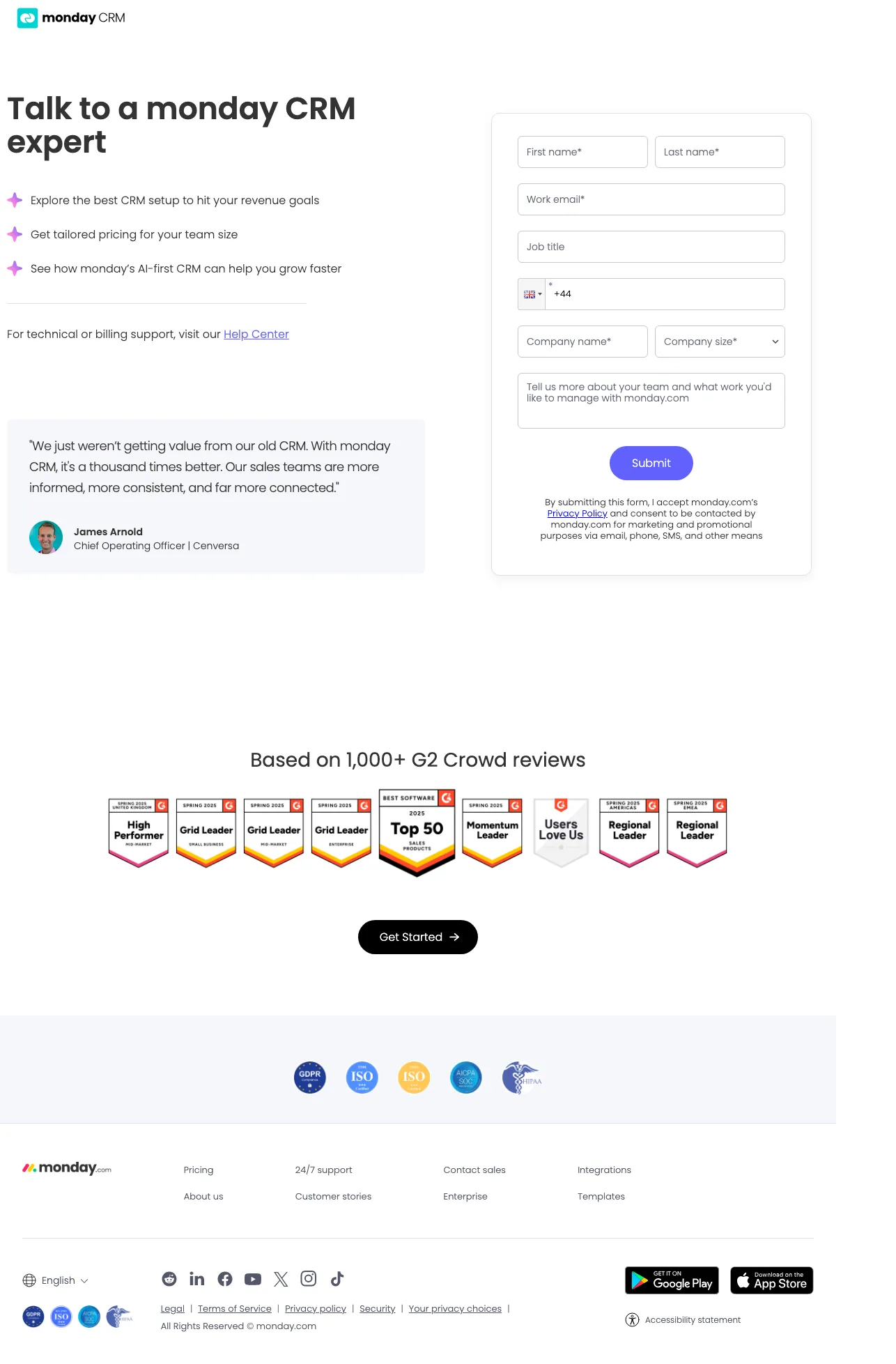
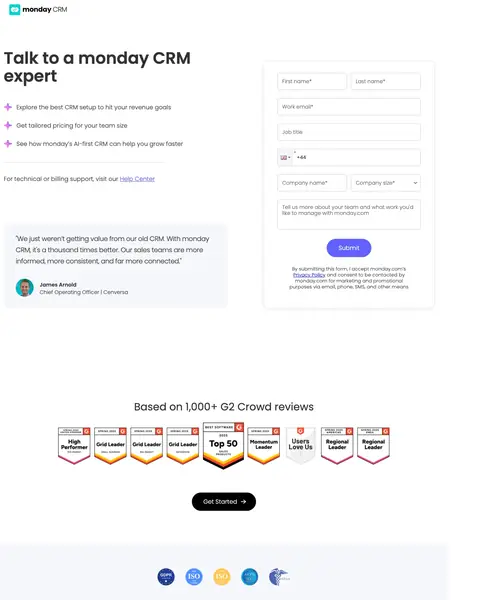
Talk to a monday CRM expert is a contact sales page, and it makes the trade honestly: a short list of what the call will cover, then a long form. There is no price, no trial and nothing named in return above the fold, so the form asks a stranger for everything while promising a conversation. The badge wall and the review count that would answer the trust question sit well below the first screen, under the fold.
Build a contact-sales page that puts the form at the same visual level as a customer testimonial with photo and title, so the visitor reads the testimonial while their eyes are already on the form.
A short ticked list says what the conversation covers: the setup, the pricing for your team size and the AI features. Booking a sales call costs your visitor diary time, and telling them what they get for it raises the number who do. Write out what your call covers.
A line under the bullets sends existing customers with a billing problem to the help centre before they fill in the sales form. Everybody you catch there is a lead your team need not sift. Add the same line and watch your lead quality move without touching your ads.
A dropdown beside the company name means the lead arrives already sorted into a segment, and the rep can prepare rather than spend the opening minutes asking. It costs the visitor a click, the cheapest field on the form. Make your qualifier a dropdown and never a free text box.
The cookie card sits on the left of the first screen, on top of the customer quote, so the visible words start mid sentence with CRM. With monday. That quote is the only proof above the fold. Load your page in a private window and move whatever your banner covers.
First name, last name, work email, job title, phone, company name, company size and a free text box about your team. That is the largest ask of any winner here, on a page with no price and no trial. Put something concrete behind the button, or split it into steps.
A wall of review site badges and the review count sit under a heading further down, past the point where the form makes its long ask. The trust that would justify that form is on the page, in the wrong place. Move your badge row up beside the button.

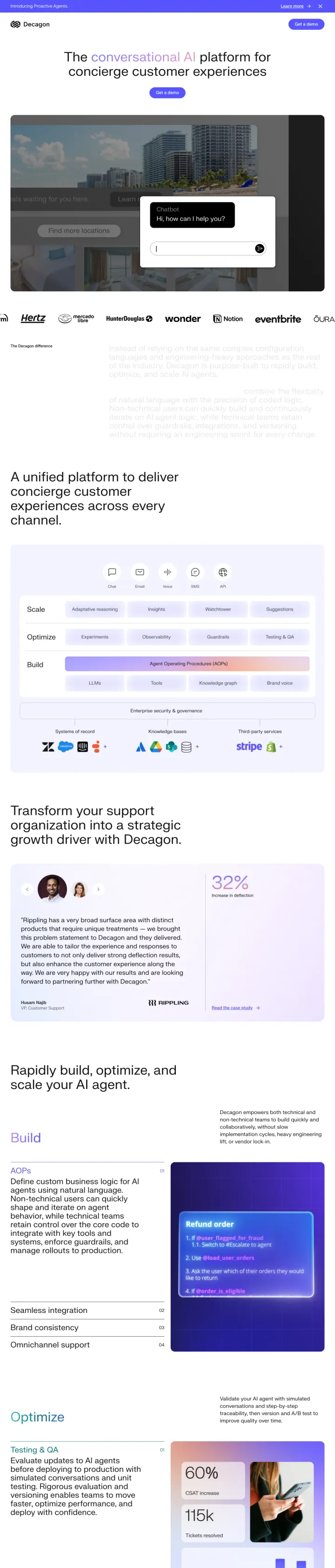
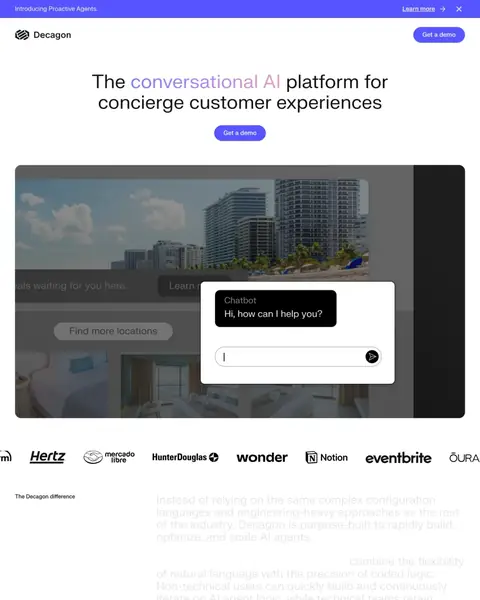
Decagon sells conversational AI agents to support teams, and its whole first screen is a headline, a Get a demo button and a product image. No form, no price, no proof. It earns its place further down, where the logo row runs Hertz, Notion, Eventbrite and Rippling, and a Rippling VP of Customer Support gives a named quote with a deflection figure beside it. The block under the logos is the problem: a long paragraph set in grey so pale it barely reads.
Show a video demo of your product in action directly below the hero headline, so the enterprise evaluator can see the actual interface before deciding whether to request a live demo.
Hertz, Notion, Eventbrite, Rippling, Duolingo and Mercado Libre run in a single band under the hero image, consumer names rather than anonymous startups. A support director looking at AI agents wants to know somebody with real volume trusted this. Sort your logo row by who your buyer recognises.
A VP of Customer Support at Rippling gives a long quote in his own words, with a deflection figure printed large beside it and a link to the full case study. Ask your customer what the problem looked like before you. The after picture is the easy half.
Straight under the headline is a screen showing a hotel booking page with the chat widget open and a real question typed into it. A buyer who has never seen an AI support agent now knows what one looks like. If your product is invisible, show it inside somebody's website.
The block under the logo row, headed The Decagon difference, is set in a grey so pale against white that the words barely separate from the page. It is the section explaining why the product is built differently. Screenshot your longest paragraph and read it at arm's length.
Every competitor could run that sentence unchanged, and the visitor typed the category into Google to get here. The customer figure further down would make a better headline than the definition does. Put the proof in the biggest type and let the category description be the subhead.
There is no lead form anywhere on this page. Every route out is a Get a demo button handing the visitor elsewhere, and a researcher still comparing vendors cannot leave a name. Add a short form to the page you pay for, so the careful ones raise a hand today.

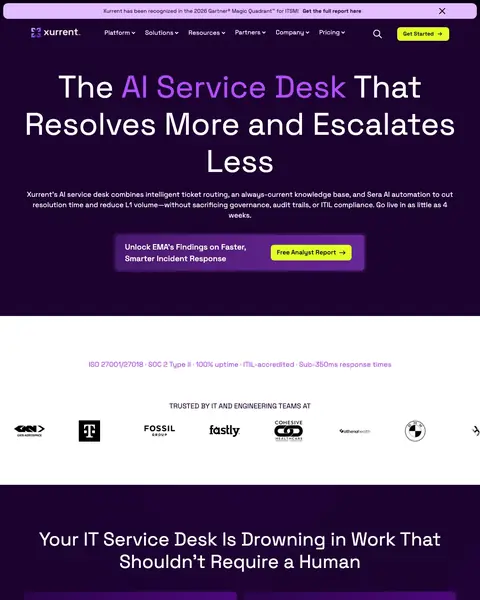
Stop Fighting Fires. is the best headline in this file, and Xurrent puts it in yellow on deep purple with the Pfizer, Cisco, BMW and Volkswagen logos directly underneath. The band lower down turns the pitch into plain numbers with a line of English beside each. What the page never offers is a form. Every button on it, from the top bar to the closing section, opens somewhere else.
Dedicate an entire visual section to analyst and review badges (G2, Gartner Peer Insights, GigaOm, Software Advice) arranged in a grid, so the enterprise buyer running a vendor evaluation can photograph or screenshot them for their internal presentation.
The first line, "Stop Fighting Fires.", names the feeling the buyer had this morning, in bright yellow on deep purple, and the line under names the product that replaces it. The problem earns the attention, the product spends it. Write the sentence your customer would say after a bad week.
Pfizer, HCA Healthcare, Cisco, Volkswagen Group, Deutsche Telekom, Fossil and BMW run directly under the hero, inside the first screen, on the same purple as the headline. Anybody buying IT service management for a regulated business reads that as permission. Do not save a logo that size for later.
Each row carries a large figure on the left and a plain sentence on the right explaining what it means for you. Response time, ticket reduction and time to go live are the things a buyer defends to their own boss. Give each number a line of English.
There is no field anywhere on this page. Under "Stop Fighting Fires." every route out is a Get Started or Get a Demo button handing the visitor elsewhere. A buyer who reads now and decides later leaves no trace. Put a short form on the page you pay to fill.
The header carries Platform, Resources, Partners, Pricing and Company, every heading a dropdown, plus a search icon and a language switch. That is the company website's navigation on a page you buy clicks for. Strip it to a logo and a single button.
Review site badges, an analyst customers' choice, a certified tool mark and a best support award sit far down the page, under every feature block. Response time earns attention up top; in plain English, badges could too. Move a couple beside the headline.

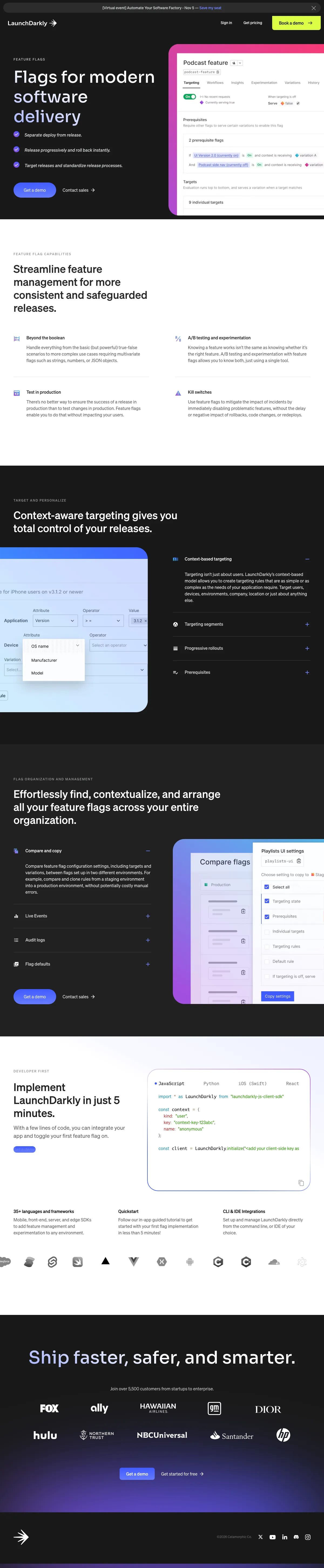
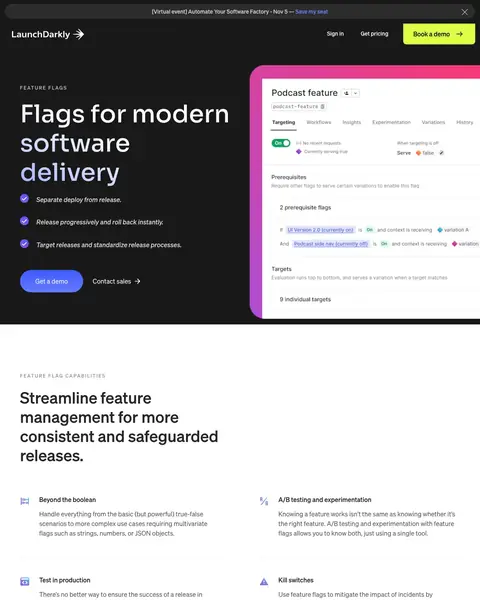
LaunchDarkly runs a developer page and writes it like one: bullets that say what feature flags actually do, no adjectives, no manifesto. The hero pairs Get a demo with Contact sales so the ready and the researching both get a route. Then the cookie banner drops across the bottom of the screen and takes the next section's heading with it.
Put an animated product UI mockup directly beside the hero headline so the technical evaluator clicking your ad sees exactly what they will be configuring in their first session, not a stock illustration of abstract teamwork.
Short lines under the headline, each a technical claim rather than a benefit: separate deploy from release, roll back instantly, standardise the process. A developer reads those and either nods or objects, and both beat skimming. If your buyer is technical, write claims they could challenge and drop the adjectives.
Get a demo sits as a filled button with Contact sales as plain text beside it, so the ready buyer and the one who needs procurement both get a route. Neither is hidden and neither shouts. Give your page two speeds and make the slower one look deliberate.
Further down, a block prints the integration claim in huge type with real code beside it, then names the languages and frameworks supported. The worry with a developer tool is not price, it is how long the rollout will eat. Answer with a number and show the code.
The cookie notice runs the full width at the bottom of the first view, and the heading it lands on belongs to the section explaining what feature management does. A first time visitor meets that block before your argument. Load your page in a private window and move it.
The customer count and the logo wall carrying Fox, GM, Dior, Hulu, NBCUniversal, Santander and HP sit at the very bottom, after every feature block. That is the strongest thing here and the last thing anybody sees. Put the count and a few logos under your headline.
Get a demo, Contact sales and Get started for free are the exits, and every route is a button to somewhere else. On a paid click the visitor who wants to read now and decide next week leaves no trace. Add a short form beside the customer logo wall.

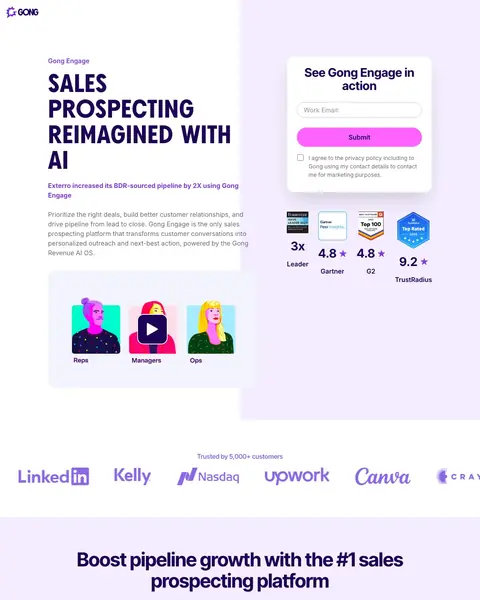
Gong asks for a work email and nothing else, and it is the shortest form in this file by a distance. Directly under the form sit analyst and review badges with their scores printed underneath, from Forrester, Gartner, TrustRadius and the review site every software buyer already reads, which is the only first screen here that answers who says so before you scroll. The rest of the page then repeats the same argument, with a different customer figure each time.
Run a short hero video clip of your actual product dashboard (not a lifestyle reel) and pair it with a named-customer stat bar immediately below. The comparison-stage buyer needs both the 'what does it look like' answer and the 'what results can I expect' answer in the first viewport, and this page gives them both in one scroll.
Work email, a submit button and a consent tick. That is the whole form, the shortest here by a wide margin. Everything beyond an email can be asked on the call, and every field you cut is a percentage who finish. Try the shortest version you can bear.
A badge row sits beneath the submit button, Forrester Wave Leader, Gartner Peer Insights, Best Software and TrustRadius Top Rated, each with its score printed underneath in large type. Every badge you have is on somebody else's site already. Bring the scores across. Logos on their own say little.
Every feature block ends with a named customer logo and a single figure: accuracy, response rates, pipeline growth. Different section, different customer, different number. Rather than one testimonial wall, attach a separate customer's result to each thing your product does.
The headline renders in full capitals across the width of the hero, slower to read than sentence case and landing as shouting at this size. The words are fine and the styling fights them. Use size and weight for emphasis, and check it on a phone.
Halfway down the page a heading declares the product top of its category, with nothing beside it saying who decided that. This is the same page printing real analyst scores in the first screen. Every superlative needs a body and a date beside it, or it comes off.
The middle runs feature blocks making broadly the same case with a different customer figure attached, then a feature grid of tiles, then the same email form at the foot. Cut the weakest of your repeated sections and put an objection you have never answered in its place.

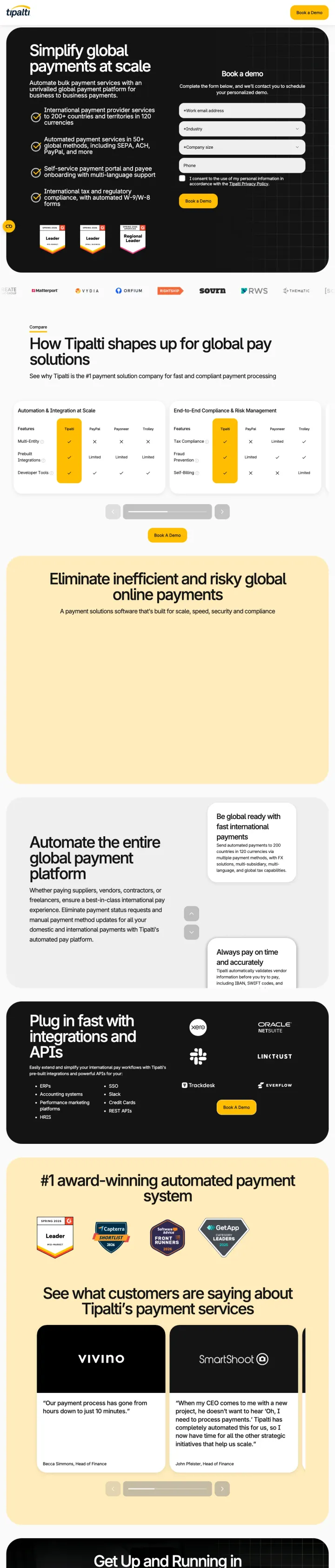
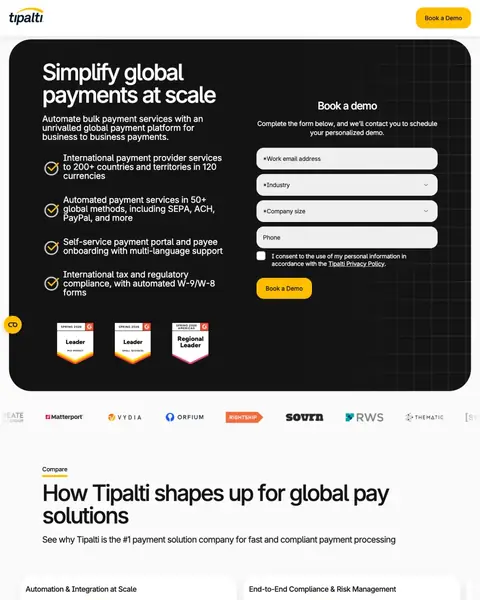
Tipalti Book a demo puts the qualifying bullets on the left, a short form on the right and a row of review site award badges along the bottom of the hero. Further down it does the thing almost nobody in this file has the nerve to do: it names PayPal, Payoneer and Trolley in a feature table and marks the boxes. That table is the reason this page is on the list, and the empty yellow block sitting above it is the reason it is not higher.
Below the hero form, drop a head-to-head comparison chart that names your top competitors and shows where you win across the metrics a finance buyer actually tracks (fee structure, currencies supported, compliance coverage). Most software pages only claim superiority. Tipalti shows it.
PayPal, Payoneer and Trolley are named in the column headings, and the rows are marked with ticks, crosses and the word Limited. Nobody else in this file will name a rival. Your buyer builds this table anyway, so build it for them and pick the rows that matter.
Beside the form runs a ticked list, each line carrying a figure or a named standard: countries and currencies, payment methods including SEPA and ACH, the payee portal, the tax forms by name. A finance buyer rules you in or out from those. Put your qualifying numbers in the hero.
A row of review site badges sits at the bottom edge of the first screen, Leader Mid-Market, Leader Small Business and Regional Leader Americas, each stamped with its season and year. Naming a company size tells a small finance team this is not only sold to enterprises.
Under that heading and its subhead sits a large pale yellow panel with nothing in it, and the page continues as if a video had loaded there. It is among the biggest blocks here and it is blank. Scroll your page on a slow connection and note every empty space.
The comparison splits into cards in a horizontal carousel, so only part shows and the next card is cut off at the right edge with a scrollbar underneath. The best asset on the page is partly hidden behind a gesture most visitors will not make. Stack your comparison vertically instead.
The form asks for a work email, then an industry dropdown and a company size dropdown before the phone box. Both are questions the visitor must think about rather than type, and a list that long is slower than a text field. Keep the qualifier your team routes on.

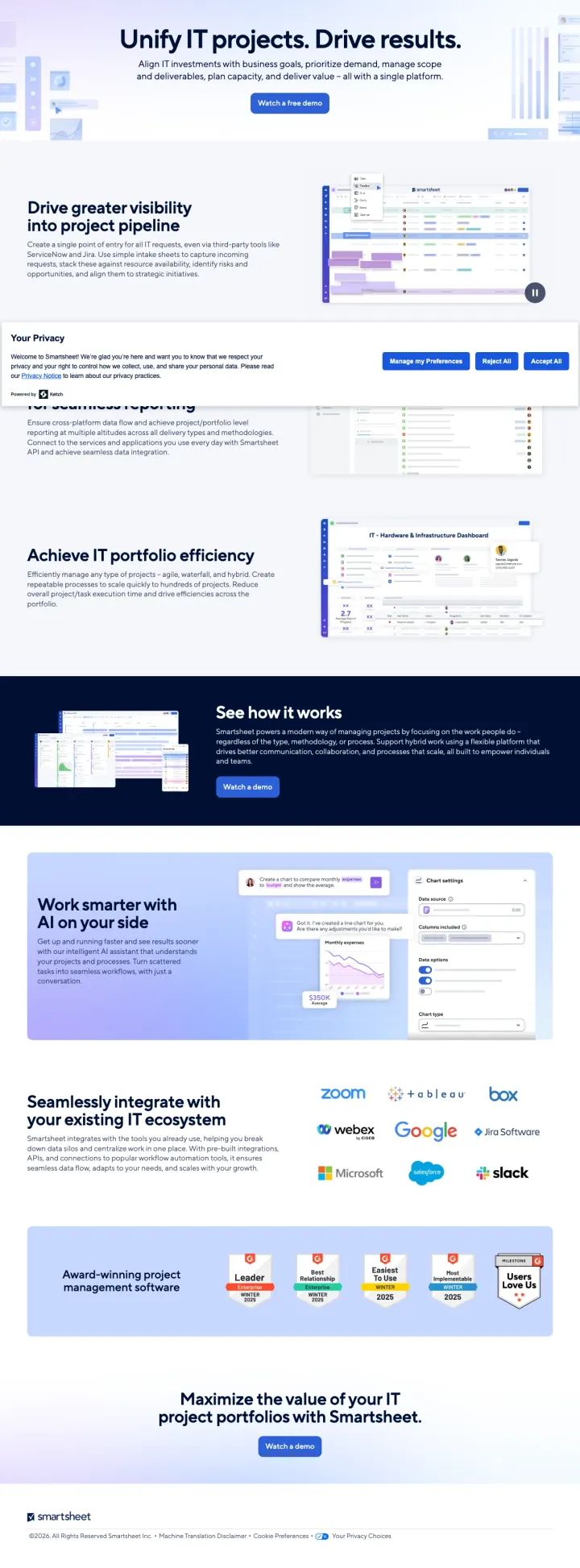
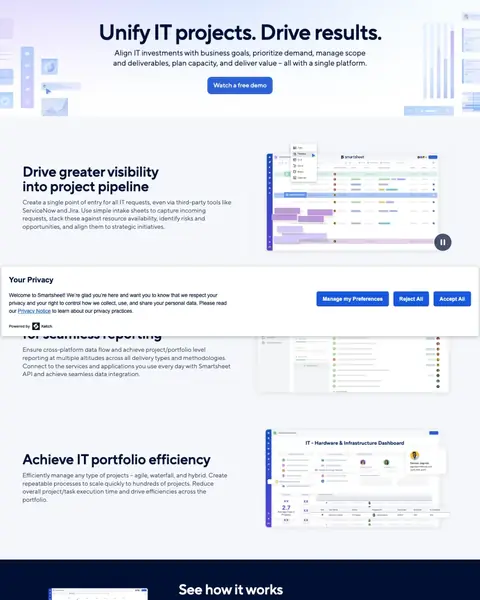
Smartsheet leads with Unify IT projects. Drive results. and offers exactly one thing, a Watch a free demo button, which is a lighter ask than a sales call and a real offer rather than a contact form. The capture shows no header bar at all, so there is no navigation to leak clicks. The award badges are near the bottom, and the privacy card lands across the second section.
Put a real product dashboard screenshot in your hero pane and label three specific use-case tiles directly beside it ('project pipeline,' 'portfolio efficiency,' 'work smarter on AI'). The IT portfolio manager clicking your ad is comparing three tools in a spreadsheet. Your hero should show them what a single day of work looks like in yours.
The only thing the first screen asks is that you watch something, and the word free does real work beside it. A recorded demo lets a researcher get what they came for without booking their calendar. Offer a watchable demo alongside the bookable one and see which paid traffic prefers.
This capture has no navigation bar of any kind. The page opens straight on the headline, with no menu, no logo link and no search to click away through. It is the cleanest page in this file. Strip your header to a logo and a button, then count the fills.
The first body section names ServiceNow and Jira rather than promising integrations in the abstract, and a logo grid repeats it with Zoom, Tableau, Box, Webex, Google, Jira, Microsoft, Salesforce and Slack. Name the tools your buyer definitely has, in the opening paragraph.
The consent card, headed "Your Privacy", lands across the page just under the first screen and swallows the heading of the cross-platform reporting section, leaving the words for seamless reporting sticking out below it. The reader meets a legal notice mid-argument. Open your page fresh and see where yours sits.
A row of review site badges, including Leader Enterprise and Easiest To Use, sits in a blue box near the foot, and the only thing after it is the closing demo button. On a page this short, proof should not arrive last. Move the badge row up to the hero.
There is no customer quote, no name, no logo and no figure anywhere on this page. The integration grid shows software brands rather than customers, and the badges say what reviewers thought without any speaking. Put a named customer, with a job title and a result, above your demo button.

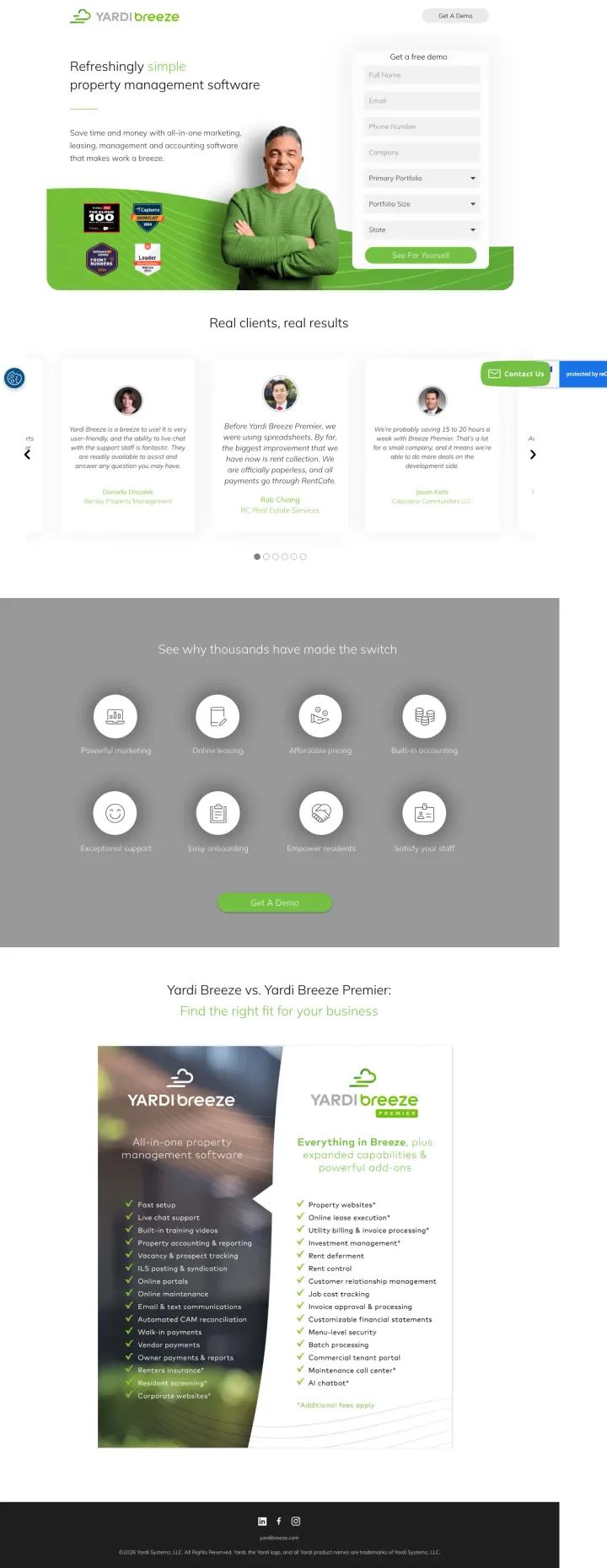
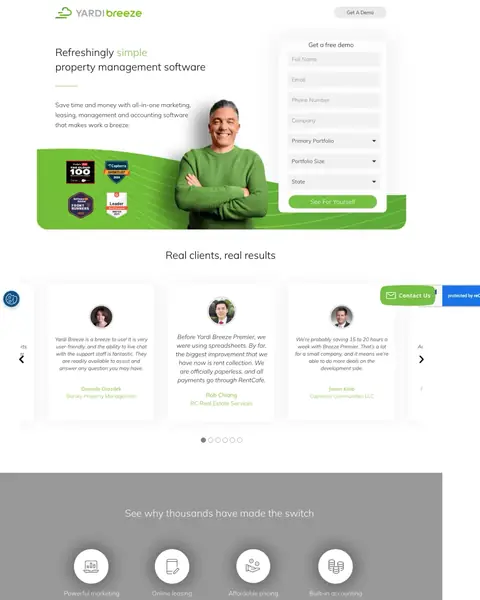
Yardi Breeze runs the most old fashioned page in this set and it works anyway. Award badges sit on the green hero band, a smiling man in a green jumper stands beside the form, and the testimonials with faces and names start immediately under the first screen. The catch is the form itself, which asks for a great deal before anybody has been shown a single screen of the software.
Place three named-customer quotes in a carousel directly below the hero form, each with a specific operational outcome (time saved, rent collected, tenant issues handled). Most vertical SaaS pages use anonymous testimonials. Named property managers with real role context ('Bret Cheney, RE Real Estate Services') convert skeptical owners faster than any feature list.
They sit on the green band inside the first screen: Forbes, Capterra and Software Advice, plus the review site your buyer already reads, each carrying its year. Award badges that land level with the form get read. Put yours in the hero, at a size somebody can read.
The very next thing under the hero is a row of testimonial cards, each with a photograph, a name and the company the person works at. No feature tour first, no explainer. The visitor's first question after the offer is whether people like them use this. Move your testimonials up.
Panels side by side list what each tier includes, tick by tick, with the dearer one headed as everything in the cheaper plus more. That turns the visit from whether to buy into which to pick. Lay your tiers out level and let the reader choose between them.
Full name, email, phone, company, then a primary portfolio dropdown, a portfolio size dropdown and a state dropdown, all before anybody has seen a screen of the software. The dropdowns are questions the sales team wants. Ask for the name and email now, and the portfolio detail on step two.
The section under the testimonials renders as a flat grey rectangle with white icons and white labels, and the heading and labels are close enough in tone to fade. It is meant to be the reasons to switch. Screenshot your page in greyscale and check nothing disappears.
A green Contact Us tab and a reCAPTCHA badge sit over the right hand end of the testimonial row, covering part of a card. A cookie icon is parked bottom left. All of it lands on your proof. Load the page and move whichever widget sits there.
Pages that break the playbook in interesting ways

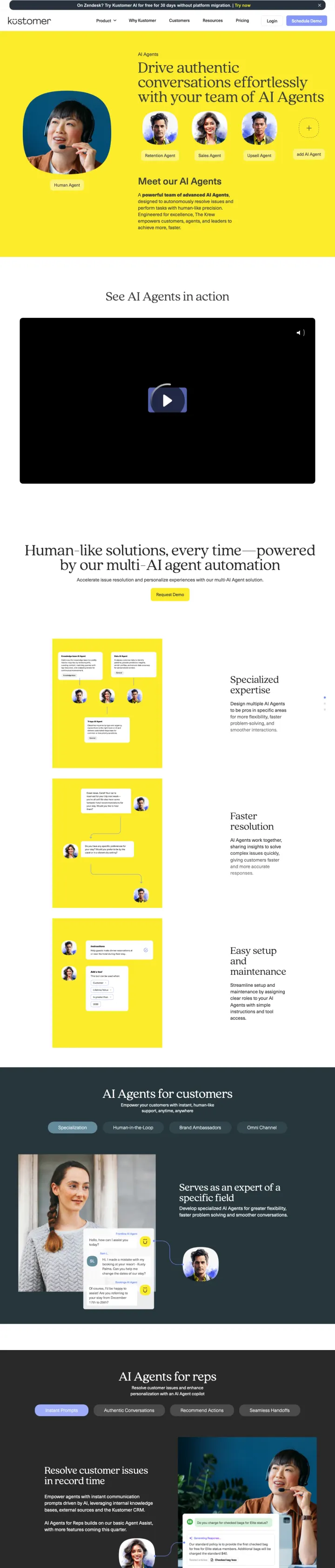
Why this breaks the rules: Enterprise B2B convention says PPC landing pages should be focused and short. Kustomer builds a 7,500-word page that functions as a complete product evaluation document. This works because the AI customer service buyer needs to build an internal business case, and this page gives them everything they need in one URL they can share with stakeholders rather than sending them to 5 different pages.
Interactive product demo video ('See AI Agents in action') with a large play button and blue CTA on a yellow background creates a visual break that stands out against the surrounding product content
The page addresses every stakeholder in the buying committee: technical evaluators get agent configuration details, support directors get ROI metrics, and CX leaders get customer experience positioning
'Human-like solutions, every time' with specific multi-AI agent automation descriptions gives the technical buyer architectural detail while keeping the business buyer engaged with outcome language
Cookie consent popup dominates the initial viewport with privacy policy text, pushing all product content below the fold before the visitor can see anything about AI agents
7,524 words means the visitor searching for 'ai customer service agent' gets a product encyclopedia instead of a focused conversion page; the average PPC visitor scans for 15 seconds, not 15 minutes
No enterprise logos visible above the fold; the page bets entirely on product depth rather than the customer names and badges that enterprise buyers use to shortcut vendor evaluation

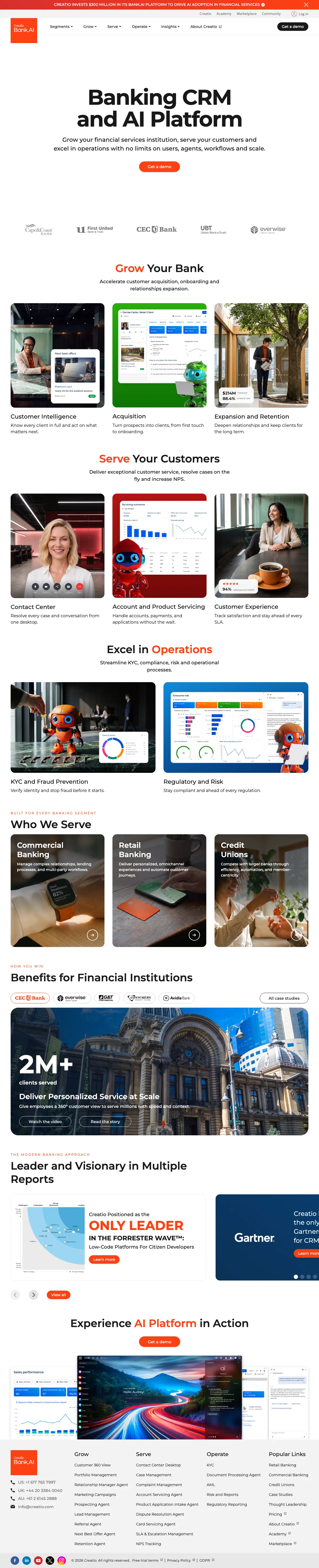
Why this breaks the rules: Enterprise banking CRM should feel corporate and serious. Creatio uses playful red mascot characters throughout the page, mixed with actual product screenshots and analyst recognition. The contrast between the playful visual identity and the serious business content ('recognized as a Leader by Gartner and Forrester') creates a distinctive page that stands out from the sea of blue-and-white enterprise software pages.
Industry-specific page for 'banking CRM' matches the exact keyword intent with dedicated content about customer acquisition, loan origination, and banking compliance rather than a generic CRM page with banking mentioned once
Analyst recognition ('Leader by Gartner and Forrester') appears in the ad copy AND on the page, creating ad-to-page message continuity for the enterprise buyer who clicked specifically because of the analyst endorsement
Banking customer logos (HarborOne, GT Continental, OTP, Avidia, NASB) are mid-market banks that are the exact target customer profile, rather than aspirational Fortune 500 logos that might feel unreachable
No form on the page despite 122 total links; the only conversion path is 'Get a Demo' which links to a separate page, so a visitor you paid for at high CPCs has to click once more before any form appears
The red mascot characters (visible in the hero and throughout) may undermine credibility with conservative banking IT buyers who expect gravitas, not whimsy, from their CRM vendor
Page has zero navigation links but 122 total links scattered throughout content sections, creating an overwhelming number of click paths away from the demo CTA

Why this breaks the rules: The conventional PPC playbook sends incident-management traffic to a product feature page with a demo CTA and hides pricing behind a gate. Incident.io runs the opposite experiment: they send PPC clicks directly to a pricing page with Free, Team ($25), Pro, and Enterprise tiers compared across 60+ features in a single scrolling table. The bet is that engineering buyers who self-qualify on price convert faster than the ones who have to book a call to find out if they can afford the tool.
A four-column pricing table with a Free tier labeled '$0 forever' removes the cost objection before the buyer asks, and the feature-by-feature comparison lets the technical evaluator find their specific use case (on-call schedules, Slack integration, post-mortems) without clicking into a separate docs page
The 'Cheaper than downtime' headline directly above the table reframes the pricing conversation from 'how much does this cost?' to 'what does NOT having this cost?' This is the same rhetorical move cybersecurity vendors use to justify premium pricing, and it works here because incident tooling has identical stakes
At the bottom of the page, the page stacks customer logos (Netflix, Etsy, Ramp, Ovo, Monzo, Linear) beside a case study on Etsy with a specific outcome, which adds enterprise credibility without pulling the visitor away from the pricing decision
The hero lacks a customer quote or named case-study outcome above the pricing table, so the buyer who lands cold on the pricing page sees dollar figures before anyone has vouched for the product
The feature comparison table runs to roughly 60 rows before the customer logos appear, and there is no sticky nav or section jump, so a PPC visitor looking for a specific feature has to scroll through unrelated capabilities before finding it
'Cheaper than downtime' is a clever frame but it is not reinforced anywhere else on the page with actual downtime cost data. Adding a single stat ('the average enterprise outage costs $540k per hour') would turn the headline from a pun into a proof point
The same questions asked of every winner, so you can find the row that matches the traffic you are already buying.
| Page | The hook | Form fields | Offer named up top | Rating you can see on arrival | Credential you can check | Standout move |
|---|---|---|---|---|---|---|
| #1ZoomInfo | Trial terms under the form heading | 4 | Yes | No | None | A named customer quote in the hero |
| #2monday CRM | A ticked list, then a sales call | 8 | No | No | In the footer | The call agenda, written out |
| #3Decagon | A category headline and a button | No form | No | No | In the footer | A customer logo row you recognise |
| #4Xurrent | Stop fighting fires | No form | Yes | No | None | Enterprise logos under the headline |
| #5LaunchDarkly | Plain bullets for developers | No form | No | No | None | Demo and sales sit side by side |
| #6Gong | An email box and nothing else | 1 | No | Yes | Up top | Analyst scores under the form |
| #7Tipalti | Bullets on the left, form on the right | 4 | No | No | Up top | A table that names the competition |
| #8Smartsheet | Watch a demo, nothing else | No form | Yes | No | None | No header, so no way out |
| #9Yardi Breeze | Award badges beside a friendly face | 7 | Yes | No | Up top | Testimonials right under the fold |
Read the keywords you are buying, then find the row that matches them. Somebody typing a competitor's name plus alternative has already decided to switch and wants the table that puts you beside them, which is why the Tipalti row matters. Somebody typing the category name is still working out whether this kind of software solves their problem, and needs the bullets and the logo row before they will consider a call. You paid the same for both clicks.
Lines lifted word for word off the pages above. We tell you whose page each came from, and one click copies it.
The conversational AI platform for concierge customer experiences
Talk to a monday CRM expert
Clean, Accurate B2B Data You Can Trust
Book a demo
2 pages burning ad spend with fundamental issues
Every click to these pages costs real money. We found pages with no logos or customer quotes anywhere, mismatched intent, weak CTAs, and messaging that ignores what the searcher actually typed. Here is what to avoid.

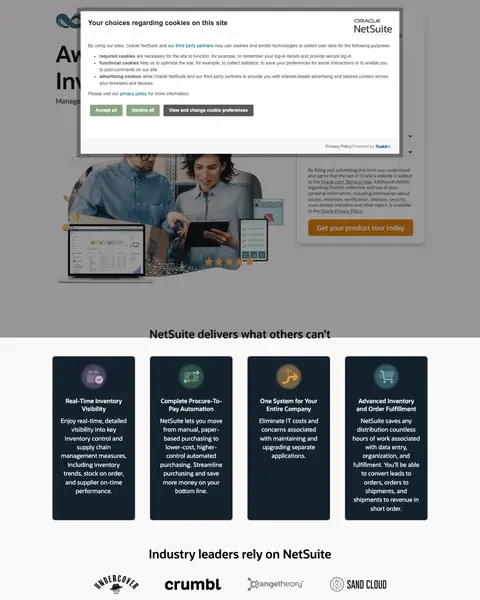
NetSuite is spending on 'netsuite' (135,000 monthly searches) and 'erp software' (49,500) and landing visitors on a page where a cookie consent modal covers the form and hero. The page below the modal has 142 words total and 4 generic benefit icons. At Oracle-level CPCs, every visitor who clicks 'View and change cookie preferences' instead of scrolling past the modal is a lost conversion.
Cookie consent modal covers the entire hero and form on initial load; the visitor sees a wall of privacy text with three buttons before they see any product content or the conversion form
The page has only 142 words of actual content and 9 total links, which means the visitor who scrolls past the cookie wall finds almost nothing to evaluate before being asked to 'Get your product tour today'
The URL itself (6262239.extforms.netsuite.com with a 200-character query string) looks like a phishing link, undermining the trust that the Oracle/NetSuite brand should provide

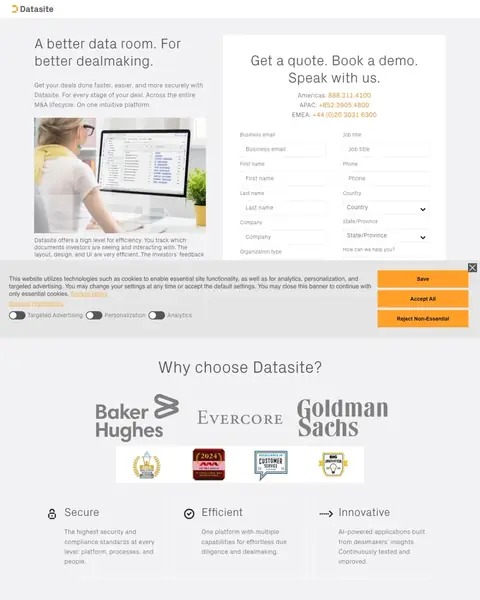
Datasite bids on 'virtual data rooms for m&a', 'secure virtual data room', and 'deal room software' (high-intent M&A terms with $30-$80 CPCs) and sends those expensive clicks to a split-screen page that asks for 16 form fields before the visitor has seen a single customer logo, case study, or product screenshot. A cold-traffic M&A buyer comparing three VDR vendors is asked to commit more info upfront than most enterprise vendors ask after a first call.
Sixteen-field form (business email, phone, country, state/province, company, organization type, plus name fields) asked up-front of cold traffic. At M&A-vertical CPCs, each additional field past field four cuts conversion roughly in half. Most of these fields belong after the demo is booked, not before
The hero headline 'A better data room. For better dealmaking.' is a generic superlative that names no differentiator. The buyer already searching 'virtual data rooms for m&a' wants to know what makes Datasite different from Intralinks or Firmex, not a tautology about better data rooms leading to better deals
No product screenshot, case study, or named-outcome appears above the fold. The only visual is a stock photo of someone with a laptop, which is indistinguishable from a Fiverr template and undercuts the premium positioning the domain is trying to claim
ZoomInfo shows Solaris +54%, Apple +43, Agora 10%, SurveyMonkey with specific percentage-improvement stats beneath each logo. Decagon shows Notion, Duolingo, Rippling, Eventbrite, Hertz, Affirm. Xurrent stacks Pfizer, Cisco, Volkswagen, BMW, Deutsche Telekom. Gong pairs 5,000+ customers with LinkedIn, Kelly, Upwork, Canva logos. LaunchDarkly closes with Fox, Ally, Hulu, NBCUniversal, HP, Atlassian. The enterprise buyer thinks 'if Pfizer trusts this, my CIO has cover to say yes.' Generic 'trusted by 35,000 businesses' without specific names does not carry that weight.
ZoomInfo places Ksenia Kouchnirenko, VP Business Systems at SurveyMonkey, with a specific metric ('reduced sales response time from 20 minutes to just under 60 seconds') directly beneath the hero. Monday.com uses James Arnold, COO at Cenversa. Gong features a named Senior Sales Operations Manager from Engine with '5x increase in sales productivity.' These compressed case studies answer 'has someone like me actually gotten results?' inside the first viewport. Unnamed testimonials do not.
Xurrent stacks 9 badges in one section including G2 Momentum Leader, Gartner Peer Insights Customer's Choice, GigaOm Leader, Software Advice Best Customer Support. Monday.com shows 7 G2 badges. Smartsheet has 6 G2 Crowd badges plus 'Users Love Us.' Creatio leads its ad copy with 'recognized as a Leader by Gartner and Forrester.' For the comparison-stage enterprise buyer running a structured evaluation, these badges shortcut the 'is this vendor legitimate?' question that would otherwise take weeks of analyst report reading.
Every winner in this set either removes navigation entirely or reduces it to a minimal logo and primary CTA. Monday.com's contact-sales page has only 13 total links. Tipalti's PPC variant has a form pinned top-right with a clean hero below. LaunchDarkly holds nav to a single 'Book a Demo' button. The losers do the opposite. NetSuite loads with a cookie consent modal covering the form on first paint. Datasite pairs generic stock imagery with a long two column form and buries the Goldman Sachs logo row below the cookie bar.
Winners treat PPC traffic as a dedicated audience with a dedicated page: stripped nav, form or demo CTA above the fold, named enterprise logos with outcome metrics, and a customer quote that a CFO could verify on LinkedIn. Losers bet on commitment before proof.
If your pages look like the losers here, that's fixable - hire the team behind this teardown to rebuild the funnel end to end.
A page built from these patterns fixes half your funnel. The other half is the account sending it traffic - we manage both for SaaS teams.
The pages that win here shrink the ask and put somebody else's word on the screen before anybody scrolls. The ones that lose spend the whole first screen describing a category the visitor already searched for.
Shrink the first ask and say what happens next. Gong takes a work email and nothing else, and Tipalti tells you in the form's own subhead that somebody will contact you to schedule the demo. Every field you add is another reason to leave and compare, and a buyer evaluating rival vendors this afternoon will fill in the shortest form first. Ask for the smallest thing that lets your sales team do their job, then earn the rest on the call.
Put somebody else's word on the first screen. Most of these first screens carry no rating and no review count at all, and business software is the one industry where the badges are easy to get. Gong prints its analyst and review scores directly under the form, so the question of who says so is answered before the visitor has scrolled anything. Almost every other page in this file has the same badges and keeps them under the fold, where they do nothing for a click you paid for.
Name your competitors and mark the boxes. Tipalti puts PayPal, Payoneer and Trolley in a table beside itself and ticks the rows. That is the page a switcher was already trying to build in a spreadsheet, and doing it for them means you get to choose the rows. Nobody else in this file does it. If you are worried about naming a rival, remember your buyer already has a comparison article open in another tab and somebody else wrote that one.
A headline that names the category is not a headline. The conversational AI platform for concierge customer experiences tells a visitor nothing they did not know when they typed the search. LaunchDarkly gets it right in a handful of words, Flags for modern software delivery, and then bullets a developer can agree or disagree with. Write the sentence your best customer would use to explain you to a colleague, and put that in the biggest type on the page.
Load your own page in a clean browser and look at what covers it. The cookie banner on the LaunchDarkly page swallows the next section's heading, the privacy card on Smartsheet lands across the second block, and the monday cookie card sits over the left half of its own testimonial. None of those show up in a design review, because the designer's browser accepted the cookies months ago. Open yours in a private window, on a phone as well, and see what a first time visitor actually meets.
Confirm the page renders, not just that it exists. There is a long stretch of white in the middle of the ZoomInfo capture where a section did not load, a pale yellow block on Tipalti with nothing in it, and a paragraph on Decagon set so light it barely reads. Each of those pages passes any test that checks whether the markup is there. Scroll your own page top to bottom on a slow connection and look at it, because a section that fails silently costs you the same money as one that never existed.
Every line below came off a screenshot somebody sat and counted. Open your own page beside it and tick what it already does.
ZoomInfo is the #1 page on this list and we still logged three problems on it. The headline reads 'Clean, Accurate B2B Data You Can Trust' - so could Clearbit, so could Apollo. All nine winners here carry three logged issues each. So point postclick at the URL your Google Ads send people to. It reads that page like someone who just clicked your ad and knows nothing about you, names what's costing you demo requests, then designs new versions as real images.