
The 7 winners.

The landing pages actually worth stealing from.

Winner #1: promo.bankofamerica.com

promo.bankofamerica.com/ccsearchlp10/compare-cards-3
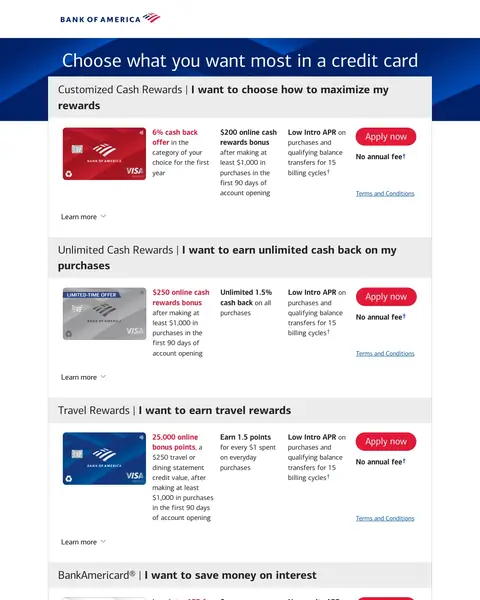
Credit Cards landing page example from promo.bankofamerica.com
  1. 1

    What works

    Heading asks what the buyer wants most

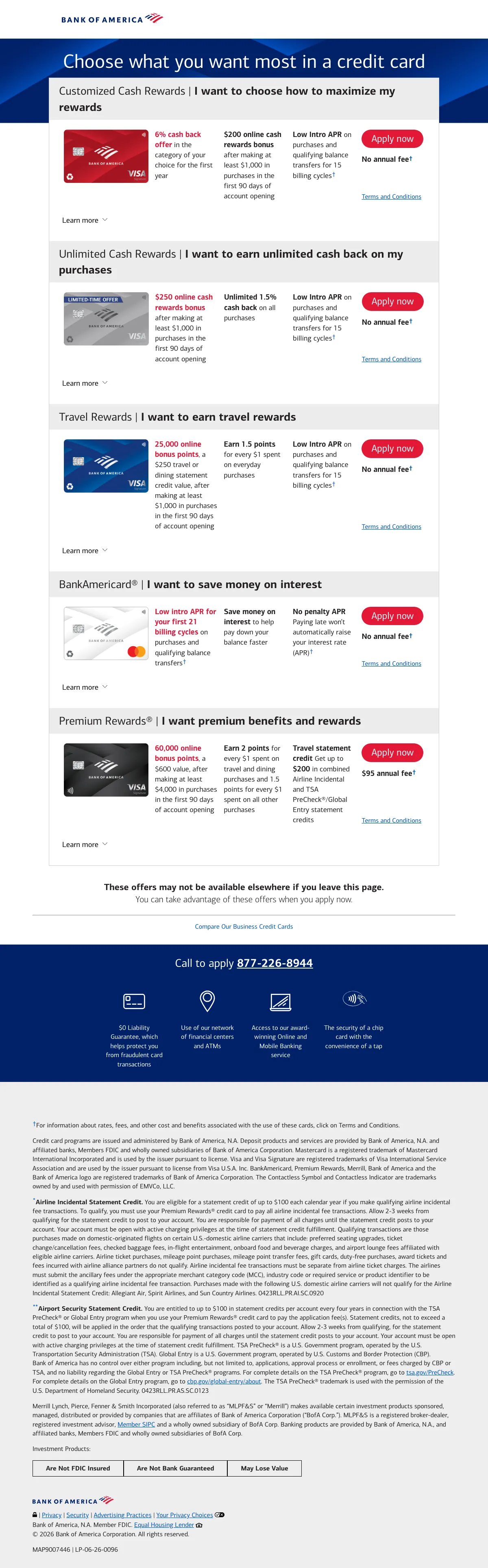
    The top heading reads ‘Choose what you want most in a credit card’. Each card below starts with an ‘I want’ line.

  2. 2

    What works

    Same row on every card

    Each card has a name such as ‘Customized Cash Rewards’ or ‘Unlimited Cash Rewards’. Rate, bonus, intro APR and an ‘Apply now’ button repeat on each one.

  3. 3

    What works

    Reason to apply now

    ‘These offers may not be available elsewhere if you leave this page.’ A buyer has a reason to decide on the spot.

  4. 4

    What gets in the way

    Phone line is near the bottom

    ‘Call to apply 877-226-8944’ is in a band near the foot of the page. A buyer with a question has to scroll to find it.

What to try

Move the phone line up

A buyer who prefers to apply by phone should see the number on the first screen, next to the first card.

See the original page

Winner #2: citi.com

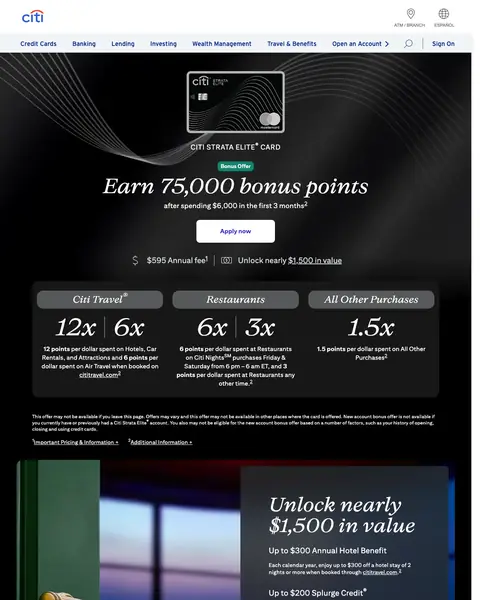
citi.com/credit-cards/citi-strata-elite-credit-card

Credit Cards landing page example from citi.com
  1. 1

    What works

    Bonus and spend target together

    ‘Earn 75,000 bonus points’ and ‘after spending $6,000 in the first 3 months’ are in one block. The buyer sees the offer and what it takes.

  2. 2

    What works

    Annual fee beside the value

    ‘$595 Annual fee’ and ‘Unlock nearly $1,500 in value’ are side by side. The buyer sees the cost and the return together.

  3. 3

    What works

    Point multipliers in one row

    The row shows 12x, 6x, 3x and 1.5x over the labels Citi Travel, Restaurants and all other spend.

  4. 4

    What gets in the way

    Credit score question is far down

    ‘What credit score is needed to qualify’ is in the FAQ, far down the page. A buyer who doubts the approval must scroll to find it.

What to try

Put the score answer near the button

A one-line answer about the credit score needed, next to ‘Apply now’, would meet the doubt where it starts.

See the original page

Winner #3: americanexpress.com

americanexpress.com/us/credit-cards

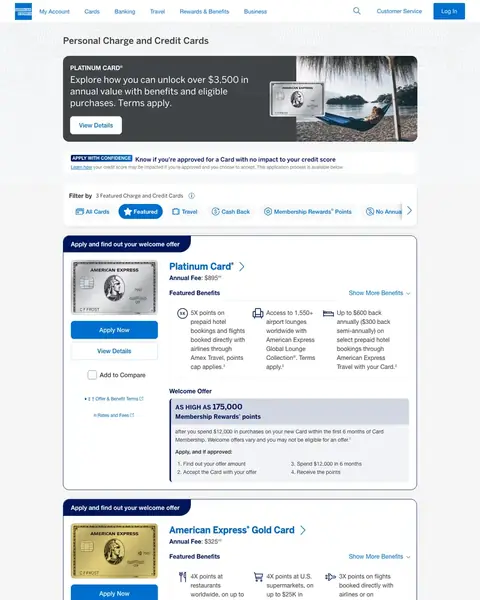
Credit Cards landing page example from americanexpress.com
  1. 1

    What gets in the way

    Full menu and login at the top

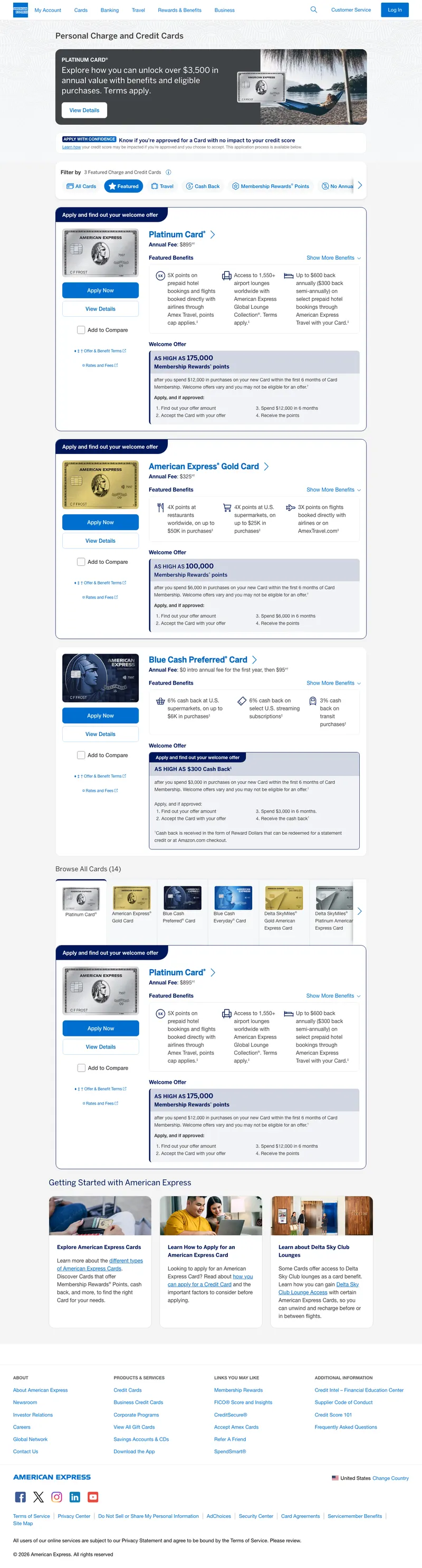
    The top bar has a full site menu and a login button. A buyer comparing cards can click away before reading the offer.

  2. 2

    What works

    Dollar value in the top banner

    The banner shows an annual value of over $3,500. A buyer sees a figure before any card.

  3. 3

    What works

    Approval check under the hero

    The band reads ‘Know if you're approved for a Card with no impact to your credit score’. It comes before any card.

  4. 4

    What works

    Filter chips cut the list

    All Cards, Featured, Travel, Cash Back, Membership Rewards Points and No Annual let a buyer cut the list to the cards that fit.

  5. 5

    What works

    Four numbered steps to the points

    The steps run from ‘Find out your offer amount’ to ‘Receive the points’. A buyer sees the whole path before the first click.

What to try

Trim the menu on this page

Fewer links in the top bar would keep a buyer on the card offer.

See the original page

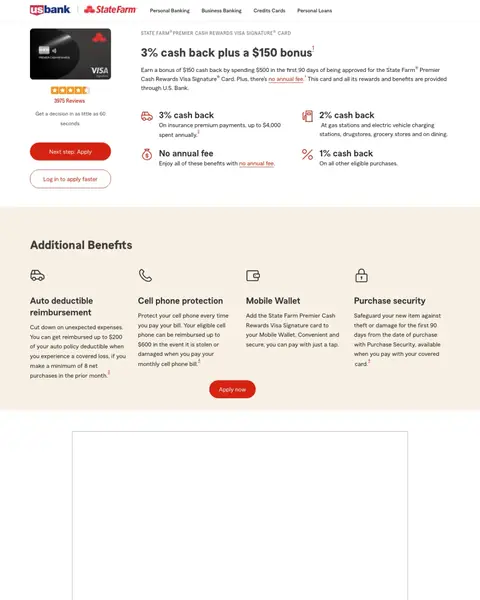
Winner #4: alliance.usbank.com

alliance.usbank.com/en-us/statefarm/credit-cards/premier-cash-rewards-visa-signature-credit-card.html

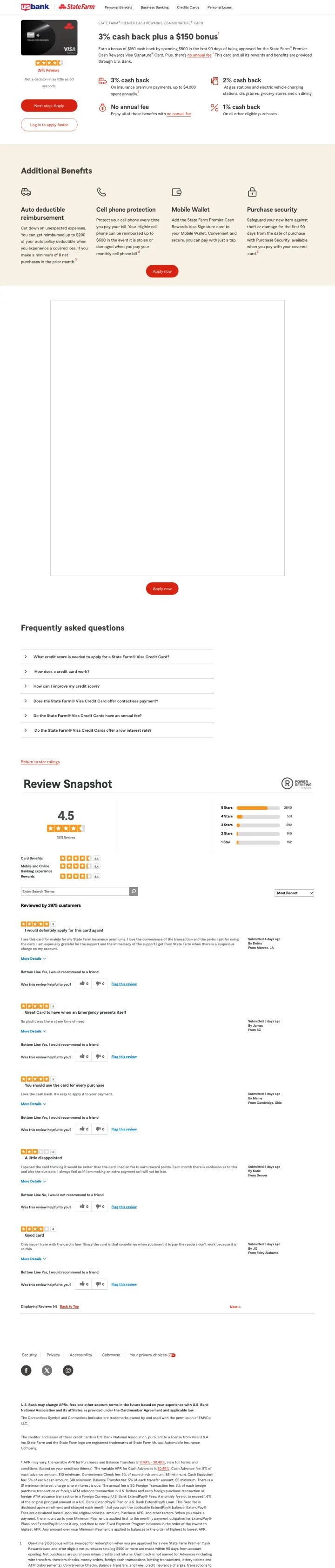
Credit Cards landing page example from alliance.usbank.com
  1. 1

    What works

    Reward and bonus in the headline

    ‘3% cash back plus a $150 bonus’ is the headline. A buyer sees the reward and the extra before anything else.

  2. 2

    What works

    Review count above the button

    ‘3975 Reviews’ appears above the apply button. Proof comes before the ask.

  3. 3

    What works

    Decision time under the reviews

    The page says ‘Get a decision in as little as 60’ seconds. A buyer knows how long applying takes.

  4. 4

    What gets in the way

    Login button under Apply

    ‘Log in to apply faster’ is a second button under ‘Next step: Apply’. A new buyer sees two choices where one would do.

What to try

Show one button first

A single apply button with the login link as small text would keep the first screen to one choice.

See the original page

Winner #5: usbank.com

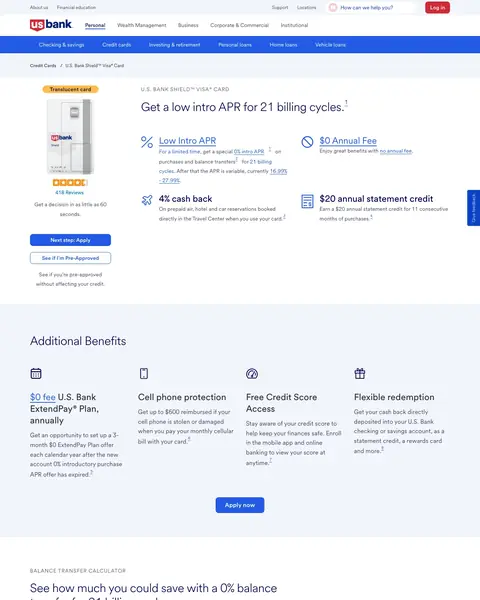
usbank.com/credit-cards/shield-visa-credit-card.html

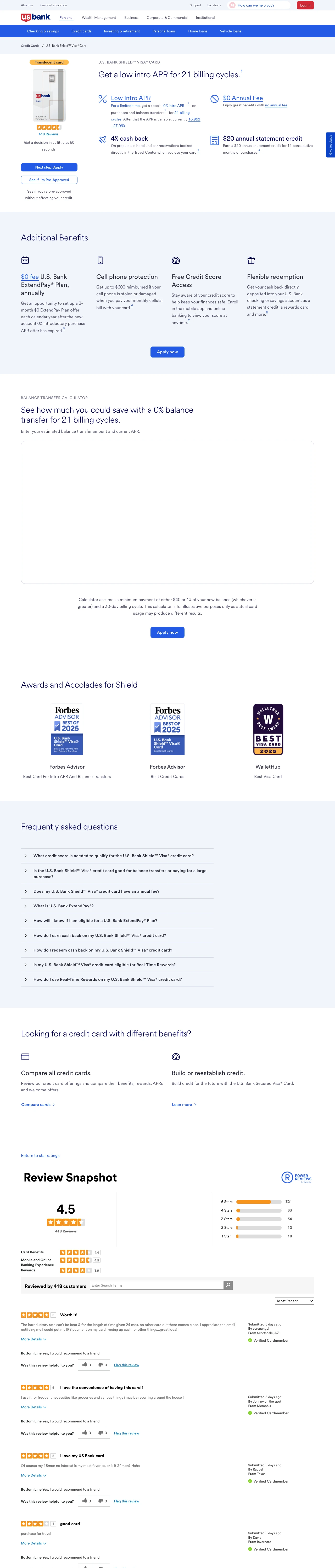
Credit Cards landing page example from usbank.com
  1. 1

    What works

    Intro offer in the headline

    The headline is the deal and its length: ‘Get a low intro APR for 21 billing cycles.’ The 0% balance transfer runs that long.

  2. 2

    What works

    Review count under the card

    ‘418 Reviews’ appears with the card art, before the button.

  3. 3

    What works

    Pre-approval button beside Apply

    ‘See if I'm Pre-Approved’ is under ‘Next step: Apply’, with a line that says it does not affect your credit.

  4. 4

    What gets in the way

    Awards are far down

    ‘Awards and Accolades for Shield’ comes after the benefits grid, with ‘Best Card For Intro APR And Balance Transfers’ from Forbes Advisor. A buyer who decides early misses the proof.

What to try

Move the awards up

A single award line under the reviews would put outside proof next to the first button.

See the original page

Winner #6: ramp.com

ramp.com/business-cards

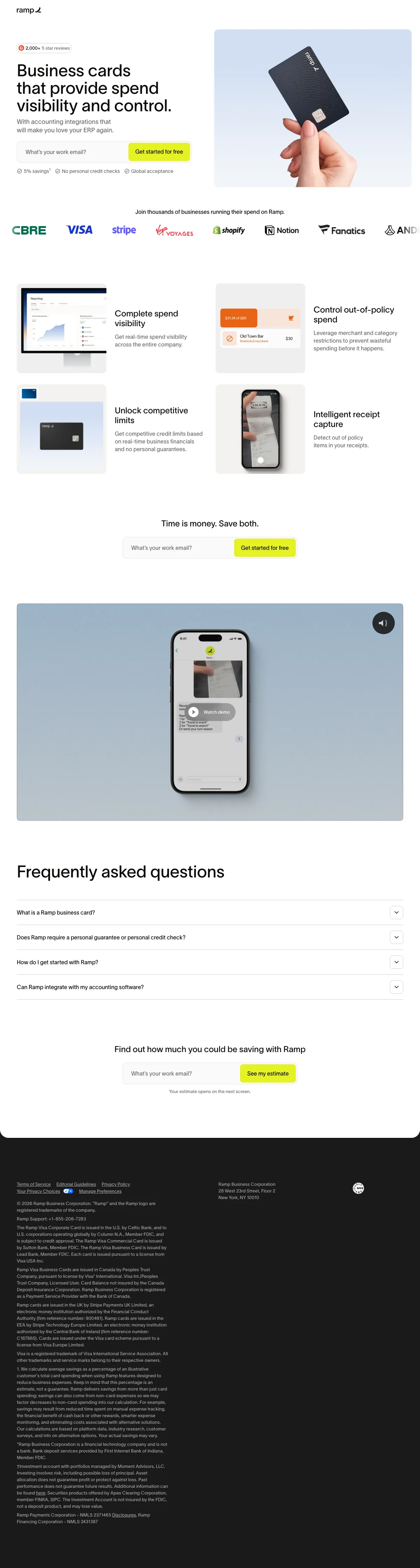
Credit Cards landing page example from ramp.com
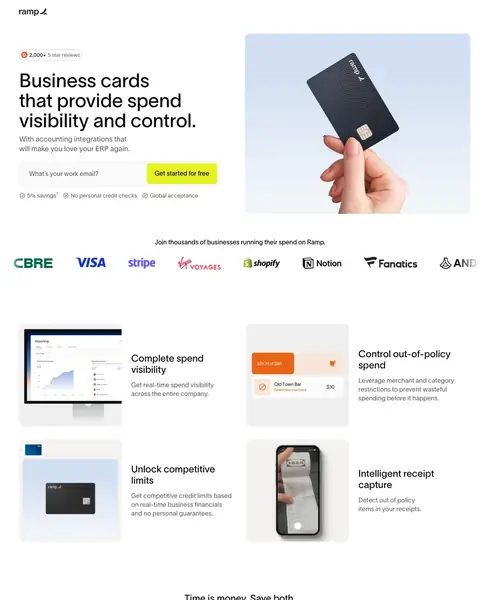
  1. 1

    What works

    Review count above the headline

    ‘2,000+ 5 star reviews’ is the first line above the headline.

  2. 2

    What works

    One field and one button

    The form has one field, ‘What's your work email?’, and a ‘Get started for free’ button.

  3. 3

    What works

    Three claims under the form

    A 5% savings line, ‘No personal credit checks’ and ‘Global acceptance’ run directly under the button.

  4. 4

    What works

    Logo row of known companies

    A row of logos including CBRE, Visa, Stripe, Shopify, Notion and Fanatics follows the form.

  5. 5

    What gets in the way

    Savings estimate comes late

    ‘Find out how much you could be saving with Ramp’ is near the bottom, after the features and the FAQ.

What to try

Show a savings figure early

A sample saving beside the first form would answer why a business should switch.

See the original page

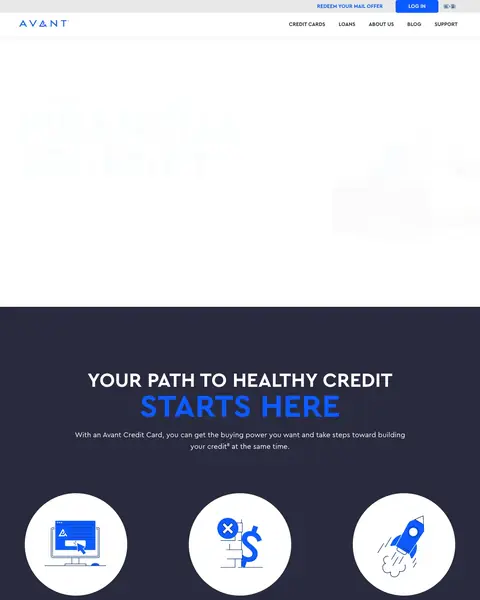
Winner #7: avant.com

avant.com/credit-card

Credit Cards landing page example from avant.com
  1. 1

    What gets in the way

    Headline is about a path

    ‘YOUR PATH TO HEALTHY CREDIT’ is the headline. The fee range and credit limit appear far lower on the page.

  2. 2

    What works

    Three claims under the headline

    Applying is easy, no hidden fees and a boost for your score each get a short block.

  3. 3

    What works

    Same button four times

    ‘SEE IF YOU QUALIFY’ repeats down the page. A buyer always has one ask in view.

  4. 4

    What works

    Fee and limit ranges printed

    The page prints a $0-$125 annual fee, a $0-$10.42 monthly fee and a $300-$3,000 credit limit.

  5. 5

    What gets in the way

    Credit score line comes late

    ‘WON'T IMPACT YOUR CREDIT SCORE’ appears near the bottom, after the fees.

What to try

Put the fee range higher

Printing the annual fee and limit beside the first button would answer the first question a buyer has.

See the original page

What the 7 winners do.

  1. Print the annual fee

    6 of 7
  2. Put the offer in the first headline

    3 of 7
  3. Show review proof near the button

    3 of 7
  4. Say a check will not hurt your credit

    3 of 7

Wildcards.

Pages that break the playbook in interesting ways.

Wildcard #1: learn.applecard.apple

learn.applecard.apple/travel

Credit Cards landing page example from learn.applecard.apple

The search: flights discount on credit card

Sponsored learn.applecard.apple

Apple Card - Travel with Apple Card

  1. 1

    What makes it work

    Headline matches the travel ad

    The ad says ‘Travel with Apple Card’ and the headline says ‘The perfect credit card when you're on the go.’

  2. 2

    What makes it work

    Fee line matches the flights search

    The search was about flights. The page says ‘no annual or foreign transaction fees’ right under the headline.

  3. 3

    What makes it work

    Approval check mid page

    ‘See if you're approved with no impact to your credit score.’ appears under the first picture.

  4. 4

    What makes it work

    Virtual card number for other sites

    The page says ‘unlimited Daily Cash back’ on everything you buy. For sites without Apple Pay, ‘there's a virtual card number in the Wallet’ app.

  5. 5

    What it gets wrong

    Hard inquiry note is in small print

    A note on hard inquiries is in small type at the foot of the page, far from the ‘no impact’ line.

What to try

Bring the inquiry note up

Put the hard inquiry note next to the ‘no impact’ line so a buyer reads both together.

See the original page

Wildcard #2: bestmoney.com

bestmoney.com/online-banking/compare-business-checking

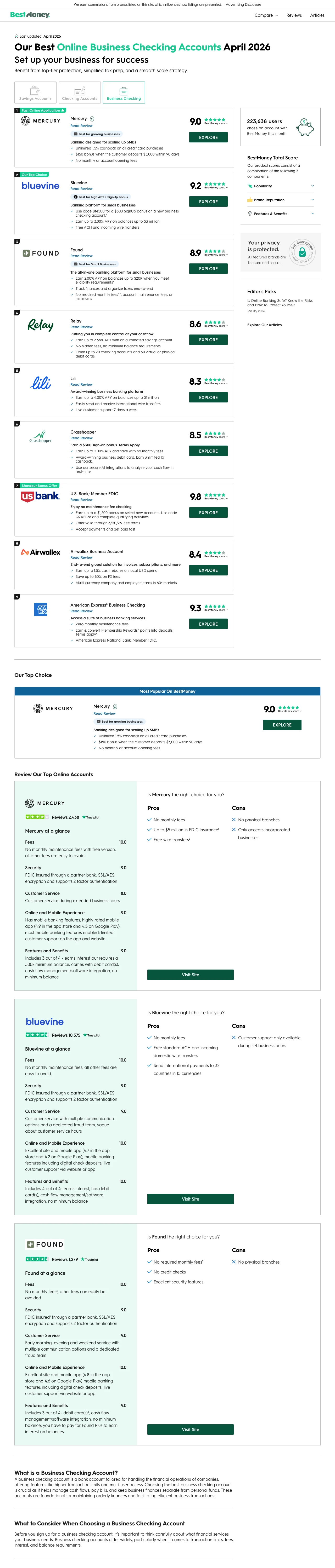
Credit Cards landing page example from bestmoney.com

The search: open a business bank account

Sponsored bestmoney.com

10 Best Business Bank Accounts

  1. 1

    What it gets wrong

    Commission note is small and at the top

    ‘We earn commissions from brands listed on this site’ is in small type above the logo.

  2. 2

    What makes it work

    Date in the headline

    ‘Last updated: April 2026’ and a dated headline show the list is current.

  3. 3

    What makes it work

    Ranked list with a score on each row

    The ad says ‘10 Best Business Bank Accounts’. Each row has a score such as 9.0 or 9.2, next to an ‘EXPLORE’ button.

  4. 4

    What makes it work

    Count of recent users

    ‘223,638 users’ chose an account this month. A buyer sees that others use the list.

  5. 5

    What makes it work

    Score method in the sidebar

    ‘BestMoney Total Score’ is followed by the parts that make it up.

What to try

Say how the money is made higher

The ad says 10 Best, so a list of ten needs the commission note next to the first score.

See the original page

The copy bank.

Headlines

Offers

  • “Earn 75,000 bonus points”

    citi.com

  • “$20 annual statement credit”

    usbank.com

  • “No personal credit checks”

    ramp.com

Promises

Next steps

3 pages that waste the click.

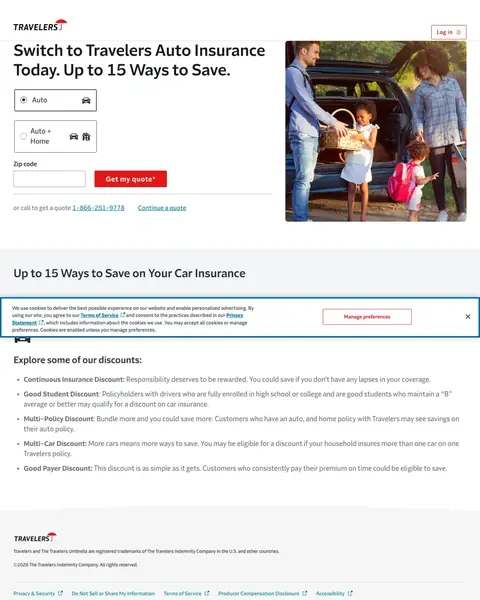
  1. travelers insurance topeka ks

    Quote box with a zip code and three tabs

    A visitor who searched for the company by name sees an Auto quote box that asks for a zip code, with Auto, Auto + and Home tabs.

    • Zip firstThe form starts with a zip code field.
    • Discount listThe page lists Continuous Insurance, Good Student, Multi-Policy, Multi-Car and Good Payer discounts.
    • Phone lineThe page says ‘or call to get a quote’ with a phone number under the form.
  2. A search for the company’s own name

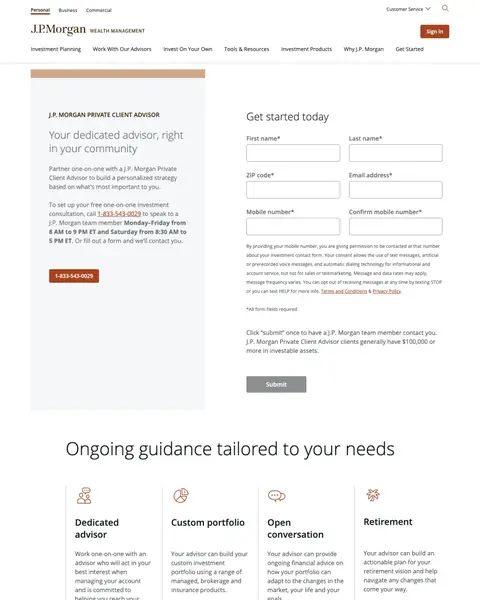
    Advisor form for a bank search

    A visitor who searched for a bank in Kansas City finds a form with fields for first name, last name, zip code, email and two mobile numbers.

    • Six fieldsThe form has fields for first name, last name, zip code, email, mobile number and a second mobile entry.
    • Asset lineThe page says clients usually have $100,000 or more in investable assets. That excludes most visitors.
    • Wrong askThe page offers a wealth advisor to a visitor who searched for a local bank.
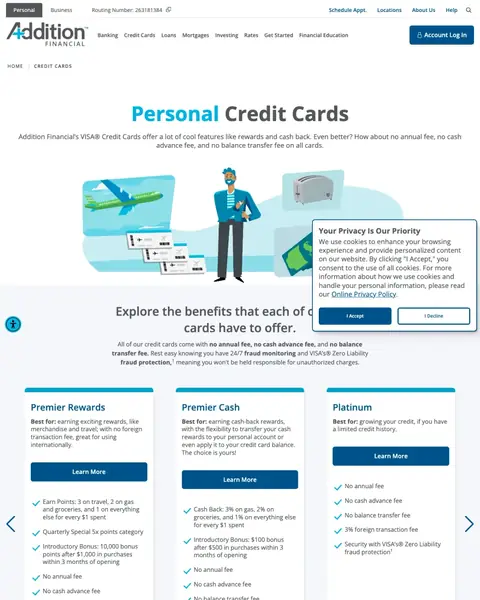
  3. good credit card in usa

    Card list with three Learn More buttons

    A visitor who searched for a good credit card finds three cards below a vague opening paragraph.

    • Vague openingThe opening says cards offer ‘a lot of cool features like rewards and cash back’.
    • Learn MoreThe card blocks use ‘Learn More’ buttons.
    • Foreign feeOne card lists a 3% foreign transaction fee.

What we learned.

  1. Put the offer in the headline

    The State Farm card page headline is ‘3% cash back plus a $150 bonus’. The Shield Visa says ‘Get a low intro APR for 21 billing cycles.’

  2. Say how fast the decision is

    Both US Bank card pages say ‘Get a decision in as little as 60’ seconds. That answers anyone who searches for 60 second approval credit cards. A buyer who types instant approval gets a real time: 60 seconds.

  3. Match the keywords with one next step

    Buyers who type keywords like credit card application need one clear next step. Bank of America repeats ‘Apply now’ on every card and Avant repeats ‘SEE IF YOU QUALIFY’.

  4. Give a reason to decide now

    Bank of America says ‘These offers may not be available elsewhere if you leave this page.’ Citi says ‘This offer may not be available if you leave this page.’

The bottom line

The credit card pages here that win put the offer in the first headline, print the annual fee and say a check will not hurt your credit. A bank or credit union card page can copy all three. Avant also prints a credit limit. The losers have an insurance quote box, a wealth advisor form and a card list with Learn More buttons.

Postclick is live

Now get your own card page read

Paste the URL your own ads point at. Postclick reads it the way we read these 34 pages, shows what is costing you applications and draws new versions to look at. Your first audit and two design directions are free.

Audit my credit card page

No card required.

Visit the live page