
We read 40 CRM pages that were paying for Google Ads clicks, top to bottom. These 4 are the ones worth your time. Everything we found is here, free.


Here's the thing about CRM. Nobody buys a CRM from a landing page. They're deciding which 2-3 to trial. Your page just needs to make the shortlist. Totally different job than most people think.
From real CRM software Google Ads campaigns in the US
The landing pages actually worth stealing from
So you know exactly what to avoid

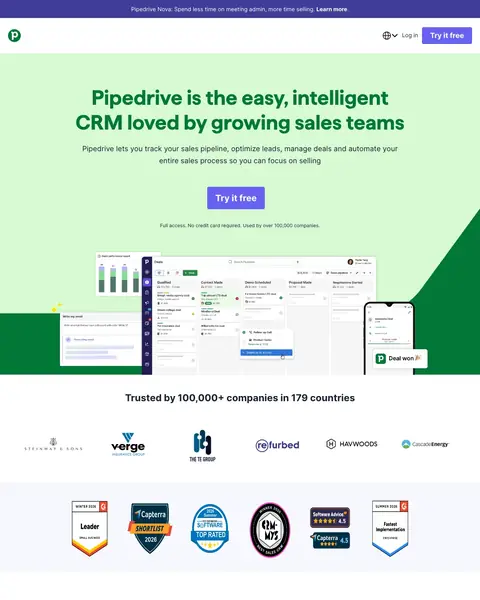
Pipedrive took the top slot on a first screen that answers the buyer's real questions in order. Headline, one purple button, then a line under it that names the trial terms and the customer base in the same breath. Below that runs an integration strip with Microsoft Teams, HubSpot, Intercom, Slack, Zoom, Gmail, PandaDoc and Google Drive, so the will it talk to my stack question dies before it forms. A Capterra bar with its score and stars sits pinned across the foot of the screen the whole time.
Show your top integration partner logos (Slack, Zoom, Google Drive, HubSpot) directly below the hero headline. CRM buyers' #1 concern is 'does it work with what I already use?' and visual logo proof answers that faster than any feature list.
One sentence, exactly where the cursor hesitates, answering what you get, what it costs to find out and who went first. Most trial buttons carry nothing and leave the visitor guessing at the catch. Write your own and put it under the button.
Directly under the hero runs a row of logos, Microsoft Teams and HubSpot and Intercom and Slack and Zoom and Gmail and PandaDoc and Google Drive. Will this talk to our stack is the first thing a software buyer asks. Put your logos where the question forms.
A bar runs across the foot of the first screen with the Capterra mark, the score and filled stars, beside "See why Pipedrive is so highly rated". That score comes from a site the visitor can check. If you have the reviews, get the badge on screen.
Pipedrive pins that same bar, so it eats the bottom of every screen and carries a second Try it free competing with the hero. A close cross sits on it, so some visitors spend a click killing it. Show it once, then let it go.
Halfway down, huge purple figures name a customer each: follow-up time saved, sales cycle cut, hours reclaimed every week. Those are the numbers a comparison shopper hunts for, and they sit a long scroll past the trial button. Move the strongest one up.

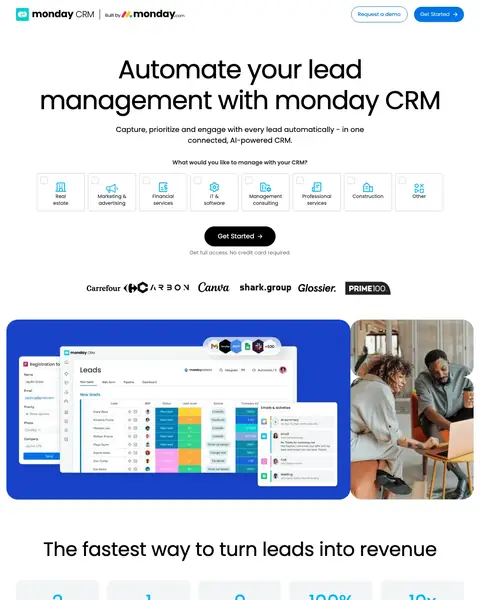
monday CRM asks the visitor a question instead of making a claim. Under the headline sits a row of industry cards, real estate through construction and other, each with its own icon, and ticking one routes the signup. That earns its place because a generic CRM suddenly reads as built for whoever is looking at it. The cookie card lands over the left of the customer logo row, which is a shame on an otherwise clean screen.
Add an industry selector above the fold ('What would you like to manage with your CRM? Real estate / Marketing & advertising / Financial / Construction / Other') so visitors self-segment and feel the product is built for their use case specifically.
Under the headline sits a row of cards, real estate through construction and other, each with an icon and a tick box, and the choice carries into signup. CRM is the flattest category in software. This is the cheapest way out of sounding like it.
A customer quote fills a blue panel, and under it sit a round headshot, his name and his job title with his employer in it. A stranger can look him up. Get a customer to say something specific and print their title beside it.
That line runs under the buttons in the middle of the page and again in the closing band, so a visitor who scrolls past the hero keeps the reassurance. Most pages say it once at the top. Put your terms under every button.
Consent lands in the lower left of the first screen and sits on the customer logo row, so the left of it never gets read on a first visit. The rest of the screen is unusually clean, which makes it worse. Move consent to the foot.
Award badges from the review site every software buyer already reads sit a long way down, under the testimonials. Nothing in the first screen carries a score or a review count. They are already earned. Copy them up beside the button.
Privacy, security and health data certifications are drawn as four round badges at the very bottom left of the footer, under the social icons. Anybody buying a CRM for a team has a security review waiting, and those badges are the answer to it.

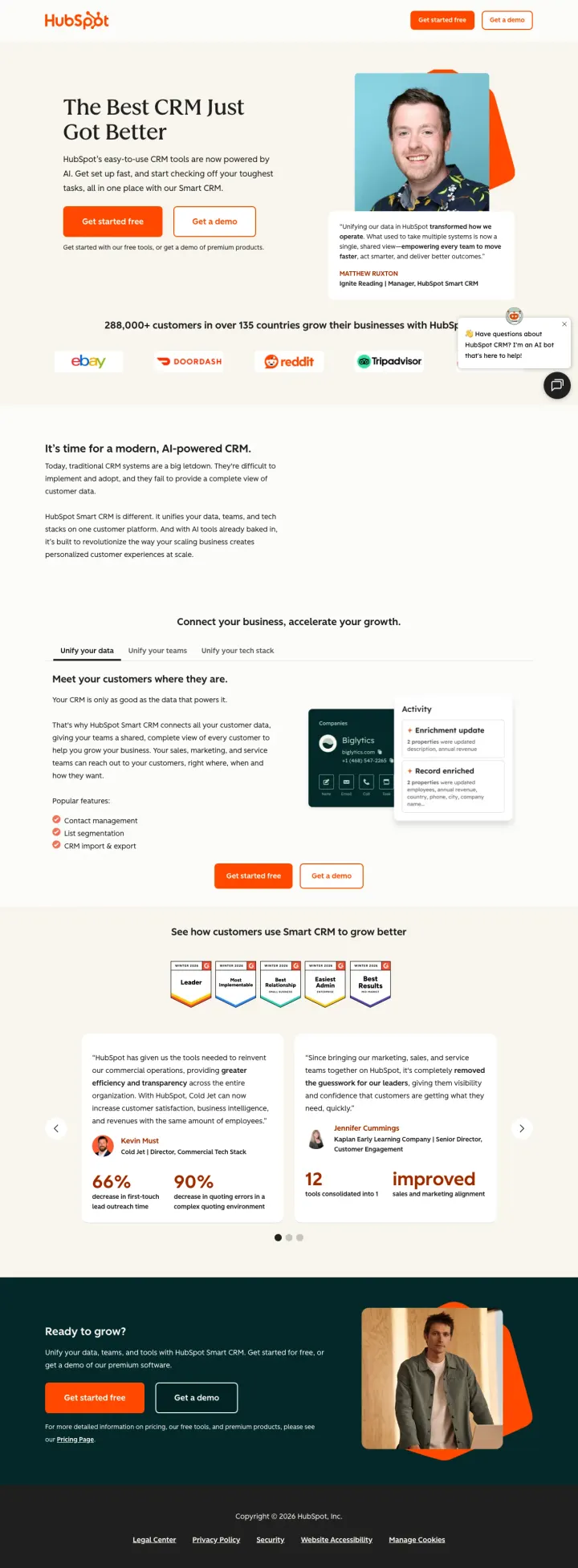
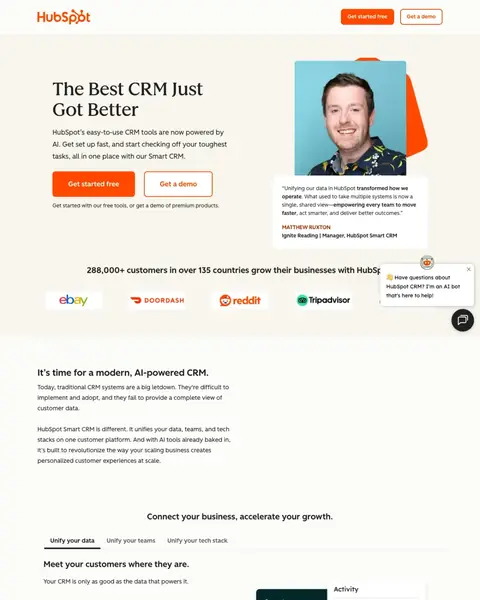
HubSpot puts a named human on the first screen and that is the whole reason it makes the list. A quote card sits beside the hero photograph with the man's name, his company and his job title on it, close enough to the buttons that you read both together. Two routes leave the hero, a free start and a demo, and the line underneath says which is which. No form anywhere on the page.
Put a real customer video testimonial with a named person and title above the fold, like HubSpot does with their customer quote next to a photo. Named humans convert better than anonymous logo bars.
A white card sits beside the hero photograph carrying a customer quote, his name, his company and his job title, close enough to the buttons that both get read together. That is a person a stranger could look up. Get one customer to say something specific.
Two buttons, a free start and a demo, and a line underneath saying plainly which is which. The visitor ready to sign up and the visitor who has to bring a colleague both get a route. Offer both, and label them so nobody guesses.
It sits over the logo row at the size of a headline, and the countries are what make it work: a spread across borders is harder to fake than a total. If your number is good, set it like a headline and give it the country count.
A chat card opens in the lower right of the first screen and covers the last logo in the customer row along with the right end of the heading above it. Delay your chat widget until the visitor scrolls, or keep it as a small circle.
The strongest numbers sit in a carousel near the bottom: outreach time cut, quoting errors cut, tools consolidated. Each one has a named person and an employer attached. That is what a comparison shopper is scrolling for. Lift one figure into the hero.
Free tools and premium products are mentioned side by side in the hero, and nothing says where one ends and the other begins until a link in the closing paragraph. A buyer justifying this internally needs the upgrade price first. Name the boundary early.

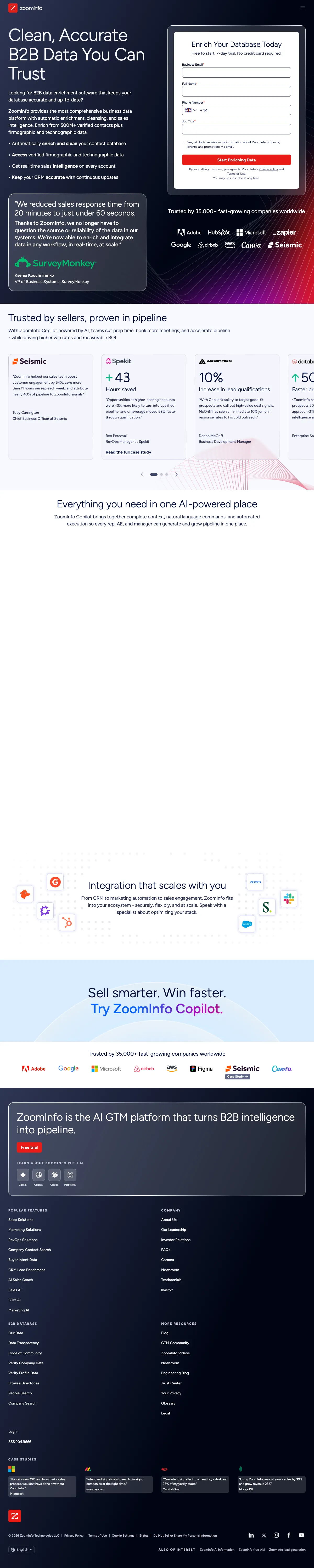
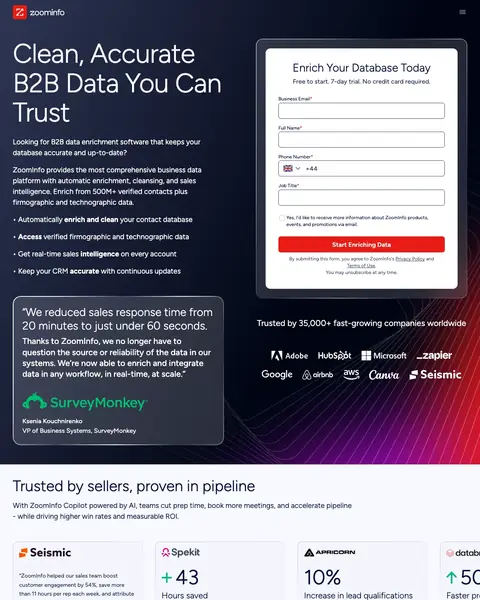
ZoomInfo runs the only lead form in this file and puts it in the right half of the first screen, headed Enrich Your Database Today with the trial terms printed directly under the heading. The left half carries the headline, the bullets and a named customer quote from a VP at SurveyMonkey. Then the page drops into a long stretch of white where a section never rendered, which is the sort of thing that only shows up when somebody loads their own page and looks.
Lead with a specific customer result quote ('We saw a 27% increase from lead to opportunity creation') positioned prominently below the fold. Named metrics from real customers outperform any marketing claim for B2B SaaS buyers.
The right half of the first screen is a white card holding the whole form, and it is the only lead form in this file. Pipedrive, monday and HubSpot offer a signup or nothing. Put a short form beside your trial button and catch the researcher.
That line sits between the form heading and the first input, so the visitor reads the terms before the fields. Put it below the submit button instead and it lands after the decision to leave. Move your reassurance above the first field.
Automatically enrich, access, get, keep: every bullet in the left column opens on something the product does and closes on the result. A software buyer scans this column deciding whether to stay. Rewrite yours to start on a verb and end on an outcome.
Scroll past the case study cards and the page runs into a tall stretch of plain white where a section never rendered. Everything built to live there is invisible, and the click was bought either way. Load your own page in a clean browser.
Further down, the integration logos scatter and land on top of that heading and the paragraph under it, so the words read in fragments. The section does the same job as the strip Pipedrive runs cleanly. Check animated blocks against a real scroll.
The first case study card carries a customer quote with somebody's working note still stuck on the end of it. Nobody bounces over two words, but the buyer who spots it now has a reason to doubt the rest. Read your proof blocks out loud.
Pages that break the playbook in interesting ways

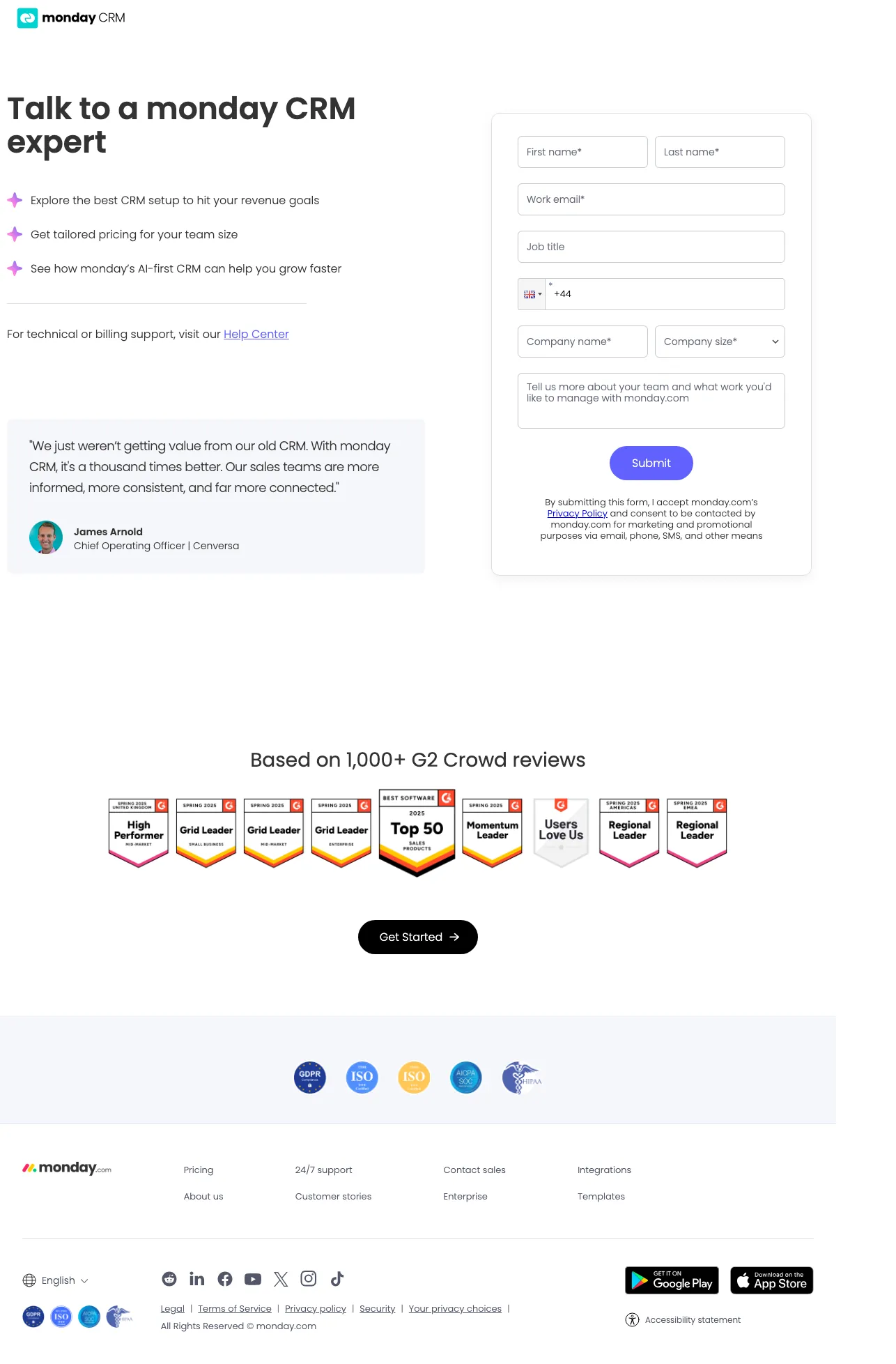
Build a dedicated enterprise-inbound variant that removes the product marketing entirely. No hero illustration, no feature list, no screenshots. Just the promise ('Talk to a monday CRM expert'), three bullet benefits, a form, a named customer quote, and a G2 badge wall. It forces the visitor to either submit or bounce, and it is the opposite of what every other CRM contact-sales page does.
Three bullet benefits next to the form ('Explore the best CRM setup', 'Get tailored pricing for your team size', 'See how AI-first CRM can help you grow faster') map directly to what the enterprise CRM buyer wants from a sales call, reducing form abandonment
The named COO testimonial from Cenversa, with photo, is the only customer proof above the fold. Pairing one specific human with seven familiar enterprise logos (Coca-Cola, Universal, Motorola, Lionsgate) does the work of a full case study in one visual row
G2 badge wall below the form ('High Performer', 'Grid Leader', 'Top 50', 'Users Love Us', 'Regional Leader' stacked) converts the scroll-past visitor by front-loading every recognizable category award in one scan
Cookie consent modal lands directly on top of the testimonial quote at first paint, so the page's best piece of trust copy is hidden behind a dismiss step
Form asks for 8+ fields including company size and a free-text description before submit, which is heavy for a 'talk to an expert' page versus a product trial
No indication of what happens after submit, no response SLA, no calendar link. The form is the whole conversion path so one sentence setting expectations would reduce drop-off
The same questions asked of every winner, so you can find the row that matches the traffic you are already buying.
| Page | The hook | Form fields | Offer named up top | Score you can see on arrival | Credential you can check | Standout move |
|---|---|---|---|---|---|---|
| #1Pipedrive | Try it, and here is who else did | No form | Yes | Yes | Up top | A rating bar pinned to the screen |
| #2monday CRM | Pick your industry, then start | No form | No | No | In the footer | Industry cards where a claim would go |
| #3HubSpot | A named customer, right beside the buttons | No form | Yes | No | None | The quote card carries name and job title |
| #4ZoomInfo | A form with the trial terms on it | 4 | Yes | No | None | Trial terms printed under the form heading |
Read the keywords you are buying, then find the row that matches them. Somebody typing best crm for small business is comparing tools this afternoon and wants a trial they can start alone. Somebody typing b2b contact data is buying a database and will hand over a phone number to test it first. You paid the same for both clicks, and only one of those visitors will ever fill in a form.
Lines lifted word for word off the pages above. We tell you whose page each came from, and one click copies it.
The Best CRM Just Got Better
Automate your lead management with monday CRM
Clean, Accurate B2B Data You Can Trust
It’s time for a modern, AI-powered CRM.
5 pages burning ad spend with fundamental issues
Every click to these pages costs real money. We found pages with no proof a stranger could check, mismatched intent, weak CTAs, and messaging that ignores what the searcher actually typed. Here is what to avoid.

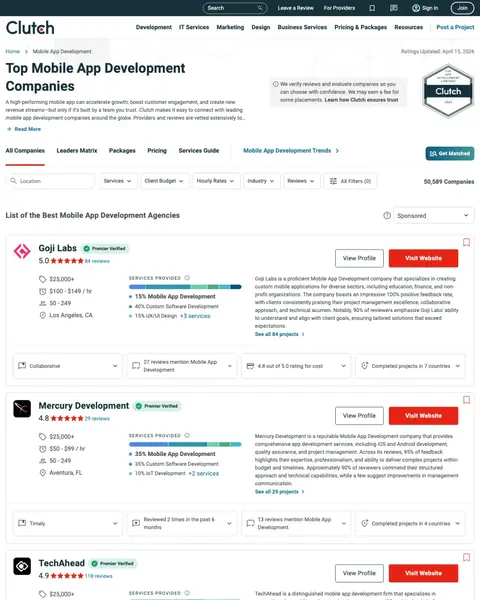
Clutch is paying for clicks on keywords like 'mobile application development companies in usa' and 'it companies in usa' to send traffic to a browsable directory with 1,380 exit links and no conversion path for Clutch itself. Every click that lands here either bounces or clicks through to a third-party agency. Clutch captures nothing.
This is a directory listing page for mobile app development companies, paid-search-bid against broad-match terms that overlap with CRM and sales tooling searches. A CRM shopper arriving here sees third-party development agencies, not a product to evaluate
1,380 clickable elements make this the worst possible destination for paid traffic. Every element is a potential exit. At scale, this page would waste virtually 100% of ad spend
No conversion path for Clutch itself (no form, no CTA for Clutch's service). The page sends visitors to third-party development agencies, meaning Clutch pays for clicks that benefit other companies

NetSuite is spending on the highest-volume keywords in this entire set (389,720 total monthly search volume including 'netsuite' at 135K, 'ERP software' at 49.5K, 'accounting packages' at 33.1K) and sending that traffic to an unbranded external forms page with a cookie wall that blocks all content on load. The ad promises a 'product tour' but the page may not even have a working form.
A massive cookie consent modal covers the entire viewport on load, hiding the headline, form, and all content. For traffic costing $20-50 per click on 'netsuite' (135K monthly searches), every second of delay is budget destruction
The page URL is an unbranded external forms subdomain (6262239.extforms.netsuite.com) which looks like a phishing page, not an enterprise software provider. URL trust is critical for B2B buyers evaluating vendors
No form is detected by the structural scraper, meaning the page may have a broken or JavaScript-dependent form that fails to render properly. A $50 click that lands on a page with no working form is pure waste

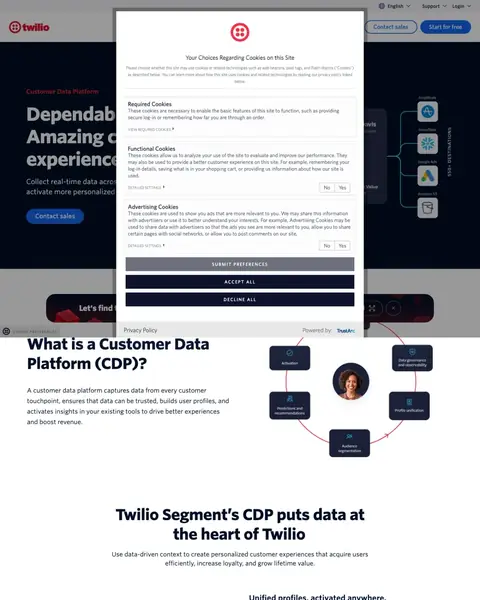
Twilio is paying for clicks on 'twilio segment' (1,600/mo), 'customer analytics software' (210/mo), and 'customer insights software' (210/mo) and sending that traffic to an educational page that starts with 'What is a Customer Data Platform?' The cookie consent modal further blocks the already-weak content. Visitors who searched for a specific product get a category definition instead.
The headline 'What is a Customer Data Platform (CDP)?' is an educational question, not a sales proposition. The visitor who clicked an ad for 'Twilio Segment CDP' already knows what a CDP is. They want to evaluate this one specifically
Zero ad terms found in the first 150 words. The page reads like a blog post or Wikipedia article, not a product page. The ad promised 'Collect, unify, and enrich customer data' but the page starts by defining the category
No form, no demo request, no trial signup visible. The only CTA is 'Contact sales' which is the highest-commitment conversion action possible for a visitor who might just want to explore the product

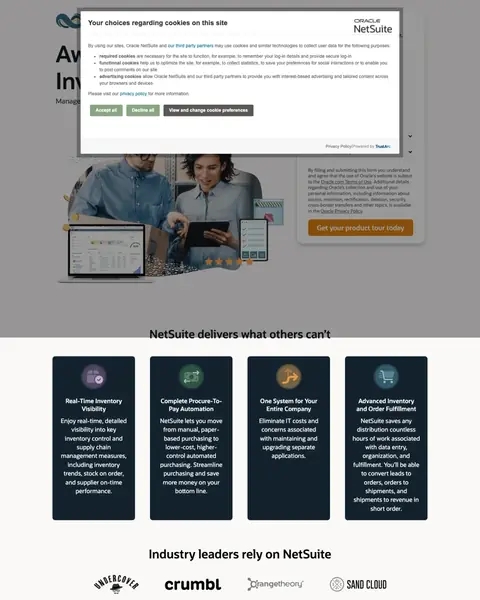
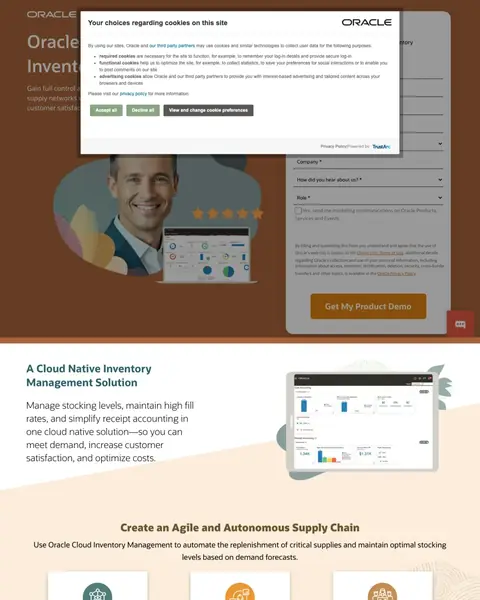
Oracle is paying for 'warehouse slotting software' clicks and sending traffic to a page where the cookie consent modal completely blocks all content on load. Behind the modal, the page is a standard enterprise lead-gen form with stock photography. The content underneath is actually decent (strong message match for inventory management) but the cookie wall means most visitors never see it.
Cookie consent modal covers the entire viewport on load, blocking the headline, hero image, and form. The visitor has to dismiss the modal before seeing any content. For enterprise PPC traffic, this first-impression failure is costly
The hero uses a generic stock photo of a smiling man in a suit that could be on any enterprise software page. Oracle Inventory Management is a specific product. Showing the actual dashboard or workflow would be far more persuasive
The form asks for excessive fields including company size, country, and other qualification data that could be collected post-demo. Pipedrive asks for one email field. Oracle asks for 8+, and every extra field is another chance to close the tab

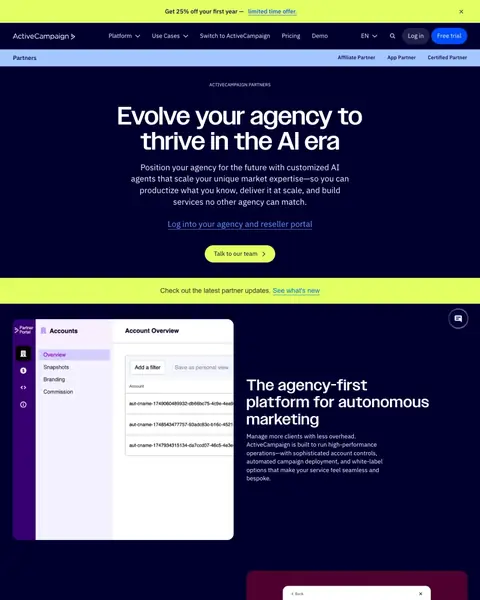
ActiveCampaign is paying for 'email marketing service provider' clicks (720/mo) with an ad promising a white-label platform with a 14-day free trial, then sending that traffic to a partner/reseller recruitment page. The person searching for email marketing software sees 'Evolve your agency' and a partner portal screenshot. This is a campaign-to-landing-page mismatch that wastes every non-agency click.
Ad copy offers a 'White-Label Marketing Platform' with '14-Day Free Trial' but the page headline is 'Evolve your agency to thrive in the AI era'. This is a partner recruitment page, not a product trial page
The visitor searching for an 'email marketing service provider' wants to send emails to their customers. This page pitches them on becoming an ActiveCampaign reseller. The intent mismatch is total. It is like advertising 'Buy a car' and linking to 'Become a car dealer'
The CTA 'Talk to our team' leads to a consultation about becoming a partner, not about using the email marketing product. Every click from someone who wants email marketing software is completely wasted
Every winner in this set offers either a free trial or a freemium tier without a credit card. Pipedrive leads with 'Try it free. No credit card required. Used by over 100,000 companies.' HubSpot leads with a free tier alongside a separate demo CTA. ZoomInfo offers a free 7-day trial with no credit card. In CRM, the product IS the sales pitch. Letting someone use it for 7-14 days costs nothing but eliminates the #1 objection: 'will my team actually adopt it?' Pages that gate everything behind 'Contact Sales' convert enterprise buyers but lose the 80% of CRM searchers who want to try first.
Every winning CRM page shows actual product screenshots or UI in the hero section. Monday shows their lead management board with deal values and pipeline stages. Pipedrive shows the pipeline view with integration logos. ZoomInfo shows the data-enrichment workflow. HubSpot shows a real customer photo with a testimonial. CRM buyers are visual evaluators who need to see if this tool fits their mental model. Pages that show only abstract illustrations or stock photography (Oracle's smiling man in a suit) fail the 3-second test.
Link counts across the winners tell a clear story. Pipedrive keeps the page tight. Monday carries 143 clickable elements, most of them header and footer navigation. HubSpot has 56. For CRM companies spending $10K+ monthly on paid search, building a nav-stripped PPC variant of the landing page almost always pays for itself within the first month. Every retained nav link is a potential exit at $8-20 per click.
Three of the five losers in this set are undermined by a cookie consent modal that covers the viewport on load. NetSuite spends on the highest-volume keywords in the set (389K monthly searches) and sends traffic to an unbranded external forms subdomain behind a cookie wall. Oracle and Twilio do the same at smaller scale. For traffic costing $15-50 per click, an overlay that delays first content by 3 seconds is the single most expensive UI element on the page.
Winners show the product and offer a free trial within the first viewport. Losers send CRM-keyword traffic to the wrong page entirely: an app development directory, a partner recruitment pitch, a 'What is a CDP?' explainer, or a cookie-walled form on an unbranded subdomain.
Software buyers arrive already comparing. Almost every page in this file spends the first screen describing the product and only one of them lets a visitor answer a question, which is why the same clicks bounce between four tabs before anybody signs up.
Print the trial terms at the button, not on the pricing page. Full access, no card, and who else already did it: that is what the line under the Pipedrive button says, and it kills three separate objections in the space of a sentence. Your visitor is not worried about your feature list at that moment. They are worried about being charged, being locked in, and being the first idiot to try this. Answer all three where the cursor already is.
Put a name, a job title and an employer on your proof. HubSpot's first screen carries a quote card with the man's name, his company and his role on it, close enough to the buttons that you read both at once. That is the difference between proof and copywriting. A wall of logos says big companies signed a contract. A named person with a checkable job title says somebody like the reader made this decision and is prepared to be quoted on it.
Ask the visitor something before you tell them anything. The monday hero replaces the usual claim with a question and a row of industry cards, and ticking one carries into the signup. CRM is the flattest category in software and every page in it says the same words about pipelines. A question is the cheapest way to stop sounding like a category and start sounding like a product for whoever is reading. Build the same row and watch which card gets picked.
Give the researcher somewhere to leave a name. Only ZoomInfo has a lead form here, and it asks for business email, full name, phone number and job title. Pipedrive, monday and HubSpot offer a signup and nothing else, which serves the visitor who has already decided and abandons the one still comparing. A short form beside your trial button costs you nothing and catches the buyer who has to take this to a colleague before anybody signs anything.
Load your own page in a clean browser and look at what covers it. The monday cookie card sits over the left of the customer logo row. HubSpot's chat bubble covers the last logo in its row. Pipedrive pins a bar across the foot of the screen for the whole visit. None of that shows up in a staging preview where the cookies are already accepted and the chat is already dismissed. Open a private window, click your own ad, and screenshot what a stranger actually gets.
Confirm your page renders all the way down. ZoomInfo has the best first screen in this file and then a long band of white halfway down where a section never loaded. Everything they paid to build under that gap is invisible, and the click was bought and paid for either way. This is a two minute check somebody has to actually do, and nobody does it, which is why it is worth doing.
Every line below came off a screenshot somebody sat and counted. Open your own page beside it and tick what it already does.
Paid traffic to HubSpot's CRM page costs $15-20 a click. And that page gives every one of those clicks 56 outbound links to leave through. Nobody's counted the links out of your CRM page. Point postclick at the URL your CRM ads land on. It reads that page cold, tells you what's costing you conversions, designs new versions as real images, and builds the one you pick.