
The 5 winners.

The landing pages actually worth stealing from.

Winner #1: sofi.com

sofi.com/banking/savings-account
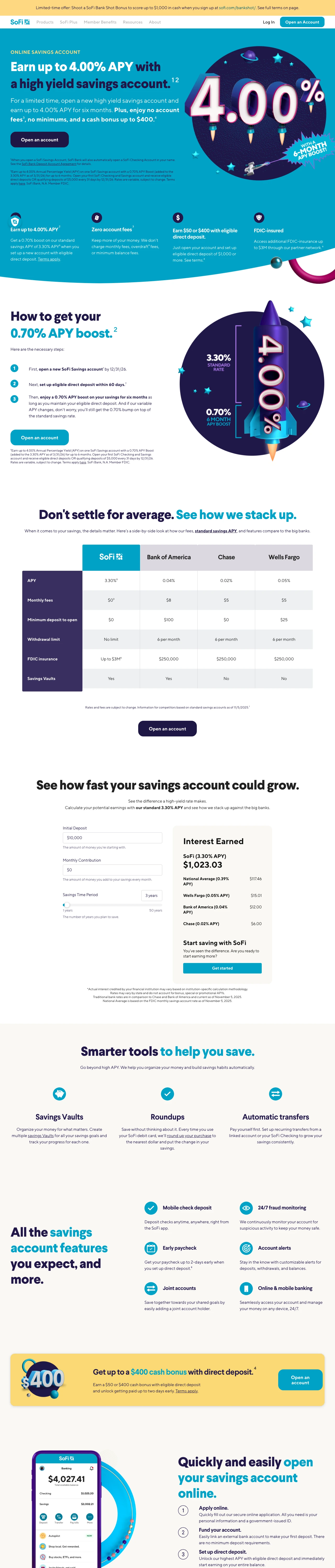
Financial landing page example from sofi.com
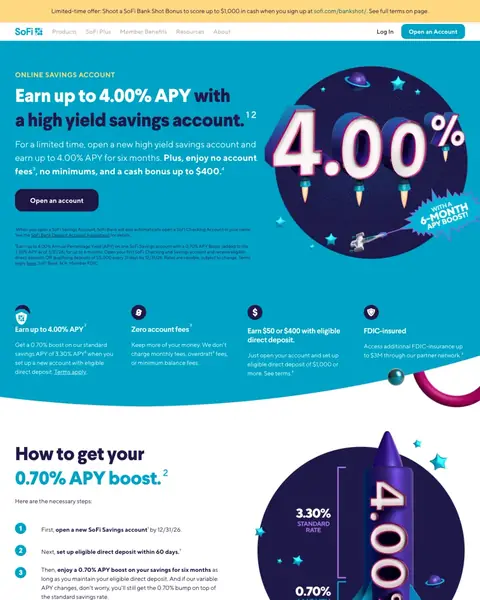
  1. 1

    What gets in the way

    Full site menu on an offer page

    The menu lists Products, SoFi Plus, Member Benefits, Resources and About above a page built for one savings offer. Each is a way to leave.

  2. 2

    What works

    Rate is the biggest thing on the page

    A giant ‘4.00%’ badge is on the right of the first screen. A saver comparing several tabs notices the rate first.

  3. 3

    What gets in the way

    Top rate needs direct deposit

    Step two says ‘set up eligible direct deposit within 60 days’. The boost lasts six months, so a saver has to read on to learn the standard rate.

  4. 4

    What works

    Rival banks in a comparison table

    Bank of America, Chase and Wells Fargo are across the top. APY, fees and withdrawal limits are in rows, so a saver can check the claim.

  5. 5

    What works

    Calculator already filled in

    The box has ‘$10,000’ in it. SoFi shows ‘$1,023.03’ earned and the national average ‘$117.46’, so the saver can see the gap.

What to try

Your rate as the biggest thing

Make the number larger than the headline. A buyer comparing lenders in other tabs sees it first and stays.

See the original page

Winner #2: credibly.com

credibly.com/lp-business-loans-3

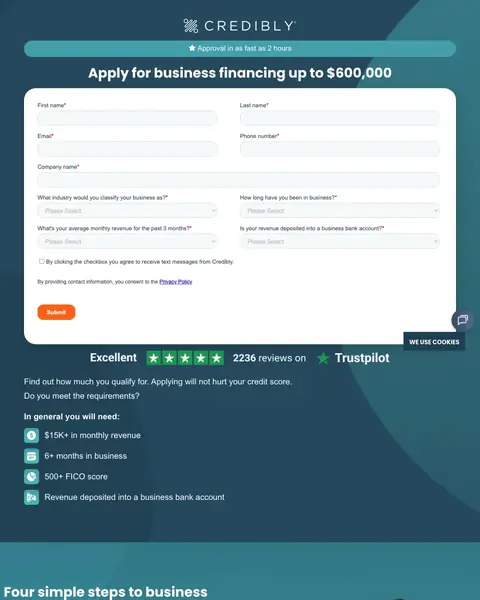
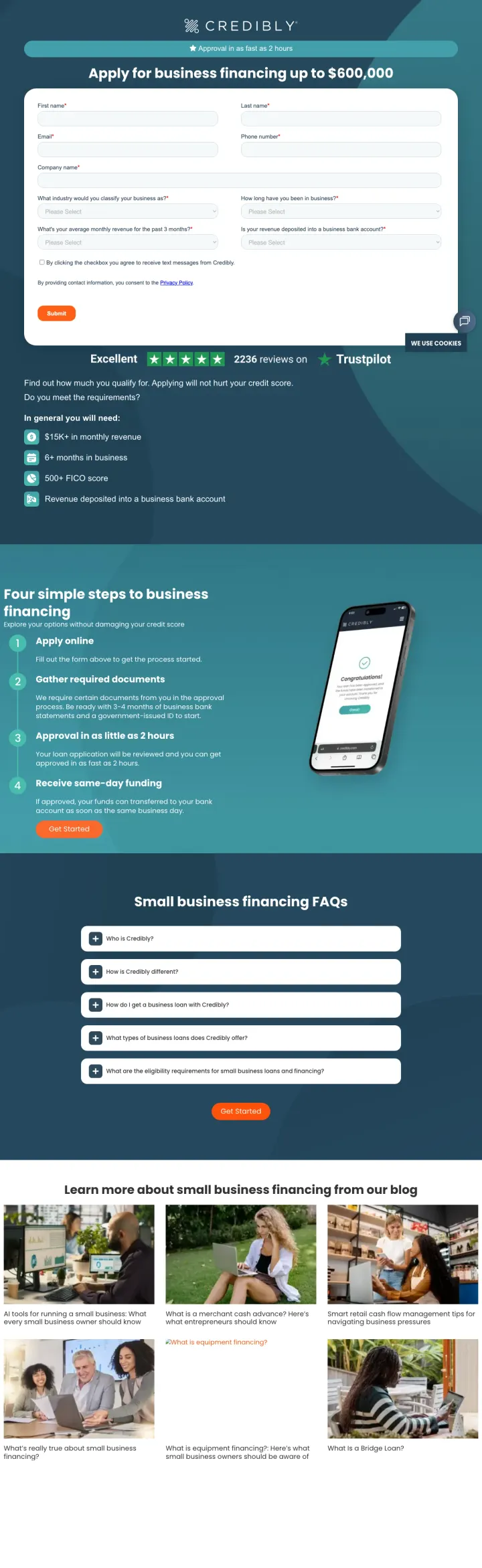
Financial landing page example from credibly.com
  1. 1

    What works

    Speed in the first line

    The page says ‘Approval in as fast as 2 hours’. That is the first question of a business owner who needs cash.

  2. 2

    What works

    Biggest sum in the headline

    The headline says ‘Apply for business financing up to $600,000’. A buyer sees what is possible before they reach a form field.

  3. 3

    What gets in the way

    Nine questions before any answer

    The form has fields for name, email, phone, company, industry, time in business, revenue and bank account, plus a text opt-in. A short first step would ask for less.

  4. 4

    What gets in the way

    Reviews come after the form

    ‘Excellent’ with five stars and ‘2236 reviews’ are under the Submit button. A visitor fills in nine fields before seeing any proof.

  5. 5

    What works

    Four short lines on who qualifies

    The lines say ‘$15K+ in monthly revenue’, ‘6+ months in business’ and ‘500+ FICO score’. A visitor knows in seconds whether to apply.

What to try

Biggest figure in the headline

‘Up to $600,000’ shows a buyer what is possible. Lead with your top amount and put the form right beneath it.

See the original page

Winner #3: splashfinancial.com

splashfinancial.com/personal-loans

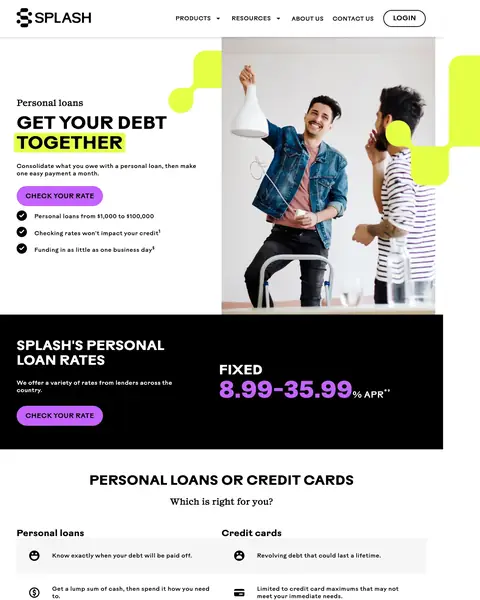
Financial landing page example from splashfinancial.com
  1. 1

    What gets in the way

    Menu above the offer

    Products, Resources, Contact Us and Login run across the top of a page built for one loan.

  2. 2

    What works

    Three lines answer three worries

    ‘Checking rates won't impact your credit’ and ‘Funding in as little as one business day’ are under the button. Credit score worry and wait time are answered before any scroll.

  3. 3

    What works

    Whole rate range printed

    ‘8.99-35.99%’ shows the high end as well as the low one. A shopper trusts a page that shows the worst case.

  4. 4

    What works

    Loan compared with the credit card

    The page lists ‘Personal loans or credit cards’ side by side. A shopper sees why one fixed payment beats a card balance that keeps going.

  5. 5

    What gets in the way

    Review proof far from the rate

    ‘Excellent’ and five stars come after the steps, long after the rate. A shopper who doubts the lender finds no proof near it.

What to try

Full rate range under the headline

Show the low end and the high end at the same size. A shopper who sees both is more likely to believe the rest of the page.

See the original page

Winner #4: bluevine.com

bluevine.com/lp/lp6-business-line-of-credit

Financial landing page example from bluevine.com
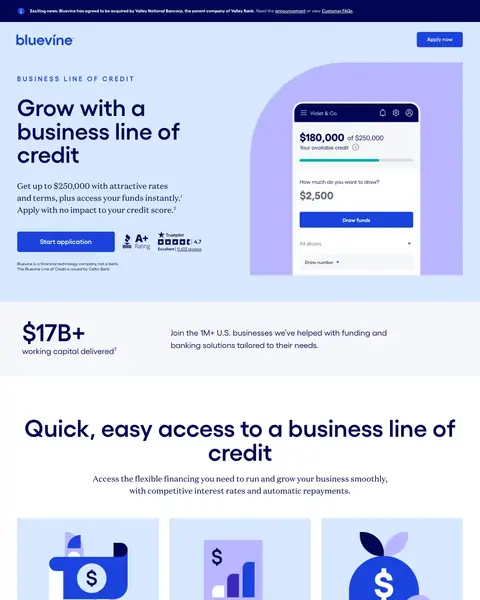
  1. 1

    What gets in the way

    Price is just ‘attractive rates’

    The page says ‘Get up to $250,000 with attractive rates’. That is a ceiling and no rate, so a buyer comparing lenders gets no figure for cost.

  2. 2

    What works

    Proof on the button's line

    A BBB rating and a Trustpilot ‘4.7’ are beside ‘Start application’. A doubtful visitor sees proof at the moment of the click.

  3. 3

    What works

    States it is not a bank

    Under the button the page says ‘Bluevine is a financial technology company, not a bank.’ Stating it early makes the page look honest.

  4. 4

    What works

    Big numbers show many others joined

    The page shows ‘$17B+’ in working capital delivered and a ‘1M+’ count of businesses. A stranger can see that many have used it.

  5. 5

    What gets in the way

    Partner offer under the FAQ

    ‘Looking for SBA funding?’ links a visitor who wanted a credit line to a different product.

What to try

Your rating next to the button

A buyer who doubts you looks for proof at the click. Put your score and your review count on the button's line.

See the original page

Winner #5: eaglebankcorp.com

eaglebankcorp.com/commercial-and-business-banking/checking-accounts

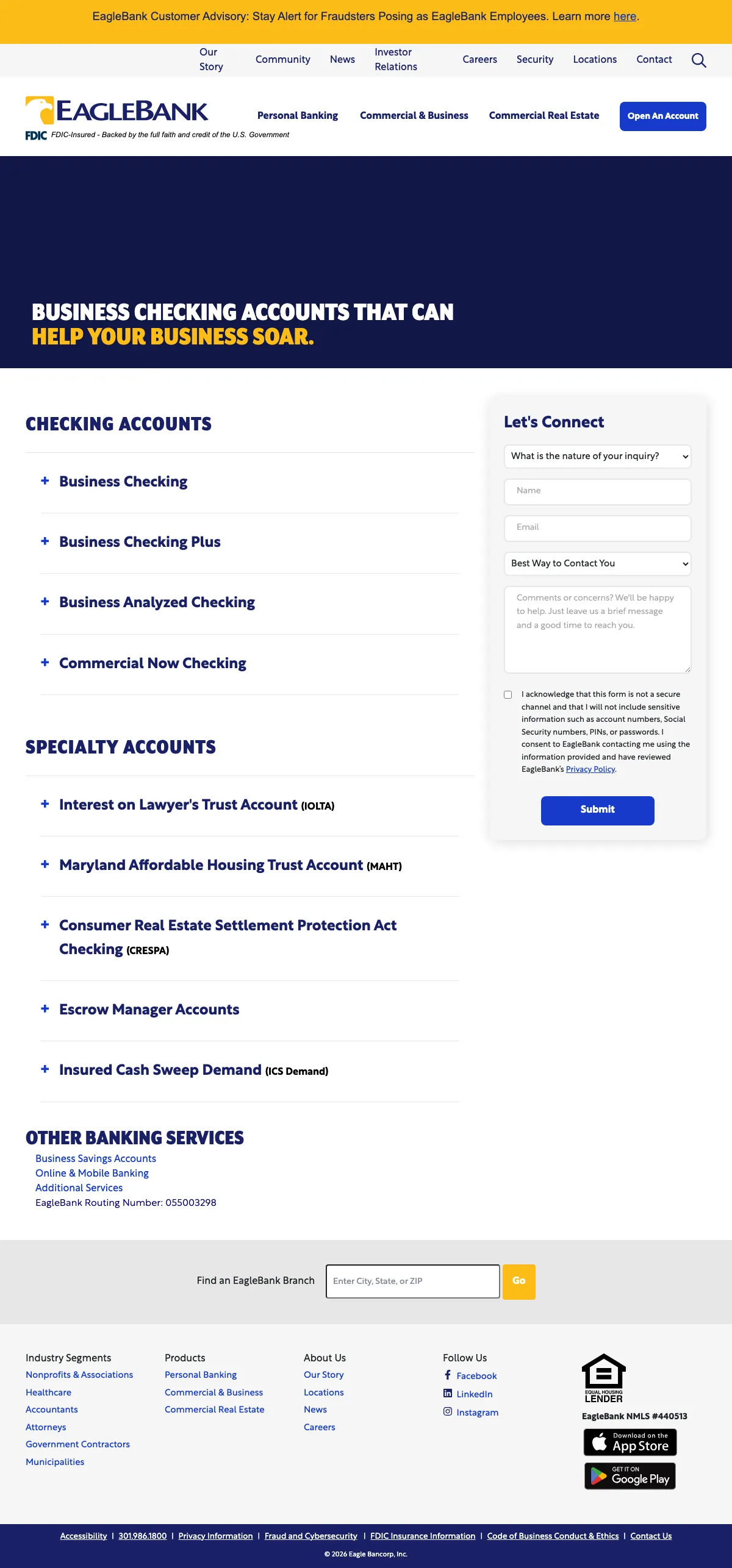
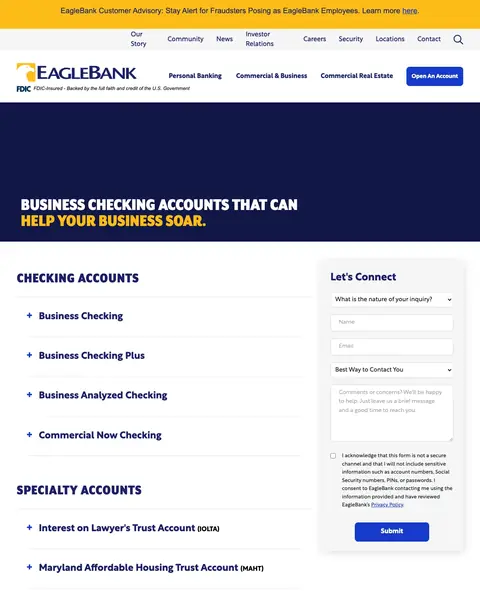
Financial landing page example from eaglebankcorp.com
  1. 1

    What works

    FDIC line under the logo

    ‘FDIC-Insured’ is the first thing under the name. A business owner checking a bank sees safety before any product.

  2. 2

    What gets in the way

    Headline fits any bank

    The headline is ‘Business checking accounts that can help your business soar.’ It has no rate, no fee and no reason to pick this bank.

  3. 3

    What works

    Form beside the account list

    ‘Let's Connect’ stays next to the list. A buyer who opens an account row can ask a question without leaving the page.

  4. 4

    What gets in the way

    Every account is a closed row

    ‘Business Checking’, ‘Business Checking Plus’ and two more show only a name. A buyer can't see a fee or minimum without a click.

  5. 5

    What works

    Specialty accounts name their buyers

    ‘Interest on Lawyer's Trust Account (IOLTA)’ shows a lawyer or title agent that this bank has done their kind of work.

What to try

Insurance or licence mark by the logo

A buyer who has never heard of you looks for a mark they can verify. Put it next to the logo.

See the original page

What the 5 winners do.

  1. Number in the first screen

    4 of 5
  2. Trust mark near the top

    3 of 5
  3. How fast, in the first line

    3 of 5
  4. Offer compared with the alternative

    2 of 5

Wildcards.

Pages that break the playbook in interesting ways.

Wildcard #1: lendingtree.com

lendingtree.com/lp/personal-loans/marie-dropdowns.html

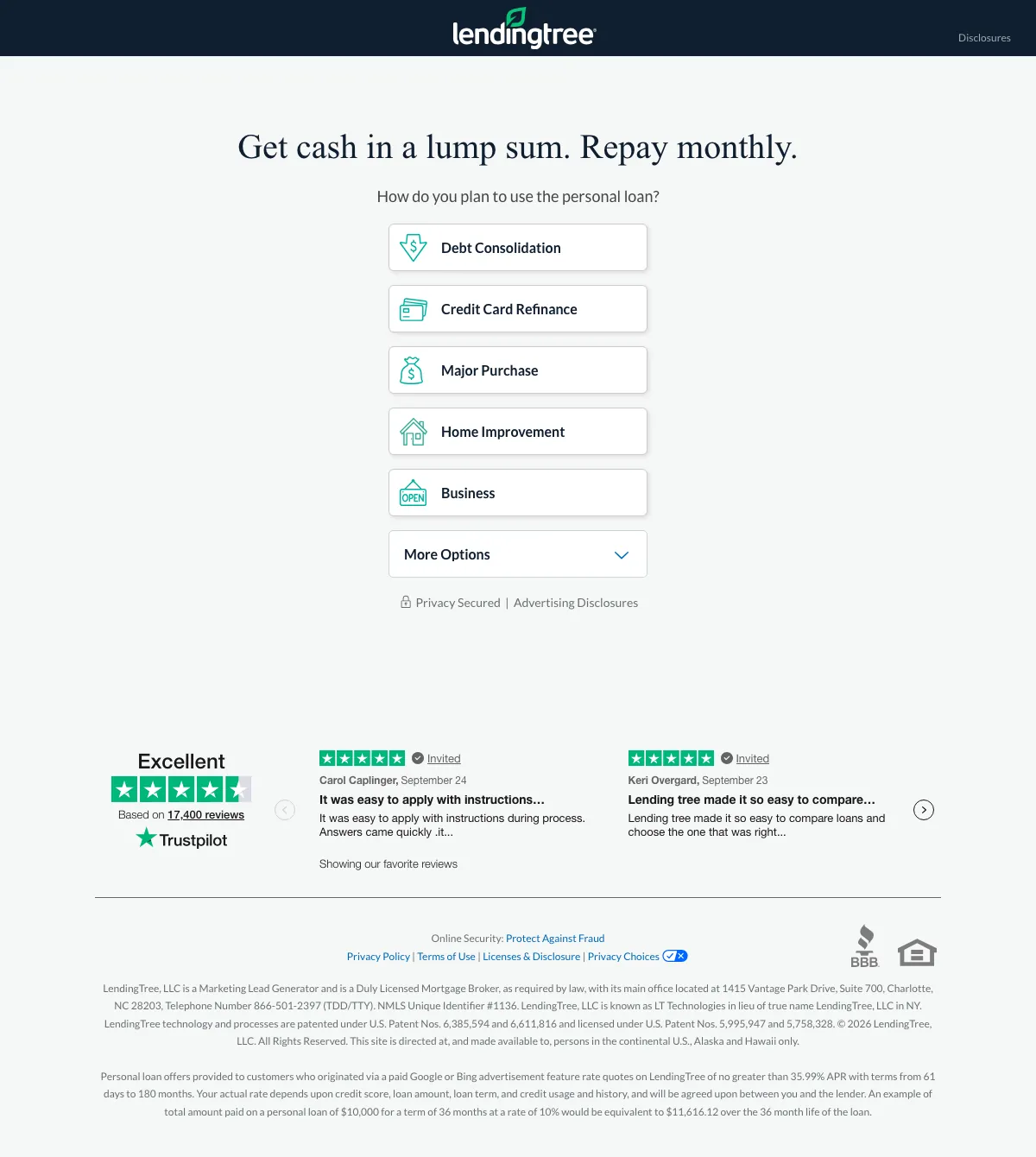
Financial landing page example from lendingtree.com

The search: loan usa

Sponsored lendingtree.com

LendingTree - Compare Personal Loans

  1. 1

    What it gets wrong

    Ad says compare, first line doesn't

    The ad says ‘Compare personal loan offers from multiple lenders’. The first line of the page is ‘Get cash in a lump sum. Repay monthly.’

  2. 2

    What makes it work

    One question is the whole page

    ‘How do you plan to use the personal loan?’ has five choices, from ‘Debt Consolidation’ to ‘Business’. One tap and the buyer is in.

  3. 3

    What makes it work

    Two reviews under the question

    ‘Based on 17,400 reviews’ and two named reviews give a hesitant buyer proof without crowding the question.

  4. 4

    What it gets wrong

    Only rate is in the small print

    ‘no greater than 35.99% APR’ is in the last lines of the page. A buyer who wants a rate before starting has to hunt for it.

What to try

Open with one question instead of a form

Ask what the loan is for and give a few choices. A buyer who taps once is more likely to finish the rest.

See the original page

Wildcard #2: privatebank.jpmorgan.com

privatebank.jpmorgan.com/nam/en/o/raising-the-standard-in-private-banking-service

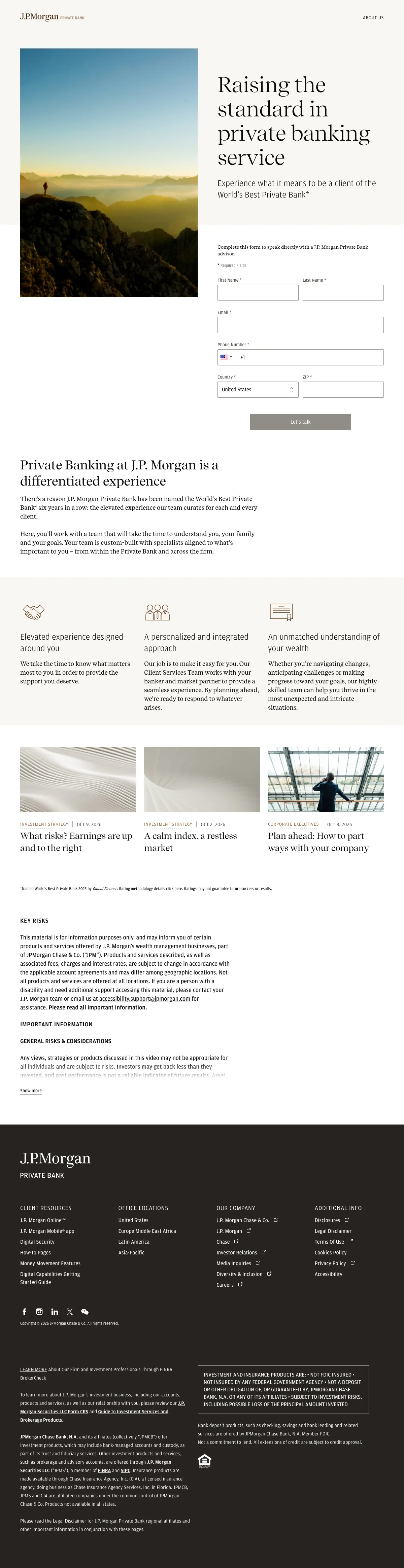
Financial landing page example from privatebank.jpmorgan.com

The search: us private bank

Sponsored privatebank.jpmorgan.com

J.P. Morgan Private Bank

  1. 1

    What makes it work

    Headline repeats the ad

    The ad says ‘Raising the standard in private banking’. The page headline uses the same words, so the buyer finds what they expected.

  2. 2

    What it gets wrong

    Big claim has a footnote

    ‘World's Best Private Bank’ ends with an asterisk. The source is far down the page in small print.

  3. 3

    What makes it work

    Form beside the headline

    The form says ‘Complete this form to speak directly with’ an advisor. A buyer ready to talk can act without scrolling.

  4. 4

    What it gets wrong

    Three columns about feeling, no terms

    The column ‘Elevated experience designed around you’ has no minimums or fees in it.

What to try

Your ad's words in the headline

A buyer who clicked an ad line should see that line again. Start the page with the same words and put the form beside them.

See the original page

The copy bank.

Headlines

Speed and risk

Trust and fit

  • “FDIC-Insured - Backed by the full faith and credit of the U.S. Government”

    eaglebankcorp.com

  • “Don't settle for average. See how we stack up.”

    sofi.com

  • “Do you meet the requirements?”

    credibly.com

Next steps

3 pages that waste the click.

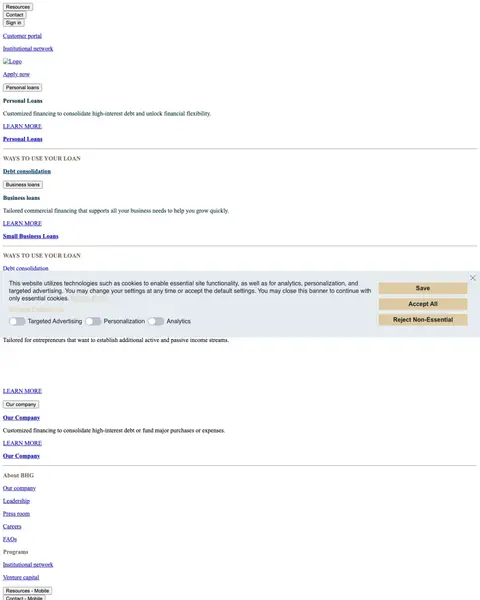
  1. bhg

    Loan page with menu and cookie banner

    A product menu, a cookie banner and several ‘Learn more’ links fill the first screen. The loan form isn't in it.

    • Cookie bannerA banner with ‘Accept All’ covers part of the first screen.
    • No formNo form appears in the first screen.
    • Mixed offersOne page offers personal loans, business loans and an institutional network.
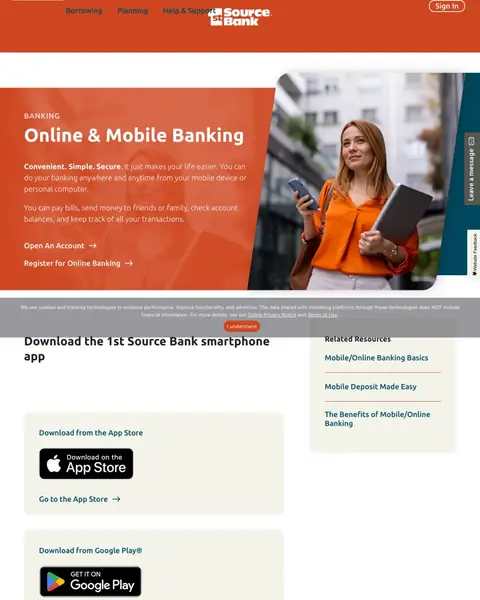
  2. us bank open account

    Account search ends on an app page

    The page says ‘Convenient. Simple. Secure.’ and describes mobile banking. A buyer who wanted to open an account has to find the link.

    • Weak link‘Open an Account’ is a plain text link below two paragraphs.
    • Full menuBorrowing, Planning and Help & Support run across the top.
    • No offerNo rate, bonus or reason to switch appears in the first screen.
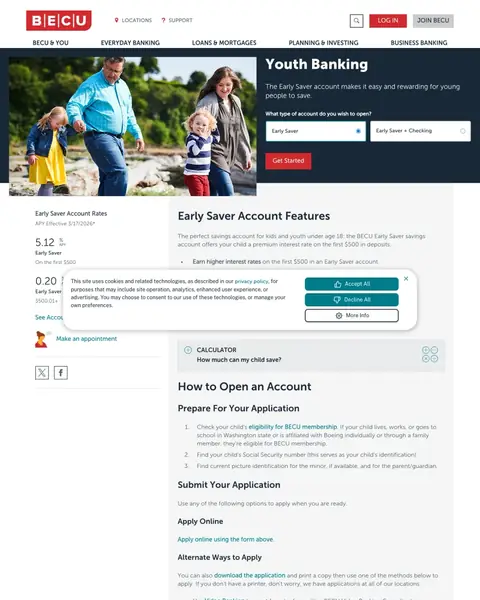
  3. credit union in washington

    Credit union search ends on a youth page

    The page is ‘Youth Banking’ for ‘young people’ under 18. An adult who wants to join has no clear next step.

    • Wrong readerThe page is for a parent opening an account for a child.
    • Cookie boxA consent box covers part of the rates.
    • Narrow rateThe rate of 5.12% applies to the first $500 only.

What we learned.

  1. Print the number first

    SoFi shows ‘4.00%’ in a giant badge, and Splash prints ‘8.99-35.99%’ with both ends the same size. Credibly leads with ‘up to $600,000’ in the headline.

  2. Put proof on the button's line

    Bluevine puts a BBB rating and a Trustpilot score beside ‘Start application’. EagleBank puts its FDIC line under the logo.

  3. Compare your offer with what they know

    SoFi lists its rate against Bank of America, Chase and Wells Fargo. Splash puts a personal loan beside a credit card.

The bottom line

The finance winners print the number, such as a rate or a lending limit, put proof beside the button and ask for little. The losers send paid clicks to menus and product pages, which is a weak start for any financial institution that pays for traffic.

Postclick is live

What would we flag on yours?

Paste the URL your own ads point at. Postclick reads it the way we read these 28 pages, shows what is costing you applications and draws new versions to look at. Your first audit and two design directions are free.

Audit my financial services page

No card required.

Visit the live page