
The 5 winners.

The landing pages actually worth stealing from.

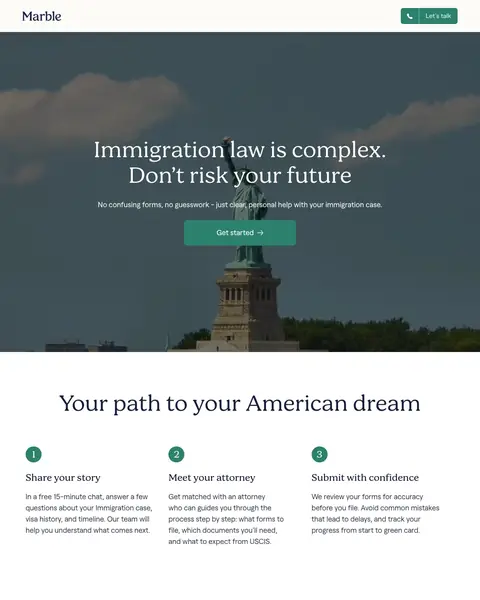
Winner #1: marble.co

marble.co/online/immigration/general/us

Immigration Law landing page example from marble.co
  1. 1

    What works

    Headline starts with the fear, then the fix

    The page shows ‘Immigration law is complex.’ followed by ‘No confusing forms’ and a Get started button. A buyer sees the worry and the answer together.

  2. 2

    What works

    Three steps for a long process

    The page lists Share your story, Meet your attorney and Submit with confidence. A long legal process looks like three small steps.

  3. 3

    What works

    Approval rate shown as a number

    The page shows a 96.2% approval rate in the middle of the page. A buyer choosing a lawyer sees the result as a figure.

  4. 4

    What works

    Case types listed so a buyer finds theirs

    The page lists K-1 fiancé visa, green card, work visas, student visas and green card renewal, each with a short line. A visitor spots their own case fast.

  5. 5

    What gets in the way

    No hourly billing, but no fee shown

    The page shows ‘No hourly billing’ and lists no fee for a case. A buyer must ask to learn the cost.

What to try

A fee next to Get started

The page has no hourly billing and shows no fee. A starting price beside the first button shows a buyer the cost early.

See the original page


Winner #2: boundless.com

boundless.com/landing/family/marriage-green-card

Immigration Law landing page example from boundless.com
  1. 1

    What works

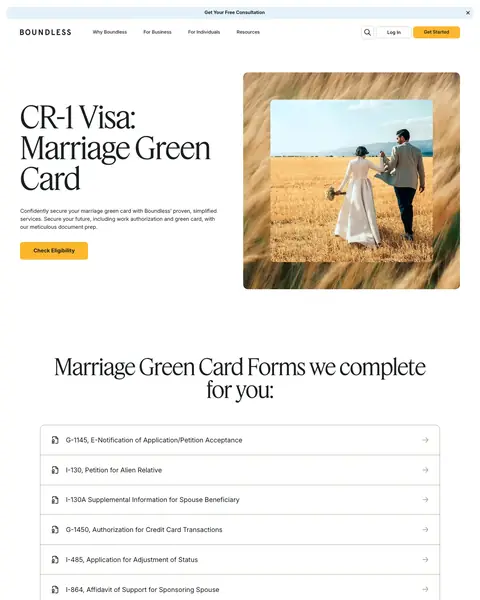
    Every form listed by number

    The page lists the forms it completes, each with its number and plain name. A vague promise of paperwork becomes a list a buyer can count.

  2. 2

    What works

    Named client story about a husband coming home

    A named client writes that her husband is on his way home. The story is the result a marriage green card buyer wants.

  3. 3

    What works

    Applications count shown as a number

    The page shows over 90,000 successful applications. A large count shows a worried buyer that many people finished this process.

  4. 4

    What gets in the way

    Price hidden behind a question

    The page lists no price. Cost shows up only as a closed question about the payment plan.

What to try

Price next to Check Eligibility

The page lists every form but no price. Showing a price beside the first button helps a buyer compare this with filing alone.

See the original page

Winner #3: deel.com

deel.com/inbound-general

Immigration Law landing page example from deel.com
  1. 1

    What works

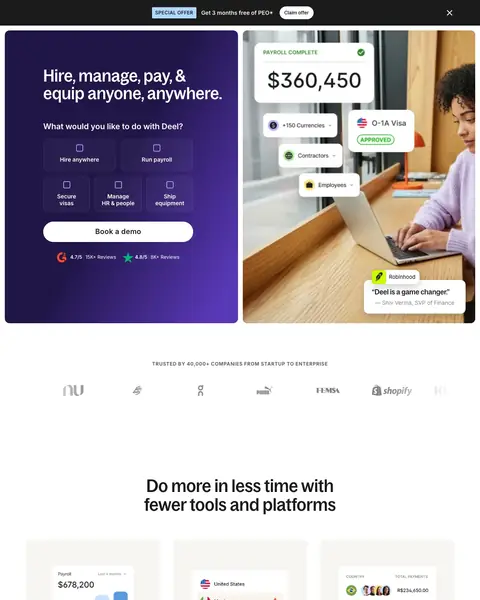
    Headline lists four jobs in one line

    The page shows ‘Hire, manage, pay’ and ‘equip anyone, anywhere’ in the headline. A buyer sees the full range of the platform before scrolling.

  2. 2

    What works

    A buyer picks a task in the first screen

    The page shows ‘What would you like to do with Deel?’ above task choices, including O-1A Visa. A visitor goes to the right service.

  3. 3

    What gets in the way

    Visa help is one card among many

    The page is about hiring and payroll. Visa help is one of several cards, so a visitor who wants immigration help must hunt for it.

  4. 4

    What works

    Support speed shown as figures

    The page shows that 91% of customer issues are resolved at first contact. A buyer who fears slow help sees a figure.

What to try

Say immigration in the headline

The headline lists hire, manage and pay. A word for immigration there shows a buyer this page covers visas.

See the original page

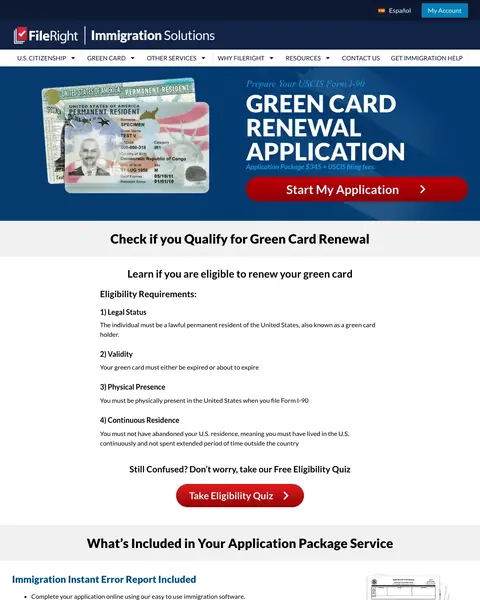
Winner #4: fileright.com

fileright.com/lp/immigration-solutions/green-card-renewal

Immigration Law landing page example from fileright.com
  1. 1

    What works

    Four rules let a buyer check themselves

    The page lists four renewal rules: legal status, validity, physical presence and continuous residence. A visitor learns if they qualify before buying.

  2. 2

    What works

    Included services listed one by one

    The page lists what the package has: an error report, printed and assembled forms and a reminder if a buyer files too early. Each item is a reason to pay.

  3. 3

    What gets in the way

    Dense text below the offer

    The page runs long text blocks in small type below the package list. A buyer must read a lot before the next button.

  4. 4

    What works

    Own fee stated next to the no-refund rule

    The page states its own fee of $345 next to what the government charges and the no-refund rule. A buyer sees the cost before paying.

  5. 5

    What works

    Questions in English or Spanish

    The page shows that the service asks simple questions in English or Spanish. A Spanish reader has a path in their own language.

What to try

Shorten the text above the buttons

The page has long blocks of small type. Shorter lines with a button after each give a buyer a faster way to start.

See the original page

Winner #5: visaplace.com

visaplace.com/canadian-immigration

Immigration Law landing page example from visaplace.com
  1. 1

    What works

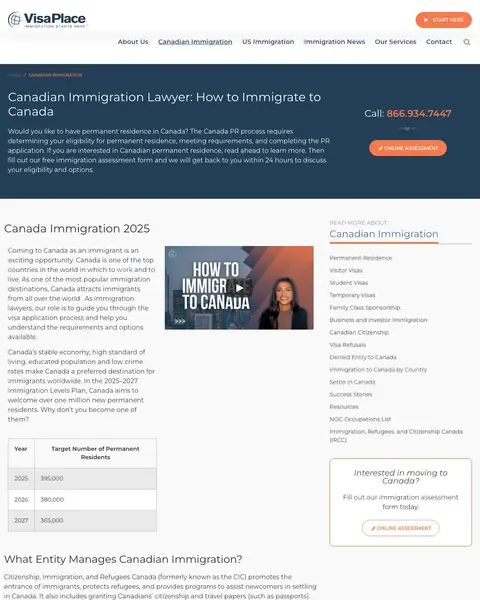
    Phone number in the top corner

    The page shows a phone number at the top right and again near the bottom. A buyer who wants a person can call at once.

  2. 2

    What works

    Free assessment with a 24 hour reply

    The page offers a free immigration assessment form and a reply within 24 hours. A buyer gets a free first step and a time.

  3. 3

    What gets in the way

    Long Canada guide below the form

    Below the form, the page runs long text on what the Canadian immigration agency does. A buyer who wants a lawyer reads a lot before the next ask.

  4. 4

    What works

    Two cases, two Read More buttons

    The page splits visitors into permanent residence and temporary residence, each with a Read More button. A buyer picks the path that fits.

What to try

Shorten the first text block

The page starts with long text before the assessment link. A short line and one button get a buyer to the first step sooner.

See the original page

What the 5 winners do.

  1. Offer a free first step

    4 of 5
  2. Show a number as proof

    3 of 5
  3. List the steps or forms

    4 of 5
  4. Show a client story

    4 of 5

Wildcards.

Pages that break the playbook in interesting ways.

Wildcard #1: boundless.com

boundless.com/immigration-resources/documents-for-k-1-visa

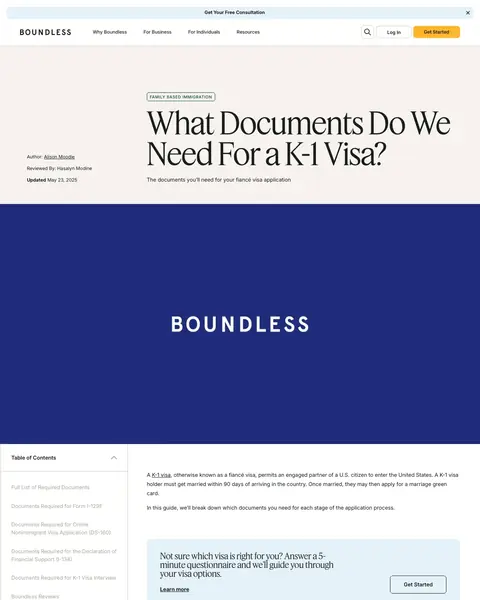
Immigration Law landing page example from boundless.com

The search: k1 visa requirements philippines

Sponsored boundless.com

What Documents Do We Need For a K-1 Visa? - Boundless

  1. 1

    What makes it work

    Ad and headline ask the same question

    The ad and the page headline ask the same question about K-1 visa documents. A clicker sees the match at once.

  2. 2

    What makes it work

    Questionnaire box with a Get Started button

    Near the top, a box shows a short questionnaire and a Get Started button for a buyer unsure which visa fits.

  3. 3

    What makes it work

    Documents listed in plain bullets

    The page lists each paper a K-1 applicant needs in short bullets, from proof of citizenship to tax returns. A buyer sees the work ahead.

  4. 4

    What makes it work

    Table shows who needs each document

    A three-column table lists the document type, examples and who needs it. A buyer finds their own case fast.

  5. 5

    What it gets wrong

    Price shows up as a related guide title

    Cost appears as the title of a related guide at the end of the page. A buyer who asks about price leaves the page to learn it.

What to try

A button after the long list

The page ends the document list with a text link. A button there shows a buyer who finished reading a clear next step.

See the original page

Wildcard #2: marble.co

marble.co/immigration/immigration-attorney-near-me

Immigration Law landing page example from marble.co

The search: immigration lawyer america

Sponsored marble.co

US Immigration Law Firm | U.S. Visas & Citizenship

  1. 1

    What it gets wrong

    One top button and no phone number

    The top bar has a single contact button. No phone number appears in the page text, so a buyer who wants to call has nothing to dial.

  2. 2

    What makes it work

    Headline matches the lawyer search

    The search is for an immigration lawyer and the headline reads top immigration lawyers at your fingertips. Search, ad and page all use immigration law.

  3. 3

    What makes it work

    A $49 first step

    The page lists a $49 consultation under the heading No hidden fees. A low first price is an easy start for a buyer.

  4. 4

    What makes it work

    Case types listed in bullets

    The list covers K-1 fiancé visas, work visas, removal of conditions and tourist visas. A visitor finds their own case in one look.

  5. 5

    What makes it work

    Fixed price for each step

    The page shows a fixed price for each step of a case, with no hourly rates or surprise bills. A buyer who fears an open bill has an answer.

What to try

Put the $49 near the headline

The $49 first step is in the middle of the page. Next to the headline it shows the low price to every visitor.

See the original page

Wildcard #3: visapro.com

visapro.com/resources/article/green-card-backlog-bill

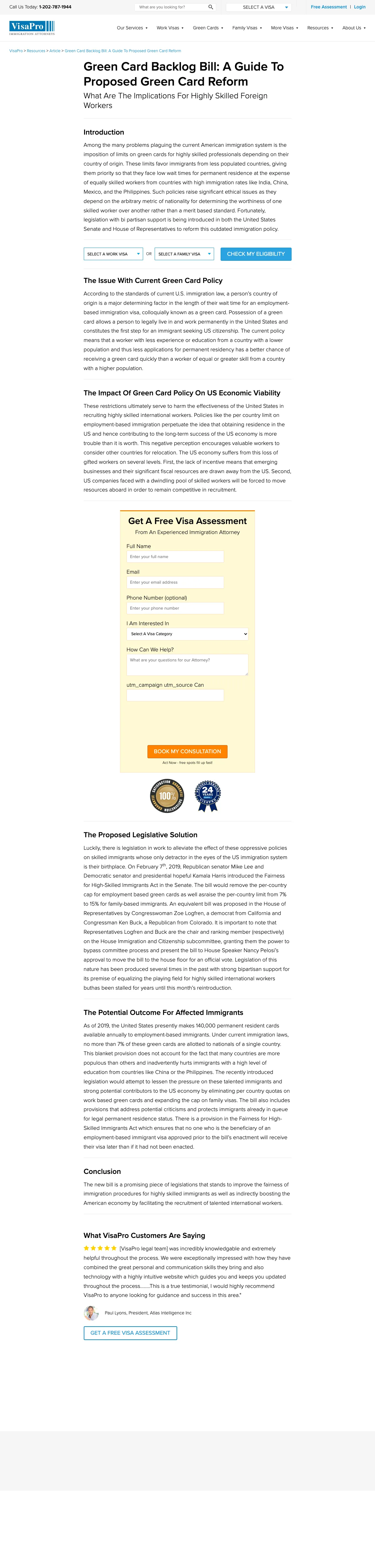
Immigration Law landing page example from visapro.com
  1. 1

    What makes it work

    Phone number in the top bar

    The page shows a phone number and a Free Assessment link in the top bar of a long article. A reader who wants help can act at once.

  2. 2

    What it gets wrong

    Long article about a 2019 bill

    Most of the page explains a bill introduced in 2019. A buyer who wants a green card reads policy news before the form.

  3. 3

    What makes it work

    Reader picks work or family visa

    After the intro, a bar offers Select A Work Visa, Select A Family Visa and Check My Eligibility. A reader picks a path early.

  4. 4

    What makes it work

    Free assessment form inside the article

    A form titled Get A Free Visa Assessment is in the middle of the article. It asks for a name, a phone number and a question.

  5. 5

    What makes it work

    Customer quote near the end

    The page ends with a customer who calls the legal team ‘incredibly knowledgable’ and helpful. A buyer with a last doubt reads it from a real client.

What to try

Move the form above the article

The form is after the first sections of an article about a bill. A shorter intro with the form beside it reaches a buyer sooner.

See the original page

Wildcard #4: rapidvisa.com

rapidvisa.com/k1-fiance-visa

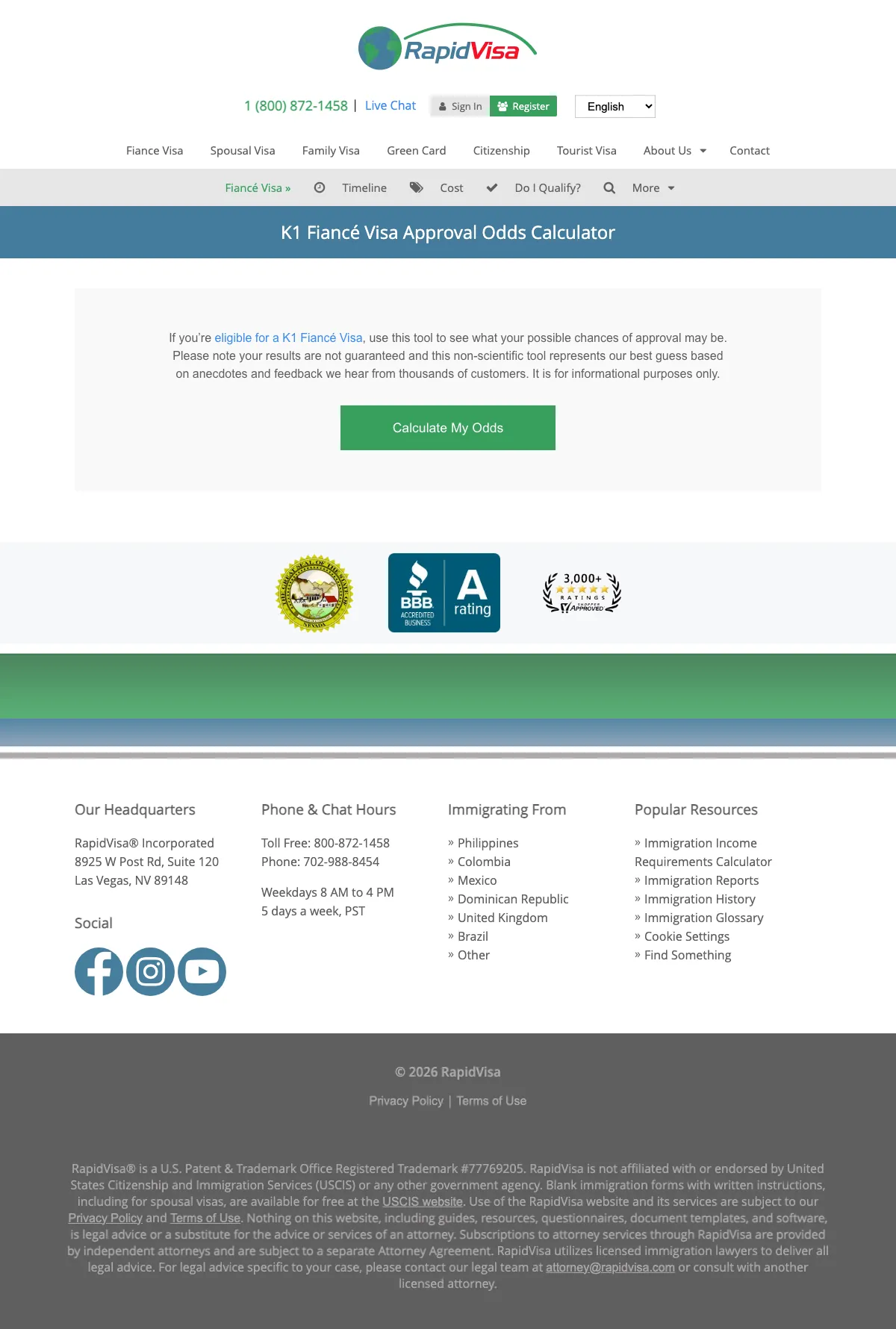
Immigration Law landing page example from rapidvisa.com
  1. 1

    What makes it work

    Phone and live chat in the top bar

    The top bar shows a phone number and a Live Chat link. A buyer with a question can reach a person before using the tool.

  2. 2

    What it gets wrong

    Menu links to other visas above the tool

    The top has a menu of links to other visas and pages. A buyer who wants to test odds can click away first.

  3. 3

    What makes it work

    A tool is the first thing a buyer sees

    The page starts with ‘K1 Fiancé Visa Approval Odds Calculator’ and a Calculate My Odds button. A nervous buyer starts by testing their own case.

  4. 4

    What makes it work

    Honest note about the tool

    The page notes that results are not guaranteed and that the tool is non-scientific. That frankness makes the odds feel more believable.

  5. 5

    What makes it work

    BBB rating under the button

    A BBB rating and a count of reviews sit under the button. A buyer sees proof right after the first decision.

What to try

Move the BBB badge above the button

The BBB rating is under the button. Above the button it is the first proof a buyer sees.

See the original page

The copy bank.

Headlines

  • “Immigration law is complex.”

    marble.co

  • “Check if you Qualify for Green Card Renewal”

    fileright.com

  • “What would you like to do with Deel?”

    deel.com

Offers

Promises

  • “Fast 24/7 support”

    deel.com

  • “FileRight is the easy way to complete your application”

    fileright.com

  • “Don't risk your future”

    marble.co

Next steps

2 pages that waste the click.

  1. how to get a work visa in costa rica

    Residency pages for a work visa search

    The search is for a work visa in Costa Rica. The page lists residency, digital nomad and retiree services and no work visa.

    • No work visaThe service cards cover residency, digital nomads and retirees. None is a work visa.
    • Firm-wide figuresThe page shows figures for the whole firm that say nothing about Costa Rica.
    • No formThe page text has no form for a visitor to describe a case.
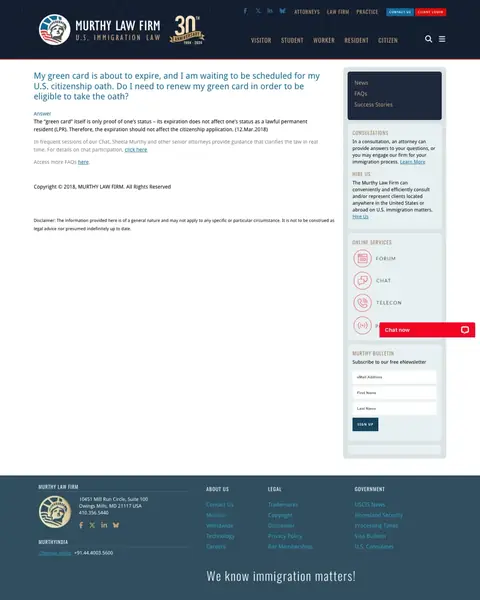
  2. A search for the company’s own name

    One old FAQ answer fills the page

    The page is a single FAQ answer dated 2018, with forum, chat and newsletter links beside it. A visitor sees no service to buy.

    • Old answerThe one answer is dated 2018 and the copyright is also 2018.
    • No priceThe page lists no fee for a consultation or for hiring the firm.
    • Late phoneThe phone number shows only in the footer, far below the answer.

What we learned.

  1. Offer a free first step

    Boundless asks a buyer to check eligibility before anything else. VisaPlace offers a free assessment with a reply within 24 hours.

  2. Put a number in the proof

    Marble shows a 96.2% approval rate. Boundless lists over 90,000 successful applications and Deel shows 91% of issues solved at first contact.

  3. List the forms and steps

    Boundless lists each form it completes by number and plain name. Marble shows three steps from your story to your filing.

The bottom line

Treat these five pages as prompts for your own legal landing page. The ones that win offer a free first step, back it with a real number and show the forms or steps a buyer will go through.

Postclick is live

Now get yours read the same way

Paste the URL your own ads point at. Postclick reads it the way we read these 29 pages, shows what is costing you clients and draws new versions to look at. Your first audit and two design directions are free.

Read my immigration law page

No card required.

Visit the live page