
The 10 winners.

The landing pages actually worth stealing from.

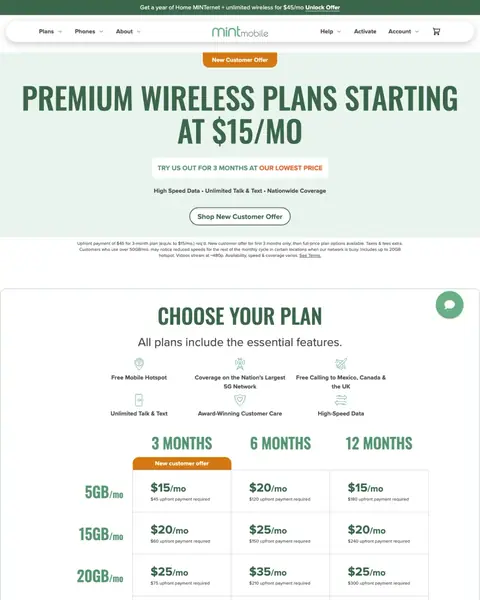
Winner #1: mintmobile.com

mintmobile.com/plans
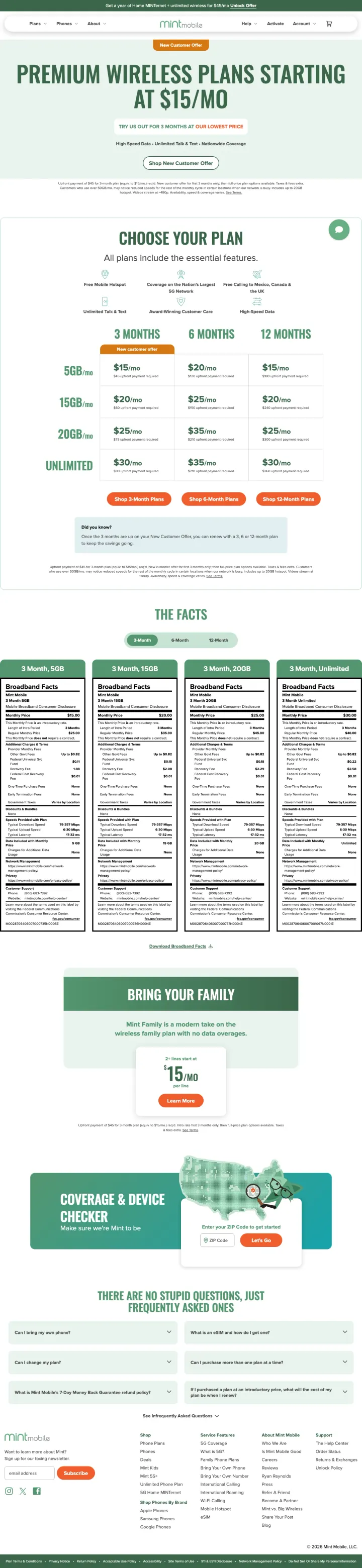
Cell Phones landing page example from mintmobile.com
  1. 1

    What works

    Starting price in the headline

    The headline says ‘PREMIUM WIRELESS PLANS STARTING’ and then ‘AT $15/MO’. A buyer sees the lowest price before any scrolling.

  2. 2

    What works

    Plan grid with three terms and prices

    A grid shows 3, 6 and 12 month terms with 5GB, 15GB, 20GB and unlimited rows. A buyer compares data and cost in one view.

  3. 3

    What works

    Broadband Facts panels under the plans

    The page shows ‘Broadband Facts’ panels for each plan. A buyer who checks the fine print finds it without leaving the page.

  4. 4

    What gets in the way

    Coverage check is near the bottom

    The ZIP code coverage check is far down the page. A buyer unsure about the signal must scroll a long way to test it.

What to try

Move the coverage check up beside the grid

The check is far below the plans. Next to the price grid, it answers the signal question while the buyer compares.

See the original page
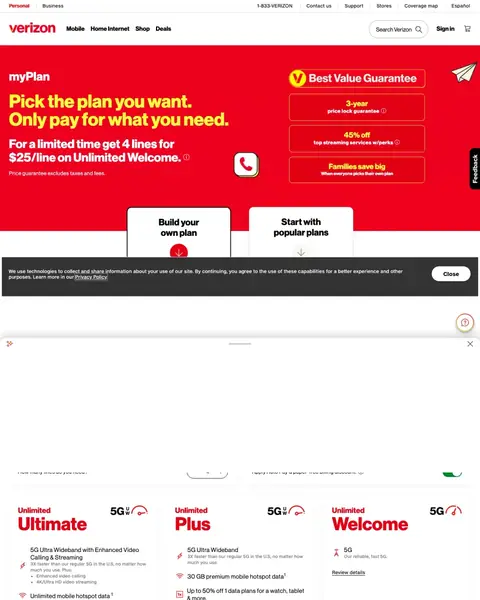
Winner #2: verizon.com

verizon.com/plans/unlimited

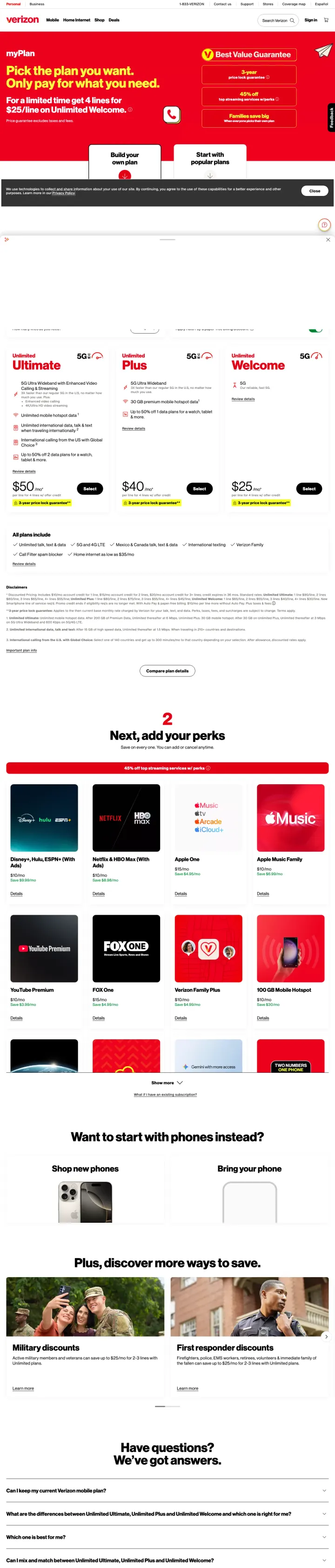
Cell Phones landing page example from verizon.com
  1. 1

    What gets in the way

    Phone number in tiny type at the top

    ‘1-833-VERIZON’ shows in very small type in the top bar. A buyer ready to call can miss it.

  2. 2

    What works

    Headline asks for a plan choice

    The headline says ‘Pick the plan you want.’ A buyer goes straight to the plans with no story to read first.

  3. 3

    What works

    Three-year price lock on each plan card

    Every card says ‘3-year price lock guarantee’ under a monthly price. A buyer knows the price stays the same for three years.

  4. 4

    What works

    Perks step after the plan choice

    The streaming tiles come after ‘Next, add your perks’. The buyer builds the bundle in steps on one page.

  5. 5

    What works

    Military and first responder discounts

    The page lists ‘Military discounts’ and ‘First responder discounts’ near the bottom. Those buyers see a reason to pick this carrier.

What to try

Phone number in larger type at the top

The number ‘1-833-VERIZON’ is tiny. A larger number in the first screen helps a buyer who would rather call.

See the original page

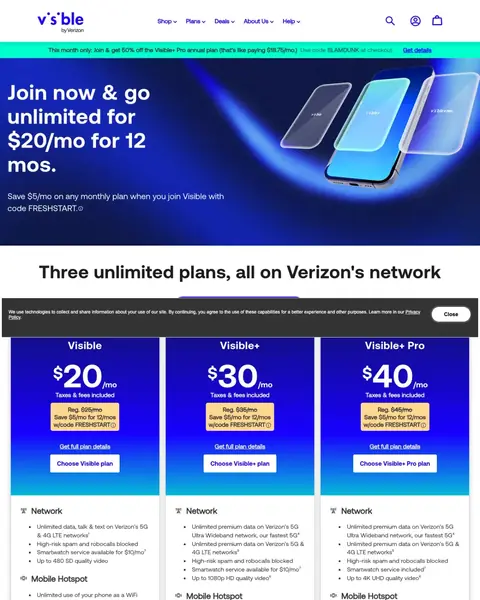
Winner #3: visible.com

visible.com/plans

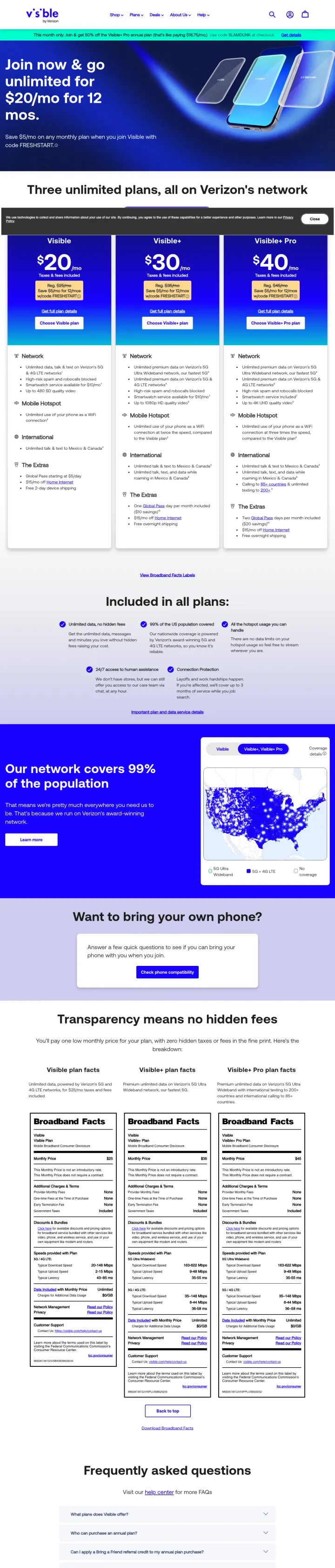
Cell Phones landing page example from visible.com
  1. 1

    What works

    Promo code in the top bar

    A bar at the top shows the code ‘SLAMDUNK’. The buyer has a reason to sign up today.

  2. 2

    What works

    Headline says which network carries the plans

    The headline says ‘Three unlimited plans, all on Verizon's network’. A buyer worried about coverage reads the answer first.

  3. 3

    What works

    Prices with taxes and fees included

    Each plan shows ‘Taxes & fees included’ and a ‘Save $5/mo for 12/mos’ line. The buyer sees what the bill will be.

  4. 4

    What works

    Round-the-clock chat in place of stores

    The page says ‘24/7 access to human assistance’ and says there are no stores. A buyer worried about support gets an answer.

  5. 5

    What gets in the way

    No-hidden-fees line is far down the page

    ‘Transparency means no hidden fees’ shows deep in the page. The same message works higher up, beside the prices.

What to try

Say no hidden fees beside the prices

Each price card already says ‘Taxes & fees included’. Adding the no-hidden-fees line there shows the proof where the buyer decides.

See the original page

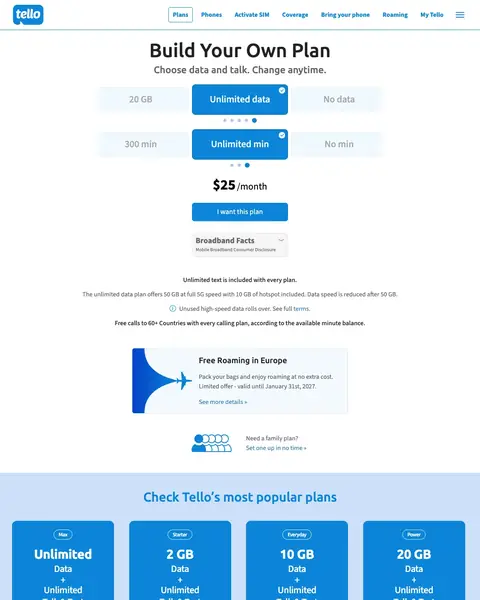
Winner #4: tello.com

tello.com/buy/custom_plans

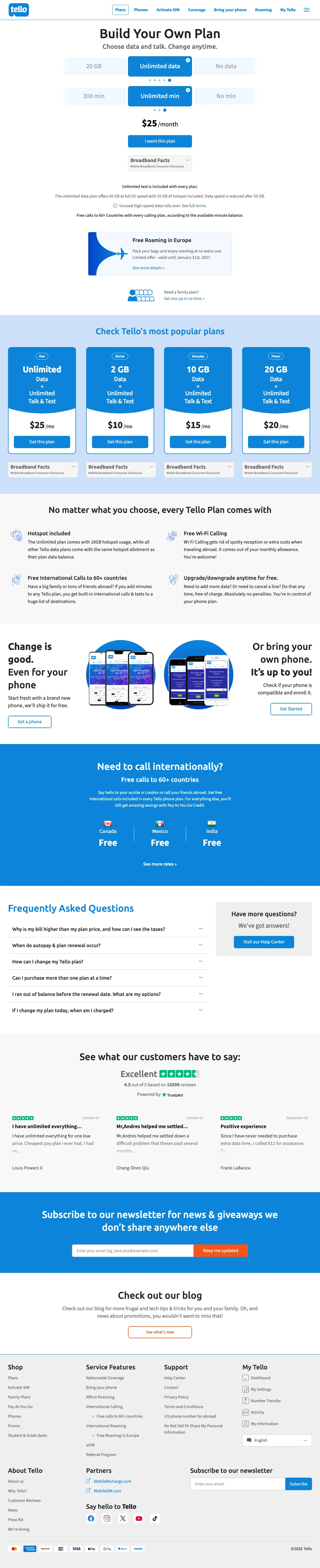
Cell Phones landing page example from tello.com
  1. 1

    What works

    Headline asks the buyer to build a plan

    ‘Build Your Own Plan’ is the first line, with ‘Choose data and talk. Change anytime.’ below it. The buyer sees control before any price.

  2. 2

    What gets in the way

    Offer end date is far away

    ‘Limited offer - valid until January 31st. 2027’ is months away. A deadline that far out adds little pressure to act today.

  3. 3

    What works

    Popular plans as four priced cards

    Under ‘Check Tello's most popular plans’ are four cards from $10 to $25. A buyer who dislikes building picks a ready-made plan.

  4. 4

    What works

    International calling in one line

    ‘Free calls to 60+ countries’ is a clear reason for a buyer who calls family abroad.

  5. 5

    What works

    Trustpilot rating below the plans

    The page shows ‘Excellent’ with ‘4.5 out of 5 based on 15599 reviews’ and a Trustpilot label. A buyer sees outside proof before leaving.

What to try

Set an offer end date within weeks

The offer runs to January 2027. A date close to the visit gives a buyer a reason to act now.

See the original page

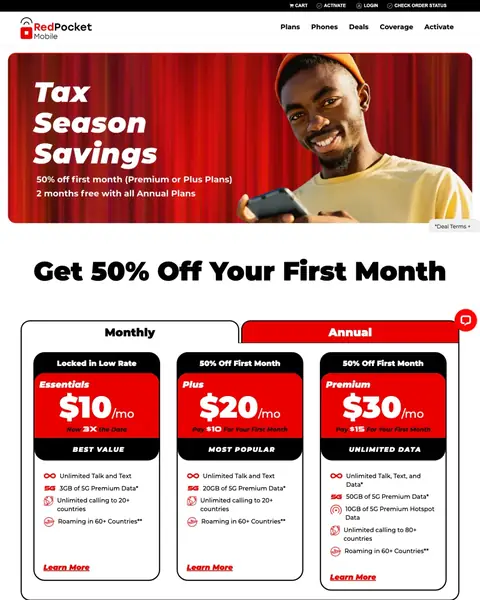
Winner #5: redpocket.com

redpocket.com/plans

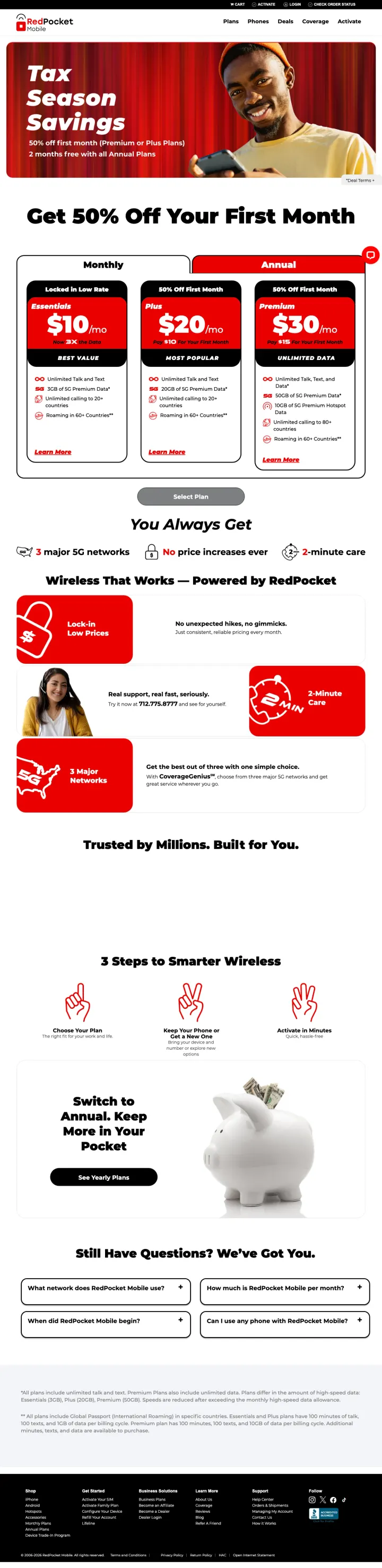
Cell Phones landing page example from redpocket.com

The search: redpocket

Sponsored redpocket.com

RedPocket Mobile® | Save On Plans & Phones

  1. 1

    What works

    Seasonal offer with two deals

    The page starts with ‘Tax Season Savings’ and two deals, including ‘2 months free with all Annual Plans’. The buyer sees a saving before any plan.

  2. 2

    What gets in the way

    First-month discount skips the cheapest plan

    ‘50% off first month (Premium or Plus Plans)’ leaves out the $10 plan. A buyer with the smallest budget gets no deal.

  3. 3

    What works

    Ribbons mark the plan most buyers pick

    Three cards at $10, $20 and $30 carry the ribbons ‘BEST VALUE’, ‘MOST POPULAR’ and ‘UNLIMITED DATA’. The buyer gets a hint about which to pick.

  4. 4

    What works

    Price increases ruled out in writing

    The page says ‘& No price increases ever’. A buyer who has seen a bill climb reads the price as final.

  5. 5

    What works

    Support number offered as a test

    The page says ‘Try it now at 712.775.8777 and see for yourself.’ A buyer can test support before buying.

What to try

Offer the first-month deal on every plan

The deal covers Premium and Plus only. Adding the $10 plan shows the smallest buyer a deal too.

See the original page

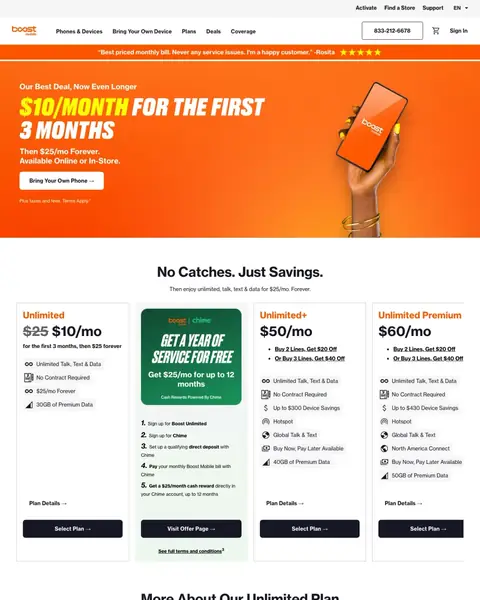
Winner #6: boostmobile.com

boostmobile.com/plans/affordable-phone-plan

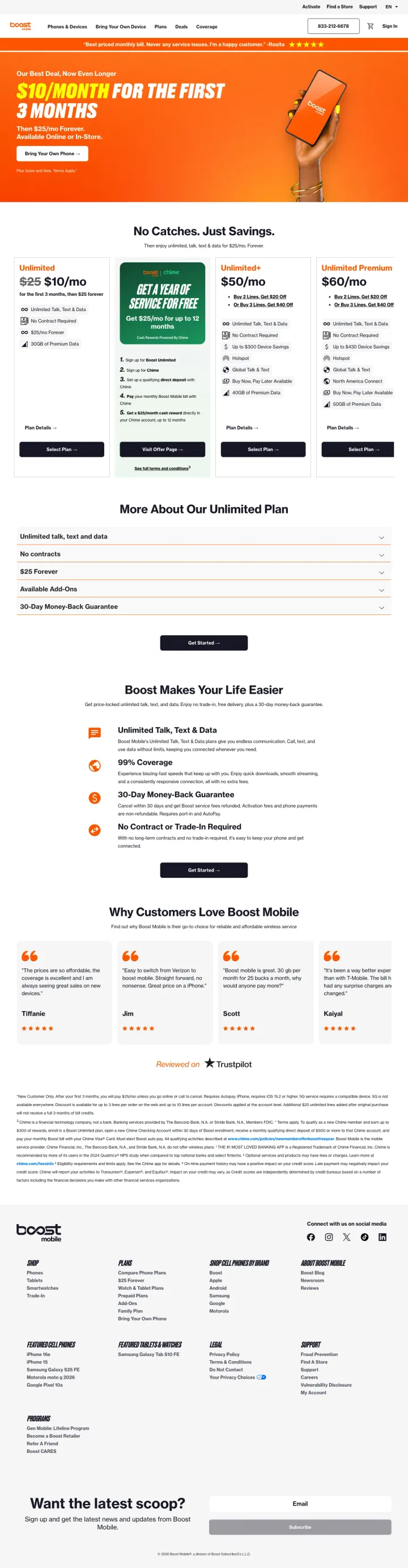
Cell Phones landing page example from boostmobile.com
  1. 1

    What works

    Phone number in the top bar

    ‘833-212-6678’ shows in a box at the top of every screen. A buyer with a question can call at once.

  2. 2

    What works

    Customer review above the offer

    A review reads ‘Best priced monthly bill. Never any service issues. I'm a happy customer.’ The buyer reads a customer voice before the price.

  3. 3

    What works

    Intro price and later price together

    ‘$10/MONTH FOR THE FIRST 3 MONTHS’ comes with ‘Then $25/mo Forever.’ The buyer sees both numbers up front.

  4. 4

    What gets in the way

    Bank offer card between the plan cards

    A five-step card from a bank partner fills the second slot in the plan row. A buyer comparing plans must read around it.

  5. 5

    What works

    Money-back guarantee beside the plans

    ‘30-Day Money-Back Guarantee’ shows beside the plan cards and again lower down. A buyer unsure about switching sees a safe exit.

What to try

Move the bank offer out of the plan row

The five-step card breaks the row. A link to it under the plans keeps the row clear for comparing.

See the original page

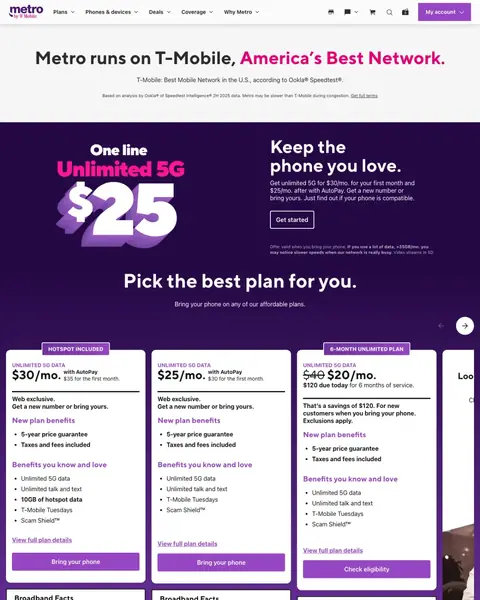
Winner #7: metrobyt-mobile.com

metrobyt-mobile.com/deals/one-line-for-25-phone-plan

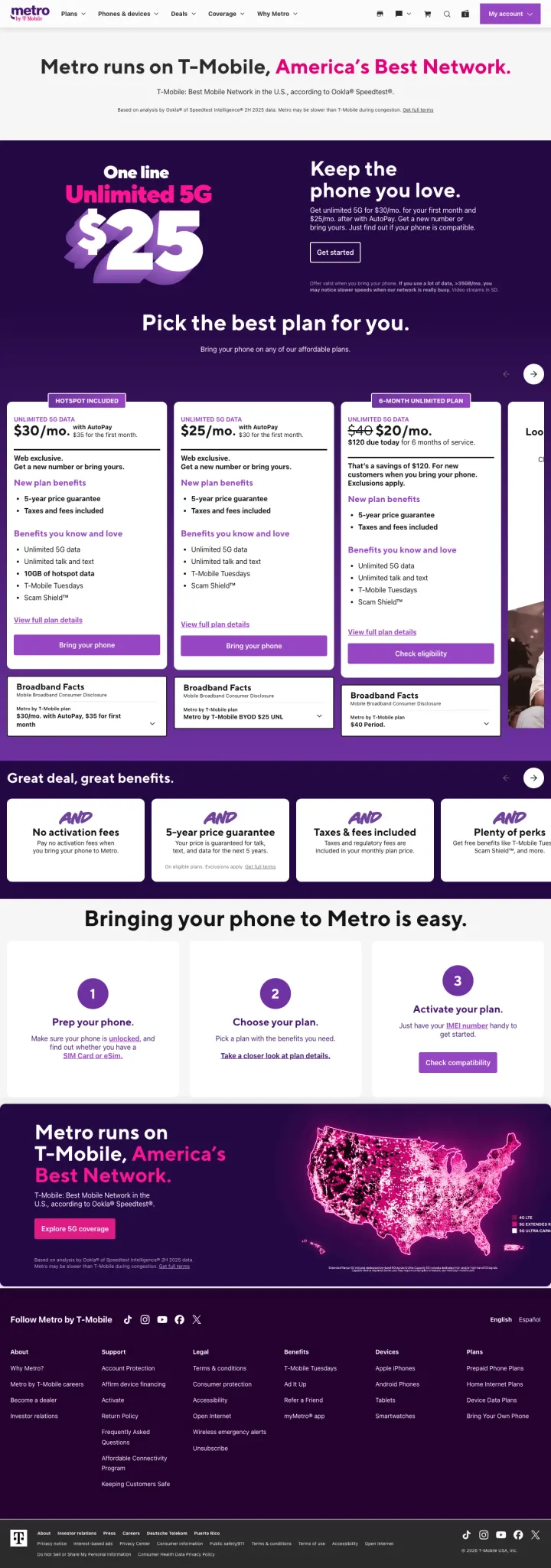
Cell Phones landing page example from metrobyt-mobile.com
  1. 1

    What works

    Headline says which network carries the plans

    The first line says ‘Metro runs on T-Mobile, America's Best Network.’ A buyer worried about signal gets the answer at once.

  2. 2

    What works

    Speed claim with its source and limit

    The page cites Ookla for the best-network claim and adds the fine print ‘Metro may be slower than T-Mobile during congestion’. The buyer sees the limit.

  3. 3

    What works

    Entry price beside the plan type

    The hero shows ‘$25’ beside ‘Unlimited 5G’. A buyer gets plan type and price in one look.

  4. 4

    What gets in the way

    Data limit in small grey type

    A notice about heavy data use shows under the hero in very small grey type. A buyer who streams a lot may miss it.

  5. 5

    What works

    Four benefits under one headline

    Under ‘Great deal, great benefits.’ the page lists ‘No activation fees’ and ‘5-year price guarantee’. A buyer sees fees and price changes covered.

What to try

Make the data notice easier to read

The notice about heavy data use is in very small grey type. Larger type builds trust with a buyer who streams a lot.

See the original page

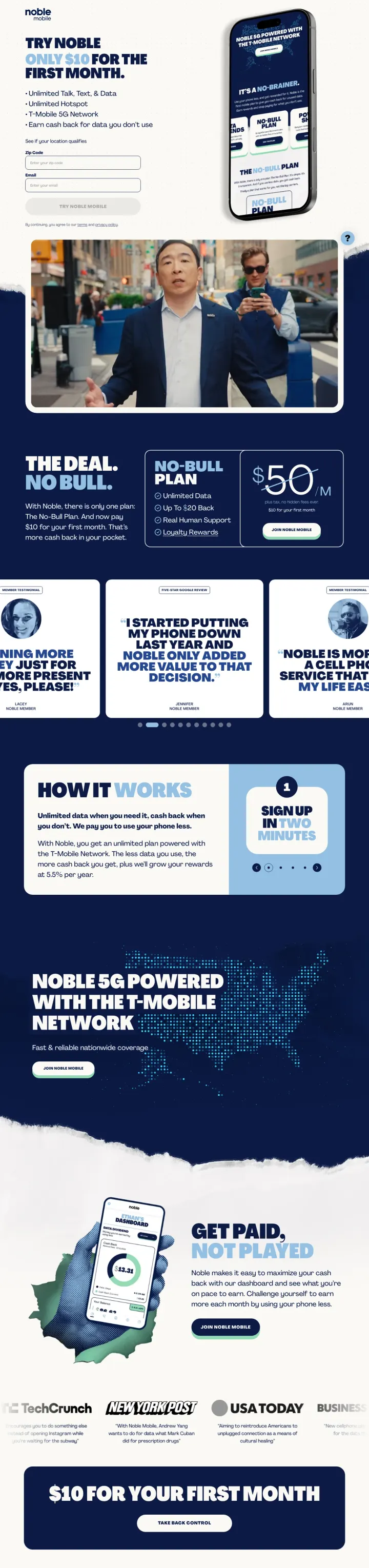
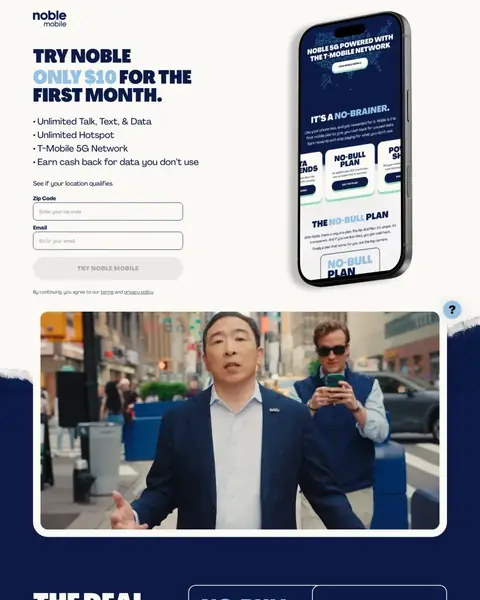
Winner #8: noblemobile.com

noblemobile.com/trynoble10-b

Cell Phones landing page example from noblemobile.com
  1. 1

    What works

    The $10 first month in the headline

    ‘ONLY $10 FOR THE FIRST MONTH.’ is the first thing a buyer reads. The page has a logo and no menu to pull them away.

  2. 2

    What works

    Bullet list ends with cash back

    The last bullet says ‘Earn cash back for data you don't use’. A buyer who uses little data sees a reason to switch.

  3. 3

    What gets in the way

    Form button label is faint

    ‘TRY NOBLE MOBILE’ shows in pale grey on a light grey button. A buyer may read the button as turned off.

  4. 4

    What works

    One plan at $50 with a $10 first month

    ‘THE DEAL. NO BULL.’ shows one plan at $50 with ‘$10 for your first month’ beside it. The buyer has one choice to make.

  5. 5

    What works

    First-month offer repeated near the bottom

    ‘$10 FOR YOUR FIRST MONTH’ shows again with ‘TAKE BACK CONTROL’. A buyer who scrolled has the offer in front of them again.

What to try

Make the form button easy to read

A pale button with faint text looks off. A dark button with clear text shows the buyer the form is ready.

See the original page

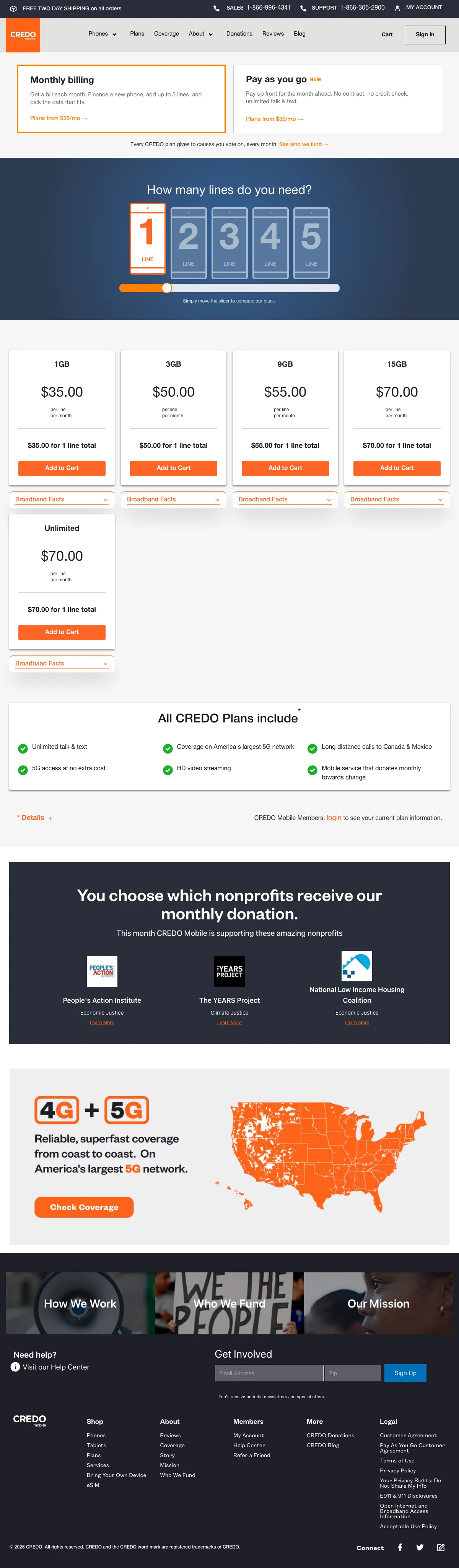
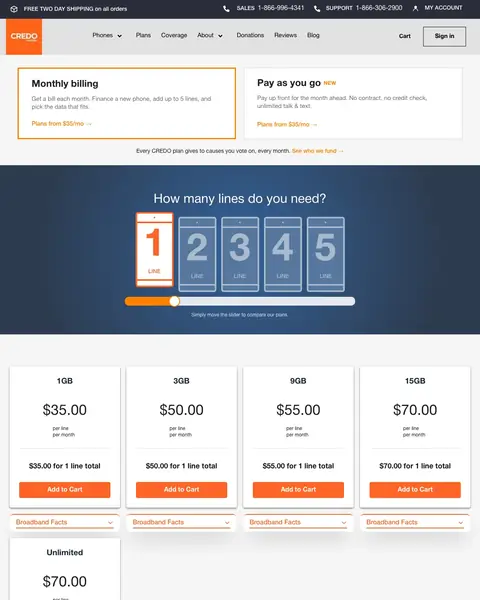
Winner #9: credomobile.com

credomobile.com/plan

Cell Phones landing page example from credomobile.com

The search: mobile plan in usa

Sponsored credomobile.com

Plan - CREDO Mobile

  1. 1

    What works

    Sales and support numbers at the top

    A strip shows ‘SALES 1-866-996-4341 SUPPORT 1-866-306-2900’. A buyer picks the right line to call.

  2. 2

    What works

    Headline links every plan to causes

    The line under the plan types says each plan supports causes the customer votes on each month. A buyer who cares about that has a reason to pick this carrier.

  3. 3

    What works

    Line count picker before any plan

    ‘How many lines do you need?’ comes first, with a 1 to 5 picker. The buyer sets the household size before seeing plans.

  4. 4

    What gets in the way

    15GB and Unlimited cost the same

    The 15GB plan shows $70.00 and the Unlimited plan shows $70.00. A buyer cannot tell which one the page favors.

  5. 5

    What works

    Customer picks the nonprofit

    The page says ‘You choose which nonprofits receive our monthly donation.’ A buyer has control over where the share goes.

What to try

Label the plan that fits most buyers

The 15GB and Unlimited plans both show $70.00. A label on the better value helps a buyer choose.

See the original page

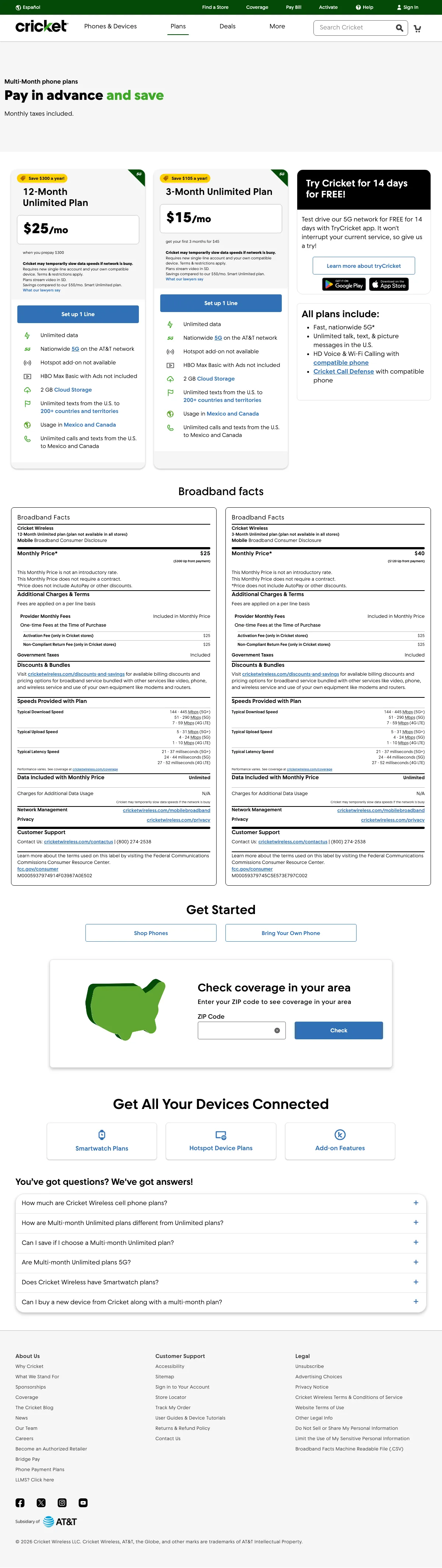
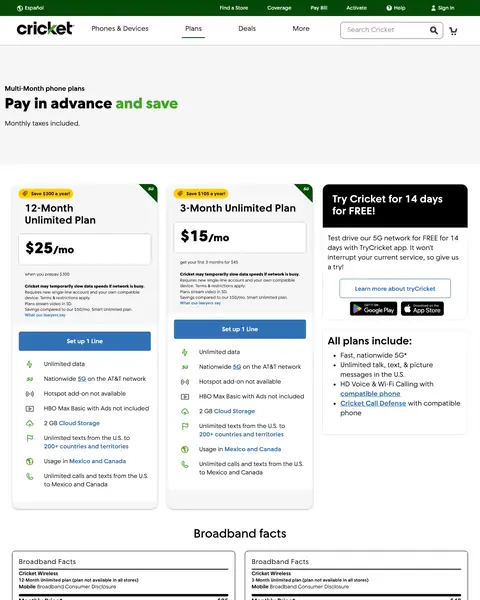
Winner #10: cricketwireless.com

cricketwireless.com/multi-month-cell-phone-plans

Cell Phones landing page example from cricketwireless.com
  1. 1

    What works

    Headline asks for payment in advance

    The headline says ‘Pay in advance and save’. ‘Monthly taxes included.’ is right below it.

  2. 2

    What works

    12-month card shows $25 and the yearly saving

    The card says ‘Save $300 a year’ with $25/mo and ‘when you prepay $300’. A buyer sees the monthly price and the upfront cost.

  3. 3

    What works

    14-day free trial next to the plans

    A box says ‘Try Cricket for 14 days for FREE!’ A buyer can test the network before paying. The copy adds that the trial leaves current service alone.

  4. 4

    What gets in the way

    Phone number is deep in the fine print

    ‘(800) 274-2538’ shows in the Broadband Facts block far down the page. A buyer ready to call has to hunt for it.

  5. 5

    What works

    Coverage check below the plans

    ‘Check coverage in your area’ is a ZIP form after the plans. A buyer can test the signal before choosing.

What to try

Put the phone number in the header

The number shows in the fine print far down the page. Placing it in the header helps a buyer ready to call.

See the original page

What the 10 winners do.

  1. Show a price in the first screen

    9 of 10
  2. Say how taxes and fees are billed

    4 of 10
  3. Show the Broadband Facts label

    4 of 10
  4. Lock the price for years

    4 of 10

Wildcards.

Pages that break the playbook in interesting ways.

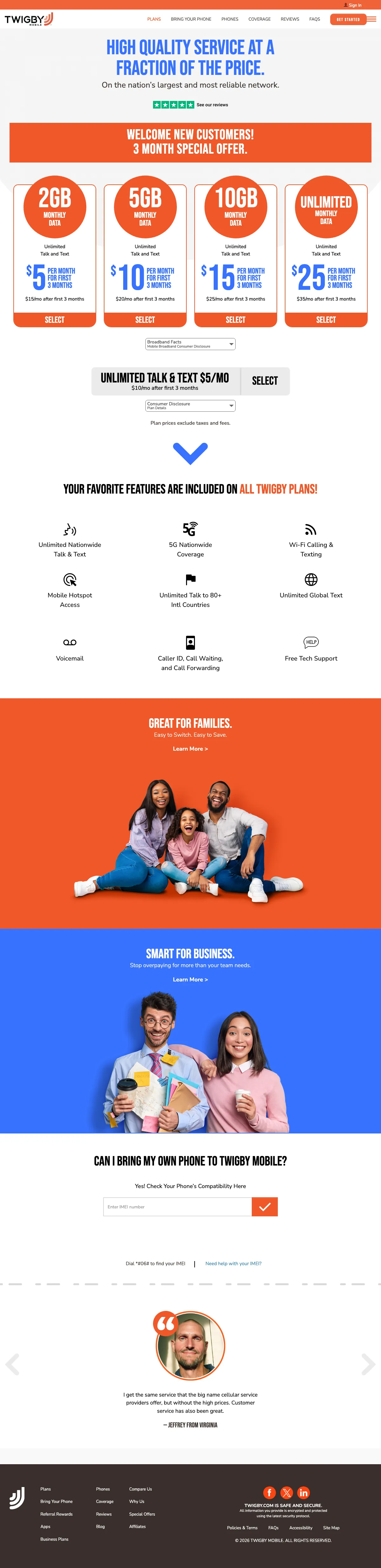
Wildcard #1: twigby.com

twigby.com/page/howitworks

Cell Phones landing page example from twigby.com

The search: mobile plan canada

Sponsored twigby.com

Twigby - Our Mobile Plan Prices Will Cut Your Current Bill in Half

  1. 1

    What makes it work

    Headline continues the ad message

    ‘HIGH QUALITY SERVICE AT A FRACTION OF THE PRICE.’ continues the cut-your-bill message of the ad. A visitor who clicked for savings sees it again.

  2. 2

    What makes it work

    Banner for new customers

    A full-width band says ‘WELCOME NEW CUSTOMERS!’ and ‘3 MONTH SPECIAL OFFER.’ The buyer knows the low price is for a first-timer.

  3. 3

    What makes it work

    Four plans with the price after three months

    Each card shows the first-3-month price and a line like ‘$15/mo after first 3 months’. A buyer sees the later cost before choosing.

  4. 4

    What it gets wrong

    Prices exclude taxes and fees

    ‘Plan prices exclude taxes and fees.’ shows in small type under the plans. The final bill will be higher than the card price.

  5. 5

    What makes it work

    Phone compatibility check on the page

    ‘CAN I BRING MY OWN PHONE TO TWIGBY MOBILE?’ has an IMEI field below it. A buyer checks the phone without leaving.

What to try

Show the later price in larger type

The big number is the first-3-month price and the later price is small. A buyer who reads only the big number may expect a lower bill.

See the original page

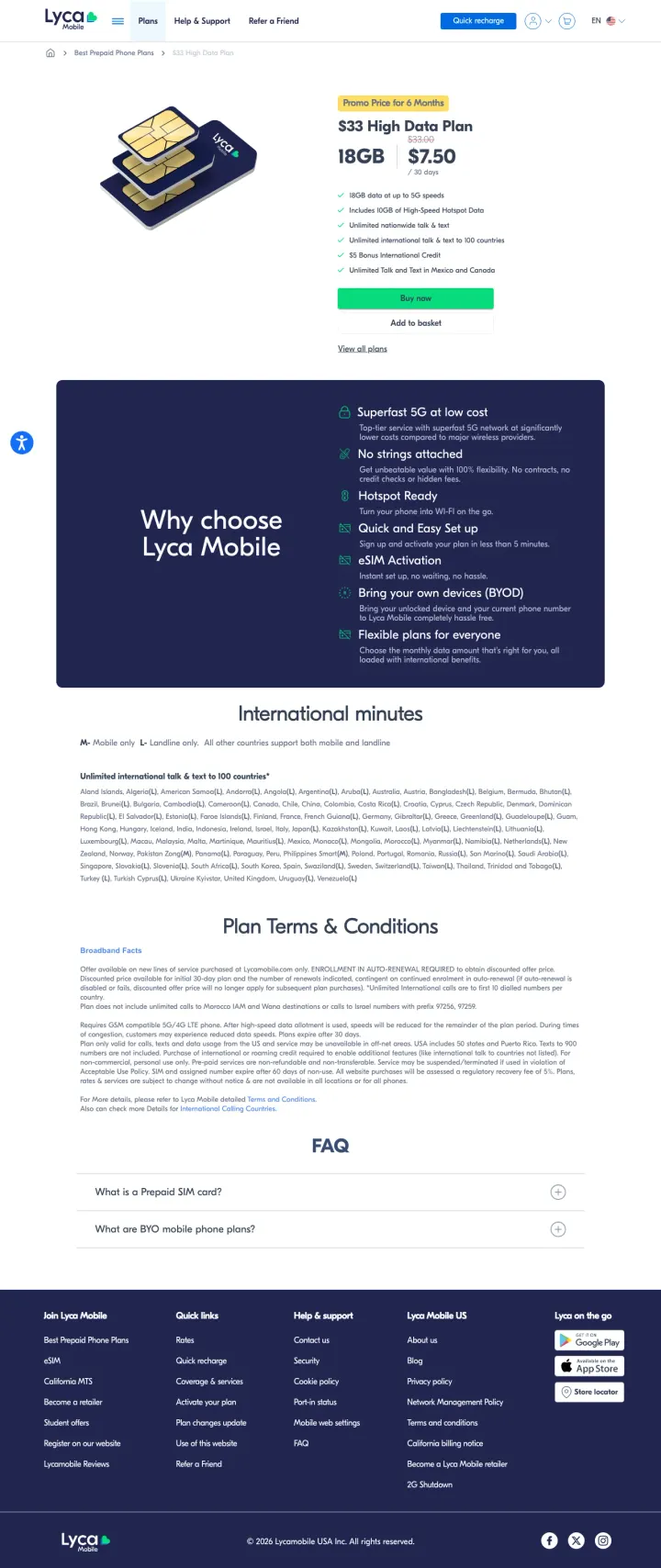
Wildcard #2: lycamobile.us

lycamobile.us/en/plan/33-high-data-plan

Cell Phones landing page example from lycamobile.us

The search: lycamobile usa esim

Sponsored lycamobile.us

eSIM & Physical SIM Options

  1. 1

    What makes it work

    Promo label above the plan name

    A yellow label says ‘Promo Price for 6 Months’. The buyer knows the low price has an end.

  2. 2

    What it gets wrong

    SIM card picture on the left

    A picture of SIM cards fills the left side. It shows the product but says nothing about the plan or the saving.

  3. 3

    What makes it work

    Crossed-out $33.00 beside $7.50

    The page shows ‘18GB’ with ‘$33.00’ crossed out and ‘$7.50’ in large type. The buyer sees the saving at once.

  4. 4

    What makes it work

    Checklist with calling to 100 countries

    The list says ‘Unlimited international talk & text to 100 countries’ and ‘Unlimited Talk and Text in Mexico and Canada’. Callers abroad see their use case.

What to try

State the price after six months

A label shows the price lasts 6 months. Adding what the buyer pays afterward keeps the later bill clear.

See the original page

Wildcard #3: tomsguide.com

tomsguide.com/best-picks/best-phone-carrier

Cell Phones landing page example from tomsguide.com

The search: top mobile networks in usa

Sponsored tomsguide.com

Best phone carriers of 2026 - Compare phone carriers

  1. 1

    What makes it work

    Headline repeats the ad wording

    The page headline ‘Best phone carriers of 2026’ matches the ad above, so a buyer sees the same words after the click.

  2. 2

    What makes it work

    Intro line says how carriers are picked

    ‘We pick the best phone carriers based on data speeds, phone selection, monthly costs and more’ shows the criteria. A buyer sees how the list was picked.

  3. 3

    What makes it work

    Jump-to links let a buyer skip ahead

    A ‘JUMP TO:’ row lists the sections. A buyer who cares about one carrier goes straight to it.

  4. 4

    What it gets wrong

    First carrier entry starts far down

    The ‘1. T-Mobile’ entry starts after about three screens of scrolling. A buyer in a hurry must scroll through the page first.

  5. 5

    What makes it work

    Each pick lists its best plan prices

    The entry shows ‘Best Unlimited Plan: $85/month’ and ‘Best Prepaid Plan: $15/month 5GB plan’. A buyer compares carrier prices in one block.

What to try

Show the top pick in the first screen

The first entry starts after about three screens of scrolling. A short top-pick box above the fold helps a buyer in a hurry.

See the original page

The copy bank.

Headlines

Offers

Promises

Next steps

3 pages that waste the click.

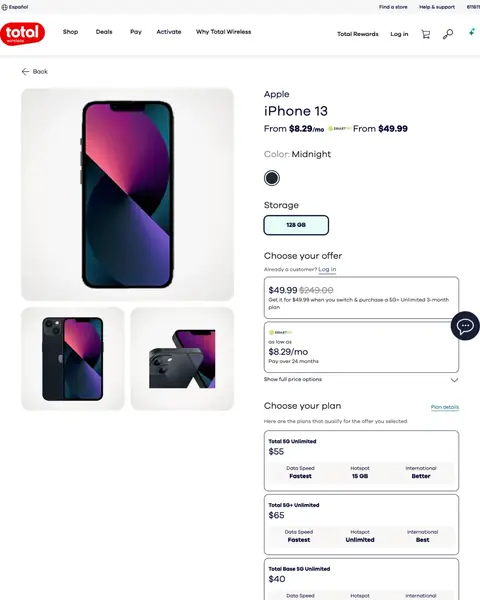
  1. A search for the company’s own name

    Phone page with plans from $40 to $65

    A visitor who searched for a phone deal reaches a product page with three prices. The monthly plan cost shows lower down.

    • Price clutter‘$49.99’ and ‘$8.29/mo’ lead the page, then plans at $55, $65 and $40 follow.
    • Cheapest plan lastThe plan list starts at $55 and the $40 plan is the last card.
    • Spec sheetFrom ‘Overview’ down, the page lists chip and camera facts a plan buyer must scroll past.
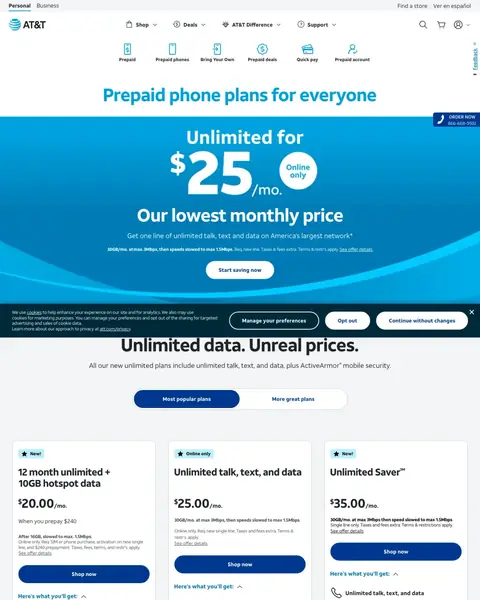
  2. att.com prepaid

    Hero price conflicts with the cards below

    A visitor who searched for prepaid plans sees $25 as the lowest price. The first card under it shows $20.00 a month.

    • Two lowest pricesThe hero says ‘Our lowest monthly price’ for $25, then the first card shows $20.00/mo.
    • Slow-down in fine printThe hero says unlimited. The slow-down after 30GB shows only in small print.
    • Exit linksA menu and six icon links show above the headline.
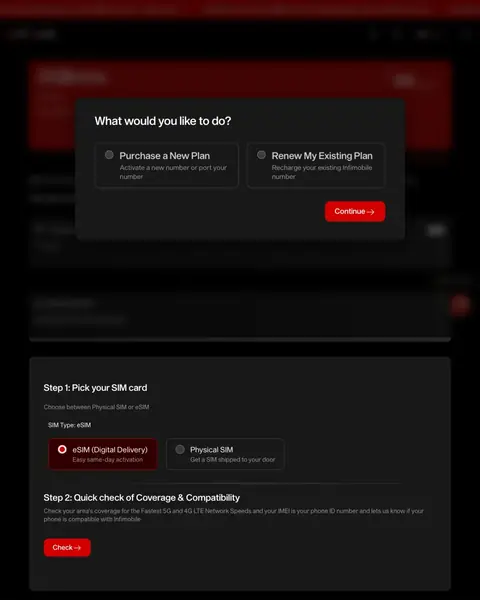
  3. us mobile operator

    Question box covers the page

    A visitor must answer ‘What would you like to do?’ before seeing a plan. The clear part of the page shows no price.

    • Question firstThe box asks ‘Purchase a New Plan’ or ‘Renew My Existing Plan’ before any plan shows.
    • No price in viewThe visible page shows SIM steps and no price figure.
    • Phone ID checkStep 2 asks a buyer to check coverage and phone compatibility with a phone ID number.

What we learned.

  1. Put the price in the first screen

    Mint prints ‘AT $15/MO’ in the headline. Boost shows ‘$10/MONTH FOR THE FIRST 3 MONTHS’ and ‘Then $25/mo Forever.’

  2. Say what the bill will be

    Visible shows ‘Taxes & fees included’ under each price. Cricket says ‘Monthly taxes included.’ A buyer sees the number on the bill.

  3. Show the network behind the plan

    Visible says ‘Three unlimited plans, all on Verizon's network’. Metro says ‘Metro runs on T-Mobile, America's Best Network.’

The bottom line

The cell phone plan pages here that win put a price in the first screen, say how taxes and fees are billed and show the network. The losers send a search to a phone spec sheet, a hero price their own cards contradict or a question box.

Postclick is live

Now check your own page

Paste the URL your own ads point at. Postclick reads it the way we read these 59 pages, shows what is costing you signups and sales and draws new versions to look at. Your first audit and two design directions are free.

Audit my wireless landing page

No card required.

Visit the live page