
The 9 winners.

The landing pages actually worth stealing from.

Winner #1: purple.com

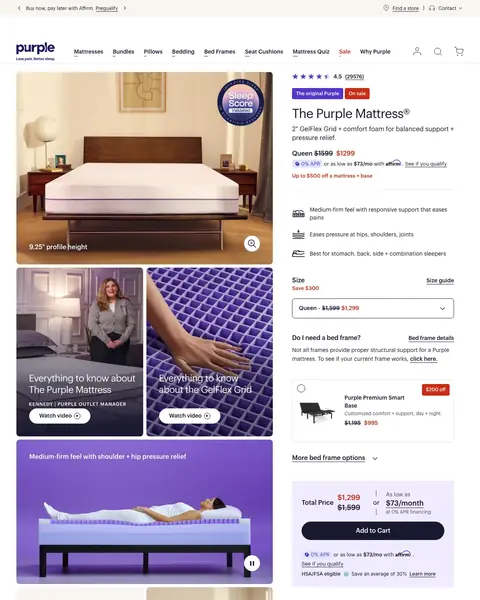
purple.com/mattresses/purple-bed

DTC landing page example from purple.com
  1. 1

    What works

    Star rating with 29,576 reviews

    The rating line shows 4.5 stars from 29,576 reviews above the product name. A buyer sees the proof before the price.

  2. 2

    What works

    Sale price and monthly cost together

    The price block shows Queen at $1299, down from $1599, with $73/mo under it. A buyer sees the total and the monthly cost in one look.

  3. 3

    What gets in the way

    Bed frame questions before Add to Cart

    The page asks ‘Do I need a bed frame?’ and shows a $995 smart base between the size menu and the buy button. A mattress-only buyer scrolls past both.

  4. 4

    What works

    Trial, warranty and shipping beside the buy button

    The guarantee list shows a 100 night trial, a 10 year warranty and free shipping in 1-2 days. A buyer sees the risk is low.

  5. 5

    What works

    Review quote with a 22K count

    A customer quote is under the line ‘This mattress has over 22K 5-star reviews!’ with a Read all reviews button. The count and a real voice come together.

What to try

Move the bed comparison higher

‘Compare Comfort’ shows three beds with prices, and it starts near 2,500 pixels. A buyer who is unsure of the model sees it only after a long scroll.

See the original page


Winner #2: ca.warbyparker.com

ca.warbyparker.com/sunglasses

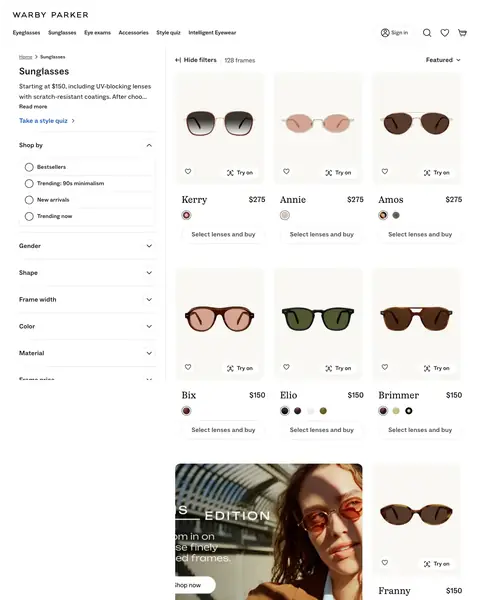
DTC landing page example from ca.warbyparker.com
  1. 1

    What works

    Starting price in the intro

    The intro says ‘Starting at $150, including UV-blocking lenses’. A buyer learns the lowest cost and that lenses are in it.

  2. 2

    What works

    Try on button on each photo

    Each frame photo has a ‘Try on’ button. A buyer can test a frame before choosing lenses.

  3. 3

    What works

    Name and price on every card

    Each card shows a frame name with a price, $275 or $150. A buyer compares cost without opening a page.

  4. 4

    What works

    Buy button on each frame card

    Every card ends with ‘Select lenses and buy’ under the colour dots. The next step is on the card.

  5. 5

    What gets in the way

    Banner text cut off at the left edge

    The banner shows ‘EDITION’ and ‘Shop now’, and the first letters of each line are missing. A buyer cannot read the full message.

What to try

Add a star rating to each card

The cards in the first rows show a name, a price and a buy button. A rating line under the name would add proof where buyers compare.

See the original page

Winner #3: zennioptical.com

zennioptical.com/b/all-glasses

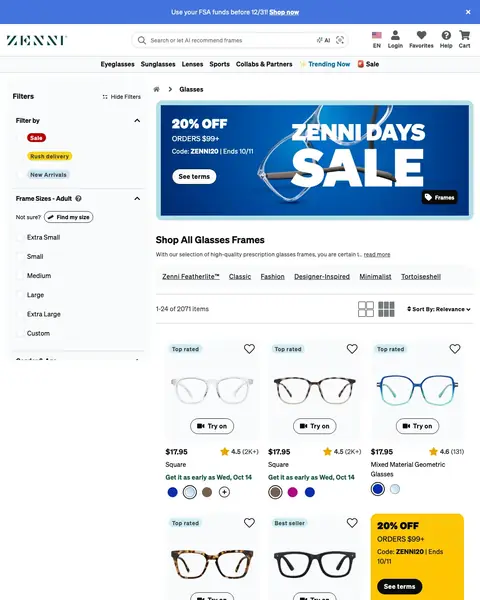
DTC landing page example from zennioptical.com
  1. 1

    What gets in the way

    Two offers compete in the first screen

    A top strip says ‘Use your FSA funds before 12/31!’ and the banner below offers 20% off with a code. A buyer must decide which offer applies.

  2. 2

    What works

    Sale banner with a code and an end date

    The banner shows 20% off orders of $99+ with the code ZENNI20 and an end date. A buyer gets the saving, the rule and the deadline in one place.

  3. 3

    What works

    Price and star rating on one line

    Each card shows a price like $17.95 with a star rating and a review count. A buyer weighs cost and proof together.

  4. 4

    What works

    Delivery date on each card

    Each card shows in green when the glasses arrive, such as Wed, Oct 14. A buyer knows the date before opening the product.

  5. 5

    What works

    Quiz tile inside the product grid

    A ‘Find your frame match’ tile with a Take quiz button is among the frame cards. A buyer who cannot choose has a next step.

What to try

Sort the grid by best seller first

The grid is sorted by ‘Relevance’ and shows 2071 items. Best sellers first would put proven frames in the first row.

See the original page

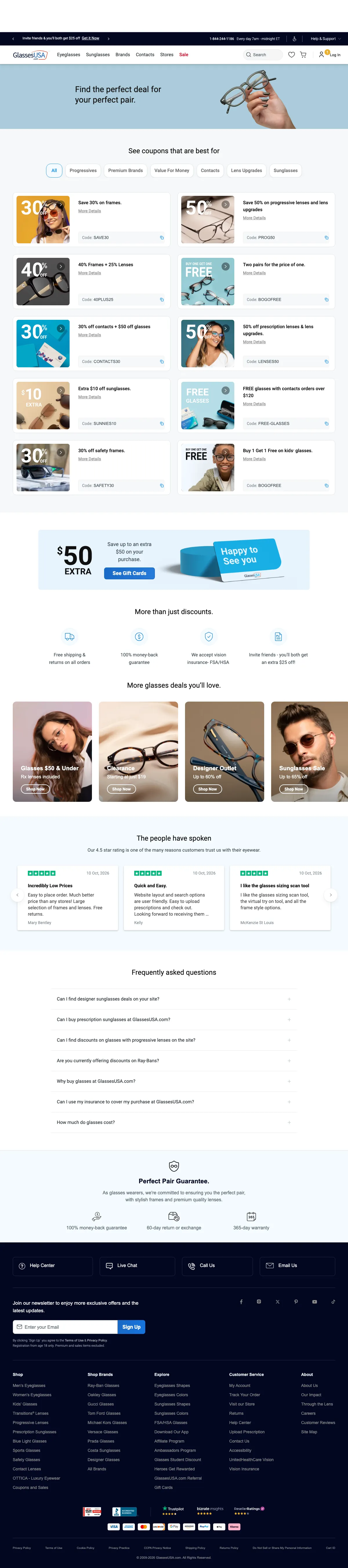
Winner #4: glassesusa.com

glassesusa.com/coupons-and-promotions

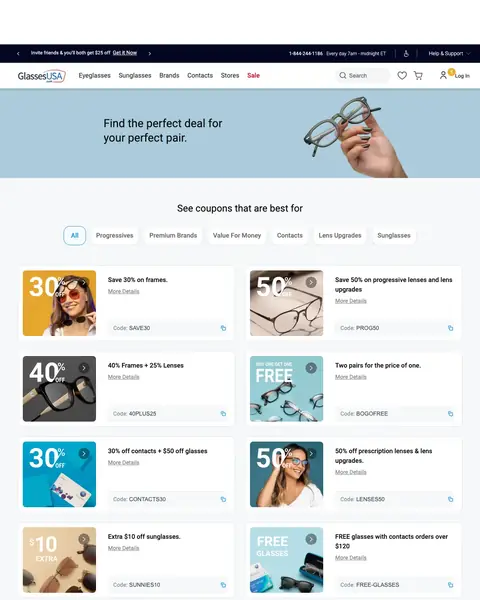
DTC landing page example from glassesusa.com
  1. 1

    What gets in the way

    Hero has a photo and no offer

    The hero says ‘Find the perfect deal for your perfect pair.’ with a photo and no coupon. The first code starts below it.

  2. 2

    What works

    Filter chips for each kind of buyer

    Chips under ‘See coupons that are best for’ list Progressives, Contacts and Sunglasses. Each buyer reaches the coupon for their need.

  3. 3

    What works

    Discount, scope and code on one card

    The first card says ‘Save 30% on frames.’ with the code SAVE30 and a copy icon. A buyer gets the deal and the code in one place.

  4. 4

    What works

    Shipping and guarantee icons under the coupons

    Under ‘More than just discounts.’ four icons list free shipping and returns, a money-back guarantee and vision insurance. They answer the last doubts.

  5. 5

    What works

    Review cards with a 4.5 star rating

    The section says ‘Our 4.5 star rating’ and shows three five-star reviews with names and dates. A buyer sees recent customers.

What to try

Put the best code in the hero

The 30% code SAVE30 starts at 400 pixels, under a hero with no offer. The hero is the place for the strongest code.

See the original page

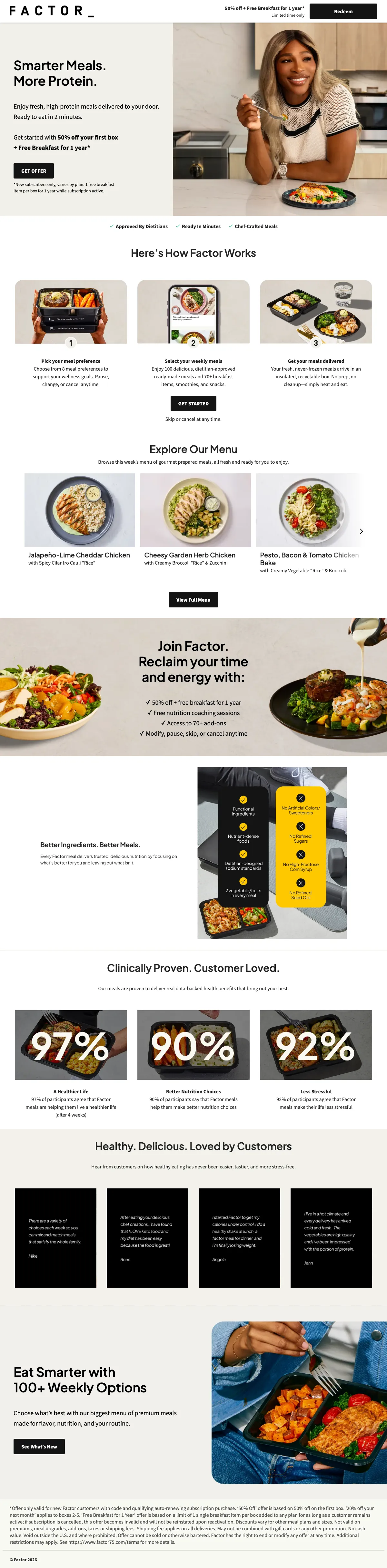
Winner #5: factor75.com

factor75.com/pages/meal-delivery

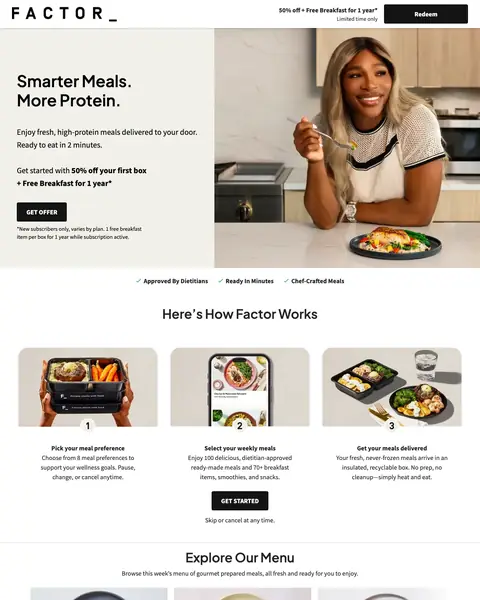
DTC landing page example from factor75.com
  1. 1

    What works

    Headline in four words

    The headline says ‘Smarter Meals. More Protein.’ That states what the food does. A buyer sees the reason to choose it before the offer.

  2. 2

    What works

    Offer line above the button

    The offer is 50% off the first box plus a free breakfast for a year, right above the GET OFFER button. An asterisk points to terms under the button.

  3. 3

    What works

    Three steps with a button after them

    The page shows three steps with photos, then a GET STARTED button and ‘Skip or cancel at any time.’ A buyer sees how it works and that leaving is easy.

  4. 4

    What works

    Survey results with the wait time

    The survey result reads 97% of participants agree, with ‘(after 4 weeks)’ added. The group and the time are stated, so the number is easier to believe.

  5. 5

    What gets in the way

    Offer limits in small type at the bottom

    ‘Shipping fee applies on all deliveries’ is in the small print. A buyer sees 50% off at the top long before this line.

What to try

Show a weekly price near the offer

The page shows no dollar price anywhere, so the 50% has nothing to cut. A price per meal gives the number a base.

See the original page

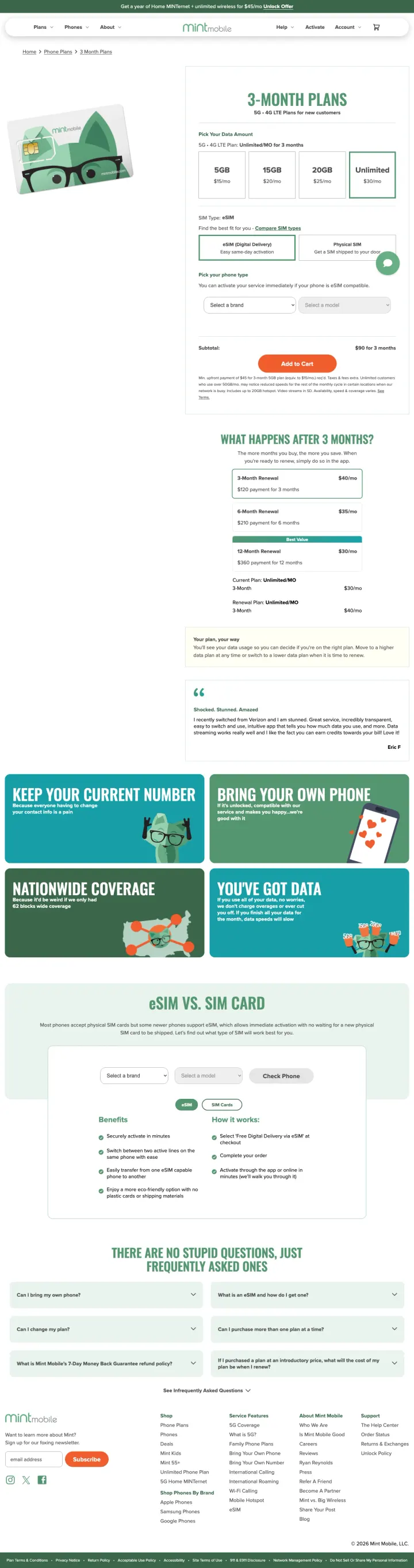
Winner #6: mintmobile.com

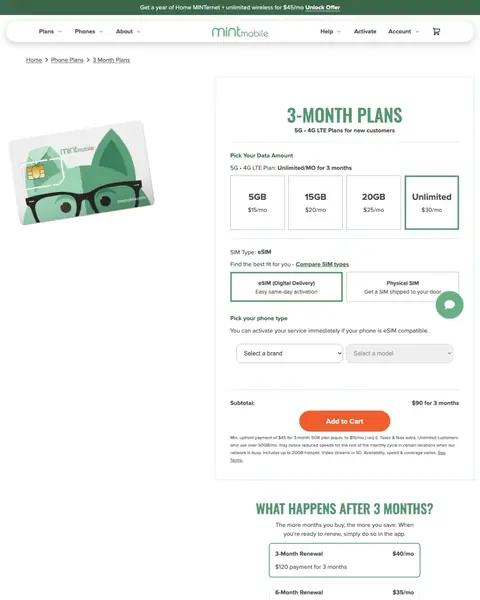
mintmobile.com/phone-plans/3-month-plans?selected=MINT-UNLIMITED-03

DTC landing page example from mintmobile.com
  1. 1

    What works

    Top strip with a monthly price

    The strip offers a year of home internet plus unlimited wireless for $45/mo. A buyer sees a price in the first line of the page.

  2. 2

    What works

    Heading says the plan length

    The heading says ‘3-MONTH PLANS’ with ‘for new customers’ under it. A buyer learns which plan this is and who it is for.

  3. 3

    What works

    Four data tiers with prices side by side

    The tiers list 5GB at $15/mo, 15GB at $20/mo, 20GB at $25/mo and Unlimited at $30/mo. A buyer compares all four at once.

  4. 4

    What works

    SIM choice with a delivery line

    The two cards say ‘Easy same-day activation’ for eSIM and ‘Get a SIM shipped to your door’ for a physical SIM. Each choice has its speed.

  5. 5

    What gets in the way

    Chat button overlaps the SIM card

    The green chat button covers the corner of the SIM card choice. A buyer who taps that corner may open a chat by mistake.

What to try

Show the 3 month total beside each tier

Tiers show $15/mo to $30/mo, and the ‘$90 for 3 months’ subtotal is lower by the Add to Cart button. The total belongs next to the tier.

See the original page

Winner #7: casper.com

casper.com/mattresses/casper-original

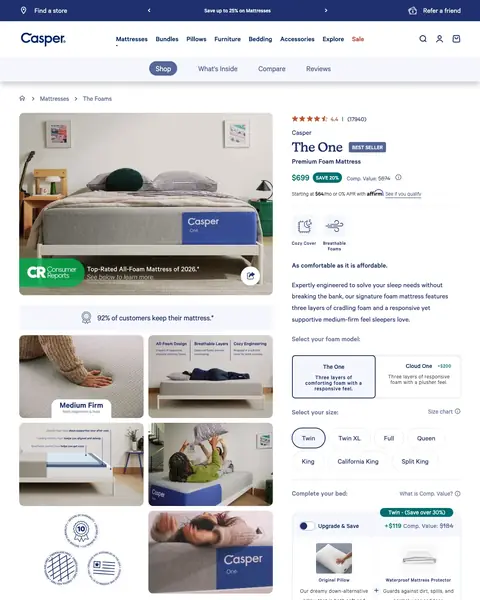
DTC landing page example from casper.com
  1. 1

    What works

    Rating, price and saving beside the photo

    The buy block shows 4.4 stars from 17940 reviews, $699, ‘SAVE 20%’ and a comparison value of $874. A buyer sees proof and price together.

  2. 2

    What works

    Consumer Reports badge on the photo

    A badge on the bed photo says ‘Top-Rated All-Foam Mattress of 2026.’ Outside proof is on the first picture.

  3. 3

    What works

    Keep rate in a band under the photo

    The band says ‘92% of customers keep their mattress.’ with a star note. It answers the fear of a wrong choice.

  4. 4

    What gets in the way

    Add-ons shown before the subtotal

    Between the size buttons and the subtotal the page shows a pillow and a mattress protector with a ‘+$119’ upgrade. A buyer must decide on extras before buying.

  5. 5

    What works

    Payment plans under Add to cart

    Under Add to cart the page shows ‘Starting at $64/mo or 0% APR with Affirm’ and a weekly Katapult option. A buyer sees low payments at the moment of purchase.

What to try

Show the phone number near the price

‘Got Questions? Talk to a Sleep Specialist’ and a phone number appear below Add to cart, near 1,300 pixels. A buyer with a question at the price has to scroll.

See the original page
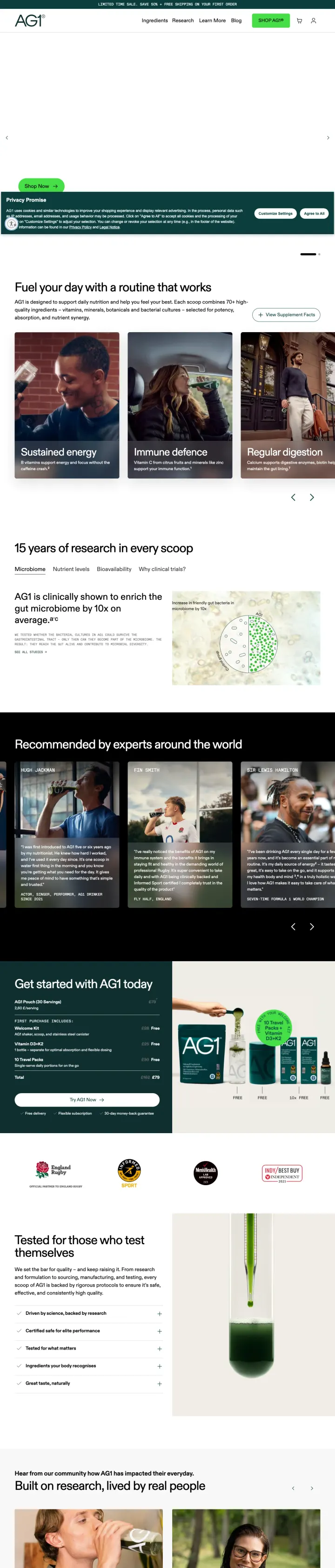
Winner #8: drinkag1.com

drinkag1.com/start

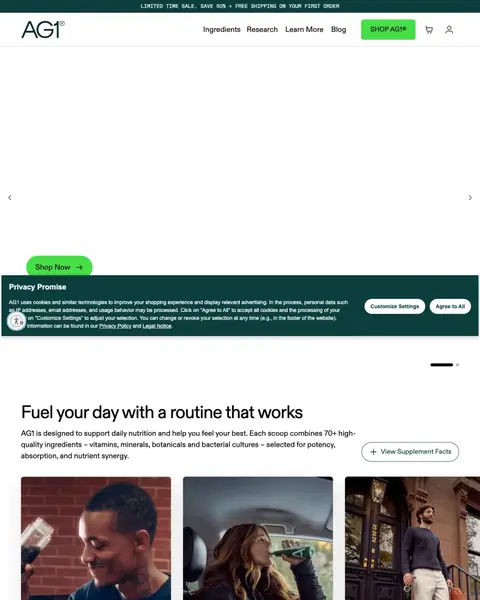
DTC landing page example from drinkag1.com
  1. 1

    What works

    Sale strip with 50% and free shipping

    The top strip says ‘LIMITED TIME SALE. SAVE 50% + FREE SHIPPING ON YOUR FIRST ORDER’. The saving and the shipping offer come in one line.

  2. 2

    What works

    Headline and a one-line summary

    ‘Fuel your day with a routine that works’ is followed by a summary of 70+ ingredients. A buyer learns what is in each scoop.

  3. 3

    What works

    Three benefit cards with photos

    The cards say ‘Sustained energy’, ‘Immune defence’ and ‘Regular digestion’, each over a person drinking. A buyer picks the benefit that matters to them.

  4. 4

    What works

    Research claim with a chart

    ‘15 years of research in every scoop’ comes with a chart of gut bacteria. The 10x claim has a picture behind it.

  5. 5

    What works

    Quote cards from named experts

    ‘Recommended by experts around the world’ shows an actor, a rugby player and a Formula 1 champion, each with a photo and a quote.

What to try

Move the 10x gut claim above the cards

‘clinically shown to enrich the gut microbiome by 10x on average’ starts below 1,250 pixels. The benefit cards before it show photos and no figure.

See the original page

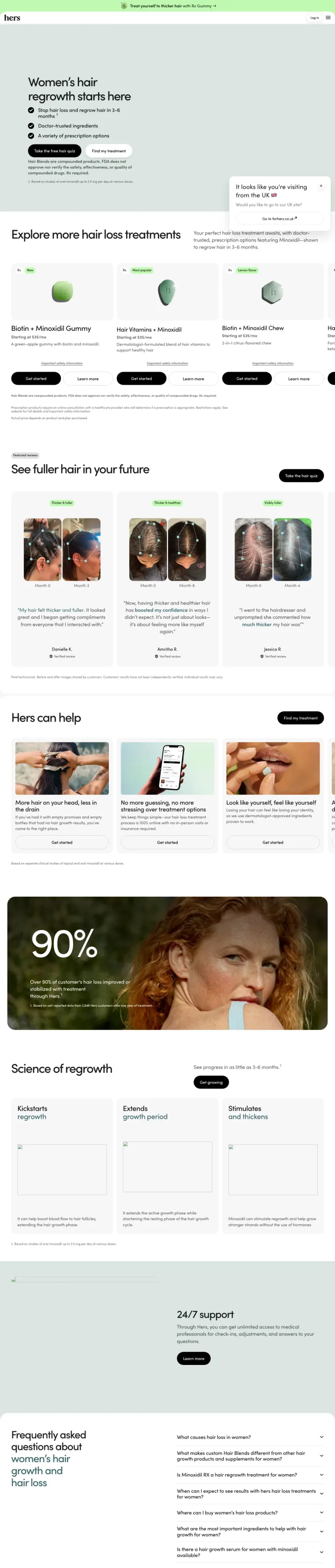
Winner #9: forhers.com

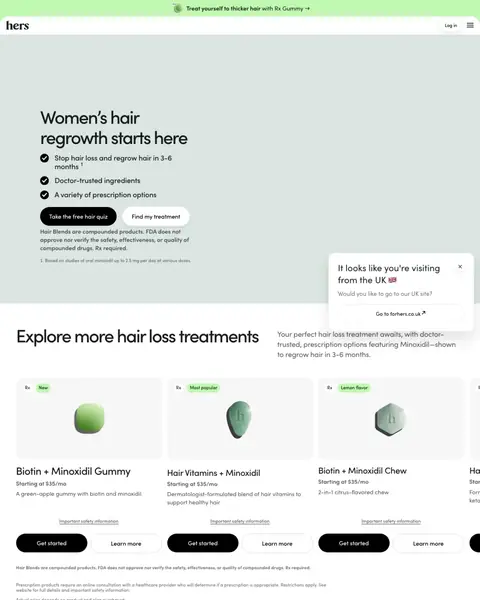
forhers.com/hair-loss

DTC landing page example from forhers.com
  1. 1

    What works

    Headline says who the page is for

    The headline says ‘Women’s hair regrowth starts here’. It states the buyer and the result, so a visitor knows at once that the page fits.

  2. 2

    What works

    Three checkmark lines under the headline

    The lines say ‘Stop hair loss and regrow hair in 3-6 months’, ‘Doctor-trusted ingredients’ and ‘A variety of prescription options’. Each answers one doubt.

  3. 3

    What works

    Quiz button and treatment button

    Two buttons say ‘Take the free hair quiz’ and ‘Find my treatment’. A buyer who is unsure starts the quiz and one who knows goes to the products.

  4. 4

    What gets in the way

    Results claim backed by a tiny footnote

    The footnote says ‘Based on studies of oral minoxidil up to 2.5 mg per day’ in very small type. A buyer must squint to see what the regrowth claim rests on.

What to try

Put a price in the hero

The hero shows a quiz button and three checkmarks. ‘Starting at $35/mo’ appears on the product cards below it.

See the original page

What the 9 winners do.

  1. Show a price in the first screen

    5 of 9
  2. Say the saving as a number

    6 of 9
  3. Show a star rating near the top

    3 of 9
  4. Offer a quiz or a try-on

    3 of 9

Wildcards.

Pages that break the playbook in interesting ways.

Wildcard #1: glassesusa.com

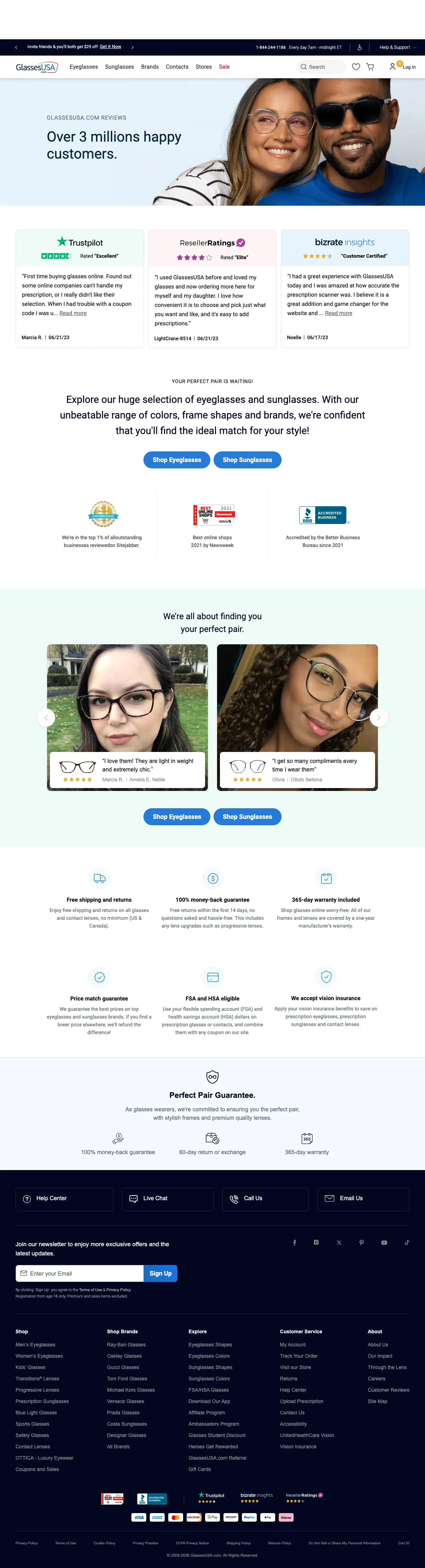
glassesusa.com/glassesusa-reviews

DTC landing page example from glassesusa.com
  1. 1

    What it gets wrong

    Headline has an extra s

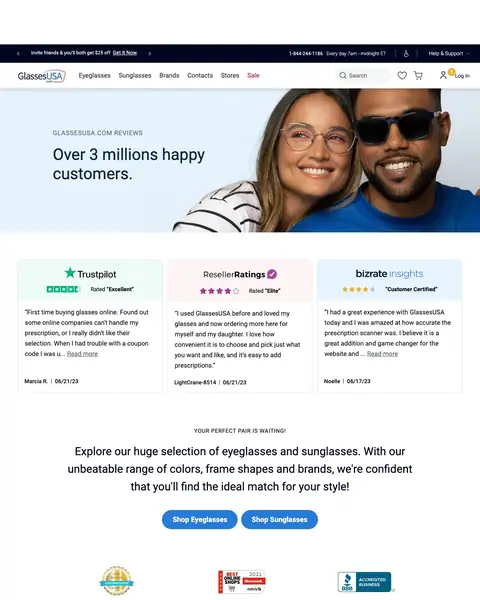
    ‘Over 3 millions happy customers.’ has an extra s on ‘millions’. A slip in the largest words can make a buyer doubt the page.

  2. 2

    What makes it work

    Three review sites with dated quotes

    Cards from Trustpilot, ResellerRatings and Bizrate show a rating label and a quote with a name and a date. A buyer compares three sources.

  3. 3

    What makes it work

    Two shop buttons right after the reviews

    ‘Shop Eyeglasses’ and ‘Shop Sunglasses’ come straight after the review cards. A buyer who trusts the reviews can start shopping at once.

  4. 4

    What makes it work

    Customer photos with the frame they bought

    Each card shows a customer photo, five stars, a quote and the frame name. A buyer sees the glasses on a real face.

  5. 5

    What makes it work

    Six buyer guarantees in a grid

    The grid lists free shipping, a 14-day money-back return, a 365-day warranty, price match, FSA and HSA, and vision insurance.

What to try

Add a starting price beside the shop buttons

The page shows ‘Shop Eyeglasses’ and ‘Shop Sunglasses’ with no frame price beside them. A buyer who trusts the reviews still cannot see a cost.

See the original page

Wildcard #2: purple.com

purple.com/mattress-sizes-dimensions

DTC landing page example from purple.com
  1. 1

    What makes it work

    Six bed drawings with measurements

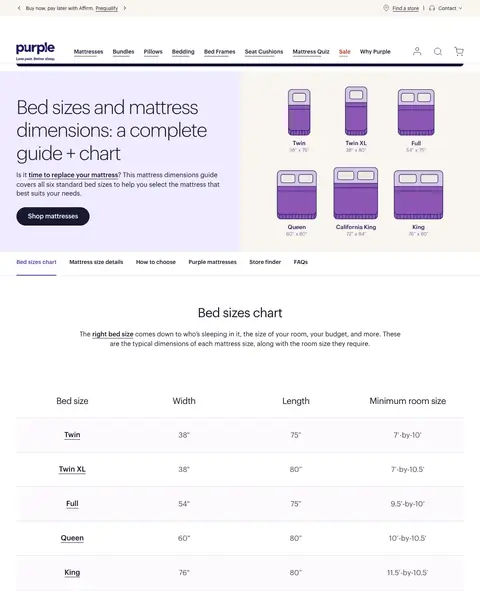
    The hero draws Twin, Twin XL, Full, Queen, California King and King with their sizes. A buyer sees every size in one look.

  2. 2

    What makes it work

    Headline says what the page is

    The headline says ‘Bed sizes and mattress dimensions: a complete guide + chart’. A visitor learns the page covers every size.

  3. 3

    What makes it work

    Size chart with a room size column

    The table lists width, length and minimum room size for six sizes. A buyer checks that a bed fits the room.

  4. 4

    What makes it work

    A starting price in every size section

    Each size lists dimensions, room size, who it suits and a price, for example ‘starting at $999’ for Twin. A buyer gets the cost with the size.

  5. 5

    What makes it work

    Shop button after each size

    A shop button ends the Twin section, and the same kind of button ends each other size. A buyer who has found the size can buy.

What to try

Put the starting prices in the first chart

The chart at 600 pixels shows width, length and room size. The starting prices come in the sections below it.

See the original page

The copy bank.

Headlines

  • “Smarter Meals. More Protein.”

    factor75.com

  • “Bed sizes and mattress dimensions: a complete guide + chart”

    purple.com

  • “Find the perfect deal for your perfect pair.”

    glassesusa.com

Offers

Trust lines

  • “100 night trial to love your mattress.”

    purple.com

  • “Lowest price guarantee or we'll match it.”

    purple.com

  • “92% of customers keep their mattress.”

    casper.com

Buttons

3 pages that waste the click.

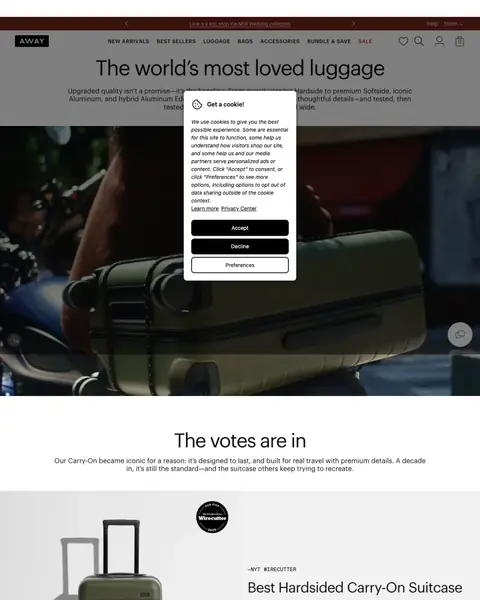
  1. A search for the company’s own name

    Praise page with no price

    The page starts with ‘The world’s most loved luggage’, then press quotes and reviews. It shows no dollar price for any bag.

    • No priceThe 3,375-pixel page shows no dollar price.
    • Praise first‘The votes are in’ and a press quote come before any product choice.
    • Late compare‘Compare Carry-Ons’ and ‘Compare Checked’ are links near 2,100 pixels, below the reviews.
  2. A search for the company’s own name

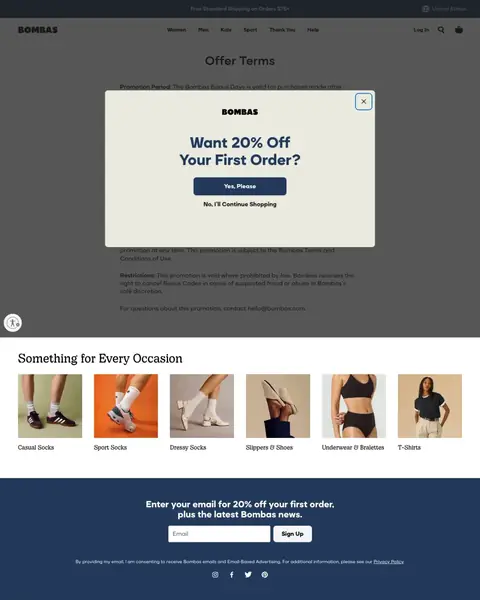
    Terms page used as a landing page

    The page starts with ‘Offer Terms’ and legal text. A visitor who clicked an ad finds no product, only rules.

    • Legal text first‘Offer Terms’ and ‘Restrictions’ fill the first 500 pixels.
    • Offer in a pop-up‘Want 20% Off Your First Order?’ is a box over the terms with Yes, Please and No, I’ll Continue Shopping.
    • Products far down‘Something for Every Occasion’ and the first category links start near 530 pixels.
  3. A search for the company’s own name

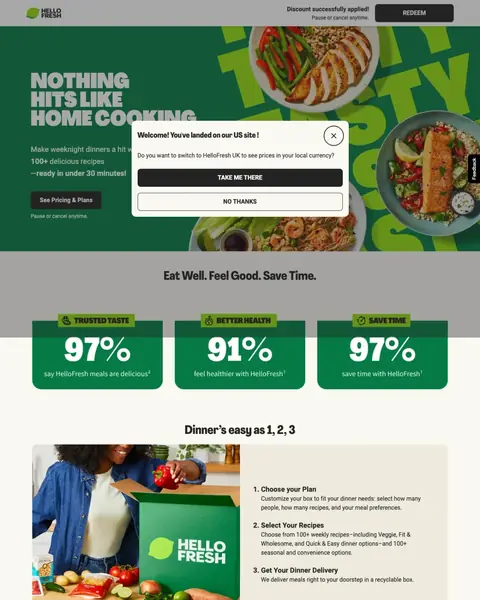
    Pricing button with no price on the page

    The button repeats ‘See Pricing & Plans’, and no dollar amount shows on the 2,065-pixel page. A buyer must click to learn the cost.

    • No priceNo dollar amount shows anywhere, though the pricing button appears three times.
    • Offer in fine printThe ‘10 Free Meals’ offer first appears in a footnote near 1,900 pixels.
    • Proof far from claimThe 97%, 91% and 97% figures at 500 pixels get their survey notes near 2,000 pixels.

What we learned.

  1. Put the price where the buyer looks first

    Casper shows $699 beside 4.4 stars. Mint lists four tiers from $15/mo to $30/mo. Warby Parker says ‘Starting at $150’ in its intro.

  2. Say the saving as a number

    GlassesUSA prints SAVE30 on a 30% card. Zenni shows 20% off orders of $99+ with the code ZENNI20. Factor says 50% off the first box.

  3. Show proof next to the buy button

    Purple lists a 100 night trial and a 10 year warranty beside Add to Cart. Casper shows 4.4 stars from 17940 reviews next to its price.

The bottom line

The DTC pages here that win put a real price in the first screen, say the saving as a number and show proof beside the buy button. The losers send paid clicks to a praise page, a terms page or a pricing button with no price.

Postclick is live

What a new visitor sees on your page

Paste the URL your own ads point at. Postclick reads it the way we read these 63 pages, shows what is costing you sales and draws new versions to look at. Your first audit and two design directions are free.

Read my DTC page

No card required.

Visit the live page