
The 5 winners.

The landing pages actually worth stealing from.

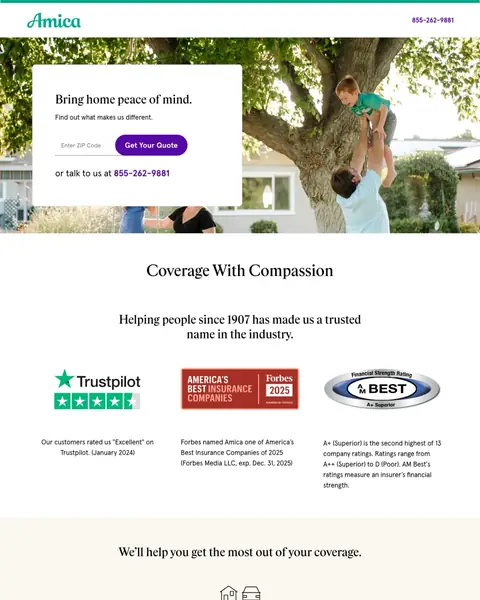
Winner #1: amica.com

amica.com/content/marketing/landing-page/coverage/home.html
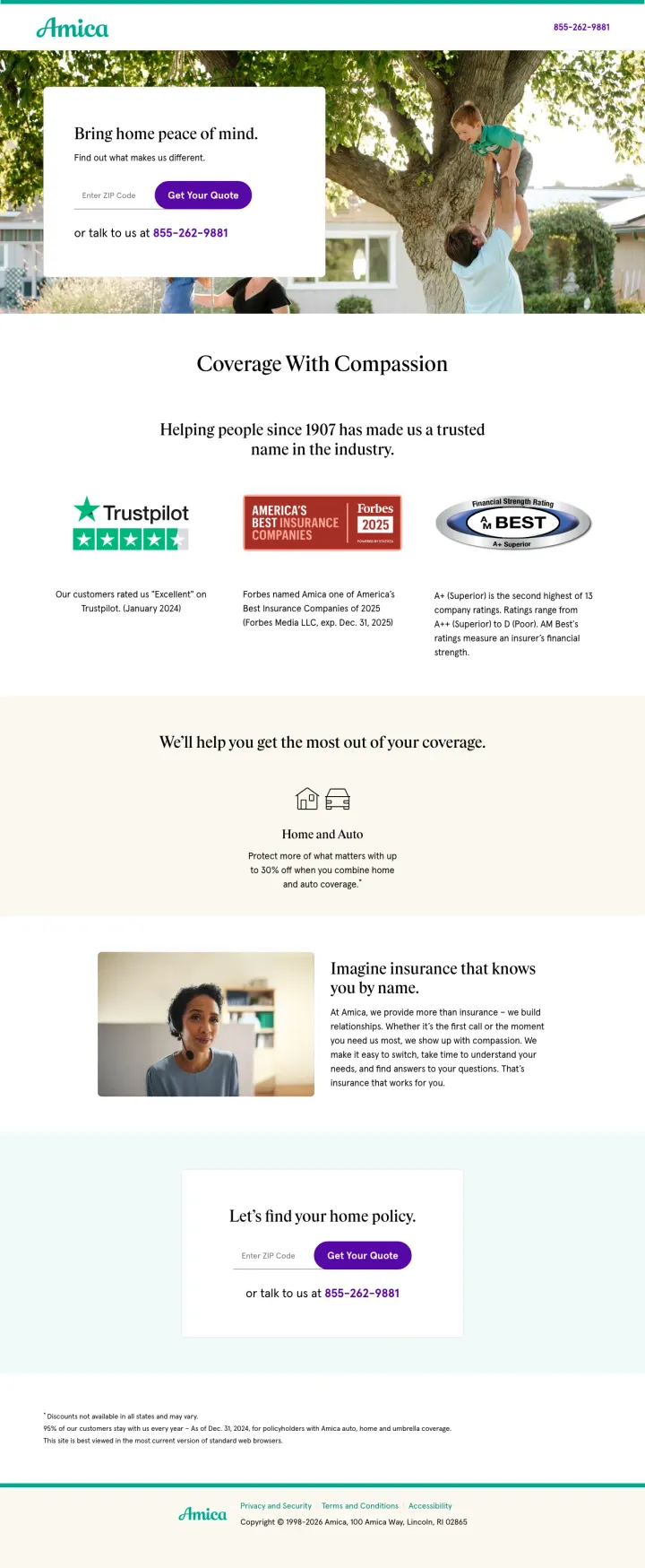
Home Insurance landing page example from amica.com
  1. 1

    What works

    Phone number in the top corner

    The top corner shows 855-262-9881. A buyer who wants a person can call before reading anything.

  2. 2

    What gets in the way

    Headline has no price or time

    ‘Bring home peace of mind.’ is a feeling with no number. A buyer with five tabs open cannot compare it to anything.

  3. 3

    What works

    One ZIP field and a quote button

    The hero has a ZIP field and a ‘Get Your Quote’ button. A buyer starts a quote with one small answer.

  4. 4

    What works

    Three outside ratings in one row

    Trustpilot, Forbes and AM Best sit in one row, each with a line of detail. A buyer sees outside proof just below the hero.

  5. 5

    What works

    Second quote box at the bottom

    ‘Let's find your home policy.’ repeats the ZIP field, the button and the phone number. A buyer who scrolled does not have to go back up.

What to try

Three ratings in one row

Amica puts Trustpilot, Forbes and AM Best in one row under its hero. Put your best three outside ratings in one row below your first screen.

See the original page
Winner #2: libertymutual.com

libertymutual.com/multi-online-quotes

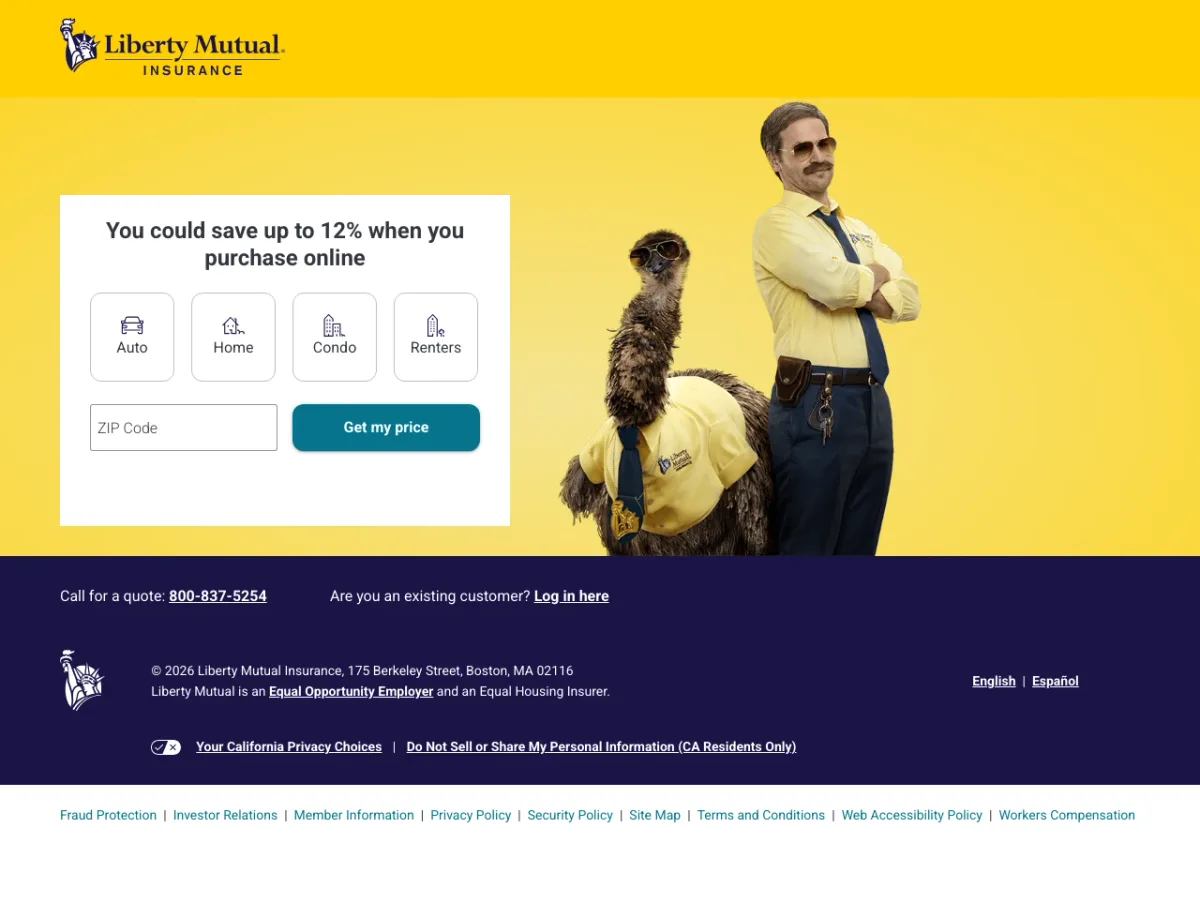
Home Insurance landing page example from libertymutual.com
  1. 1

    What works

    Savings figure in the headline

    The headline says ‘You could save up to 12% when you purchase online’. A buyer sees a reason to quote on this page.

  2. 2

    What works

    Four product icons above the ZIP box

    Auto, Home, Condo and Renters are icons above the field. A buyer picks a product with one click.

  3. 3

    What works

    One ZIP field and a price button

    The only field is a ZIP code. A buyer comparing sites can start in seconds.

  4. 4

    What gets in the way

    Phone number is small and below the form

    ‘Call for a quote: 800-837-5254’ is small text under the hero. A buyer who wants to talk has to look for it.

What to try

Product icons above one field

Liberty Mutual lists Auto, Home, Condo and Renters above a ZIP box. Put a row of product choices above your first field.

See the original page

Winner #3: tgsinsurance.com

tgsinsurance.com/lp3

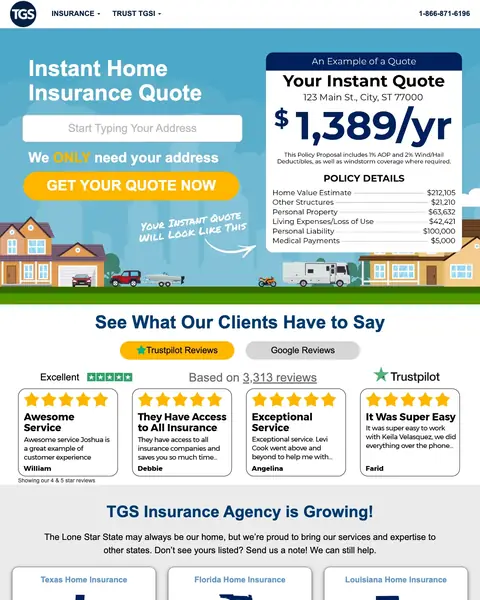
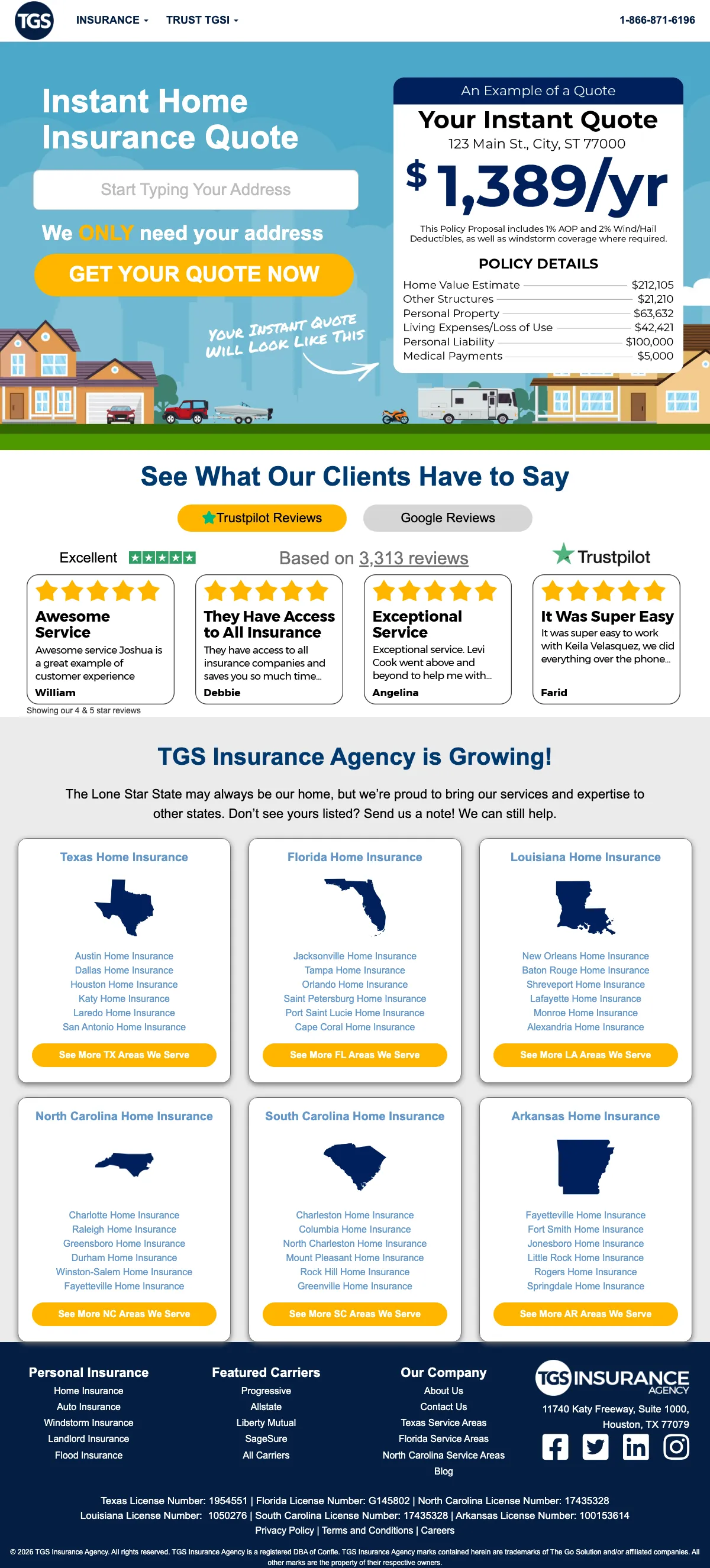
Home Insurance landing page example from tgsinsurance.com

The search: cheapest homeowners insurance in ga

Sponsored tgsinsurance.com

Home Insurance - Fast & Cheap | New Carriers, Lower Rates 2026

  1. 1

    What works

    Sample quote with a real price

    The card shows ‘$1,389/yr’ with a breakdown, such as $63,632 for personal property and $100,000 for liability. A buyer sees a price before typing.

  2. 2

    What works

    Headline matches the ad

    The ad offered an instant home insurance quote. The headline says ‘Instant Home Insurance Quote’, so the click matches the page.

  3. 3

    What works

    One address field and a big button

    The only field is an address, beside a yellow ‘GET YOUR QUOTE NOW’ button. The first step is small.

  4. 4

    What works

    Trustpilot score and four reviews

    The page shows ‘Excellent’ and ‘Based on 3,313 reviews’ with four review cards. The proof is just below the form.

  5. 5

    What gets in the way

    Search was Georgia, page lists six other states

    The search ended in ‘ga’. The page lists Texas, Florida, Louisiana and three more states, and says ‘Don't see yours listed? Send us a note!’

What to try

Sample quote next to the form

TGS shows a ‘$1,389/yr’ sample policy next to its address box. Put a real price example where a buyer is about to type.

See the original page

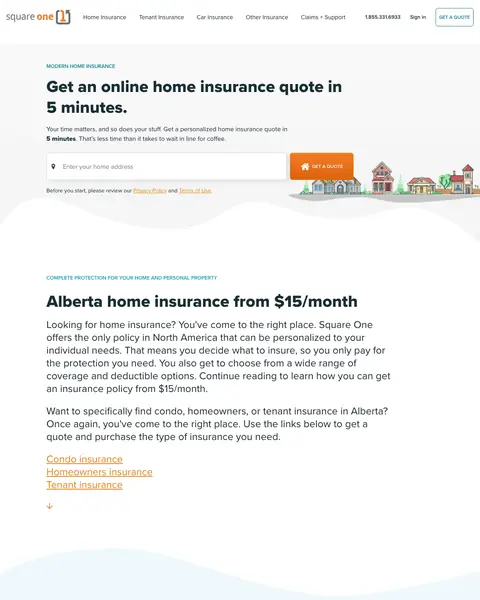
Winner #4: squareone.ca

squareone.ca/home/alberta

Home Insurance landing page example from squareone.ca
  1. 1

    What works

    Headline says 5 minutes

    The first line is ‘Get an online home insurance quote in 5 minutes.’ A buyer knows the time cost.

  2. 2

    What gets in the way

    Price is below the quote form

    The top block has a form and a time promise. ‘Alberta home insurance from $15/month’ is in the next block down.

  3. 3

    What works

    95,177 verified reviews

    The page shows 95,177 verified reviews beside customer quotes. The big number is quick proof for a first-time buyer.

  4. 4

    What works

    Recent policies with monthly prices

    Recent policies list $137/month and $17/month, each with a town and its cover. A buyer can compare a price to their own home.

  5. 5

    What works

    Customer total next to a second form

    A second address box follows ‘Join over 3,000,000 customers who received home insurance quotes from us’. A buyer who scrolled has a form again.

What to try

Monthly price in the first block

Square One puts ‘$15/month’ below its form. Put the price a buyer pays in the first screen, next to the first field.

See the original page

Winner #5: plymouthrock.com

plymouthrock.com/lp/home/insurance-for-condo-owners-ho6

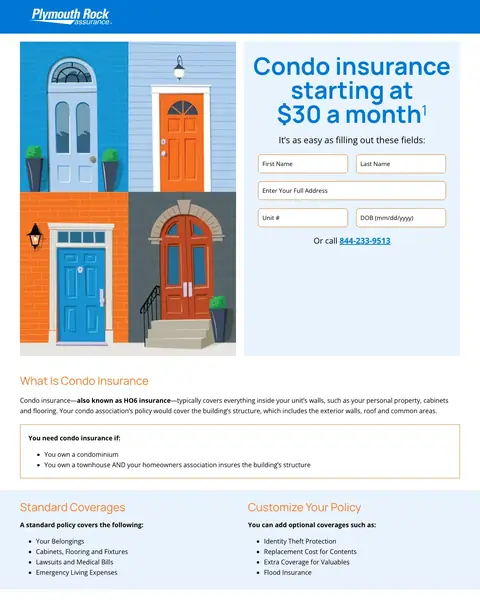
Home Insurance landing page example from plymouthrock.com

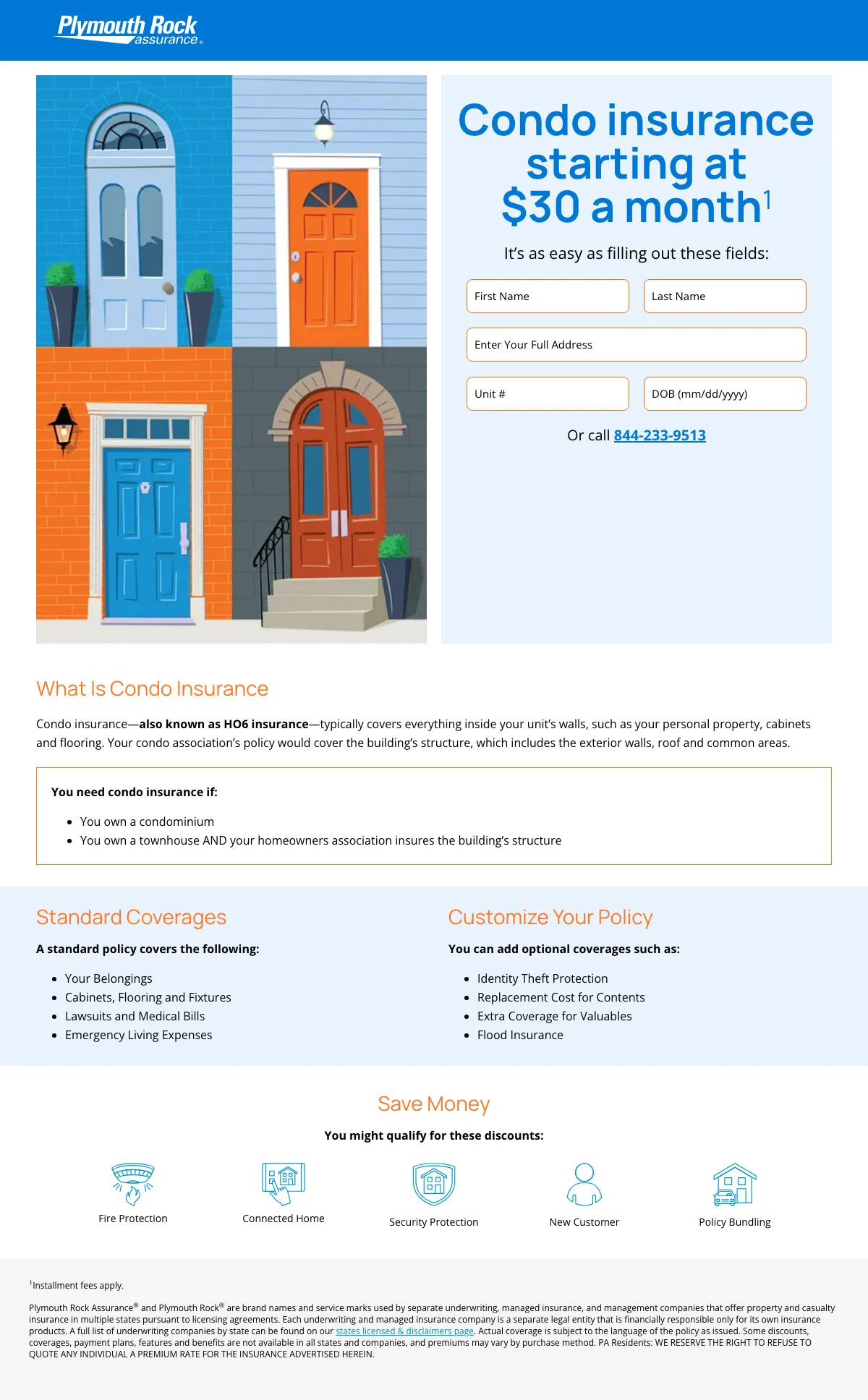
The search: condo insurance in ct

Sponsored plymouthrock.com

Local Condo Coverage - Get Covered in Minutes

  1. 1

    What works

    Headline repeats the search and shows a price

    The search was ‘condo insurance in ct’. The headline says ‘Condo insurance starting at $30 a month’, so the buyer sees a price at once.

  2. 2

    What gets in the way

    Five fields before a quote

    The form has five fields: first name, last name, full address, unit number and date of birth. That is a lot of typing for a first step.

  3. 3

    What works

    Phone number under the form

    ‘Or call 844-233-9513’ is under the fields. A buyer who doesn't want to type has another way in.

  4. 4

    What works

    Plain explainer for condo owners

    An explainer under ‘What Is Condo Insurance’ lists who needs it and what it covers.

  5. 5

    What works

    Standard and optional cover side by side

    One column lists four standard coverages and the other lists four add-ons such as ‘Flood Insurance’ and ‘Identity Theft Protection’.

What to try

Starting price in the headline

Plymouth Rock puts ‘$30 a month’ in its headline. Put your starting price in the headline too.

See the original page

What the 5 winners do.

  1. Phone number on the page

    5 of 5
  2. One field to start a quote

    4 of 5
  3. Number in the first screen

    4 of 5
  4. Product in the headline

    3 of 5

Wildcards.

Pages that break the playbook in interesting ways.

Wildcard #1: nationwide.com

nationwide.com/sem/brand-b3-pey.html

Home Insurance landing page example from nationwide.com

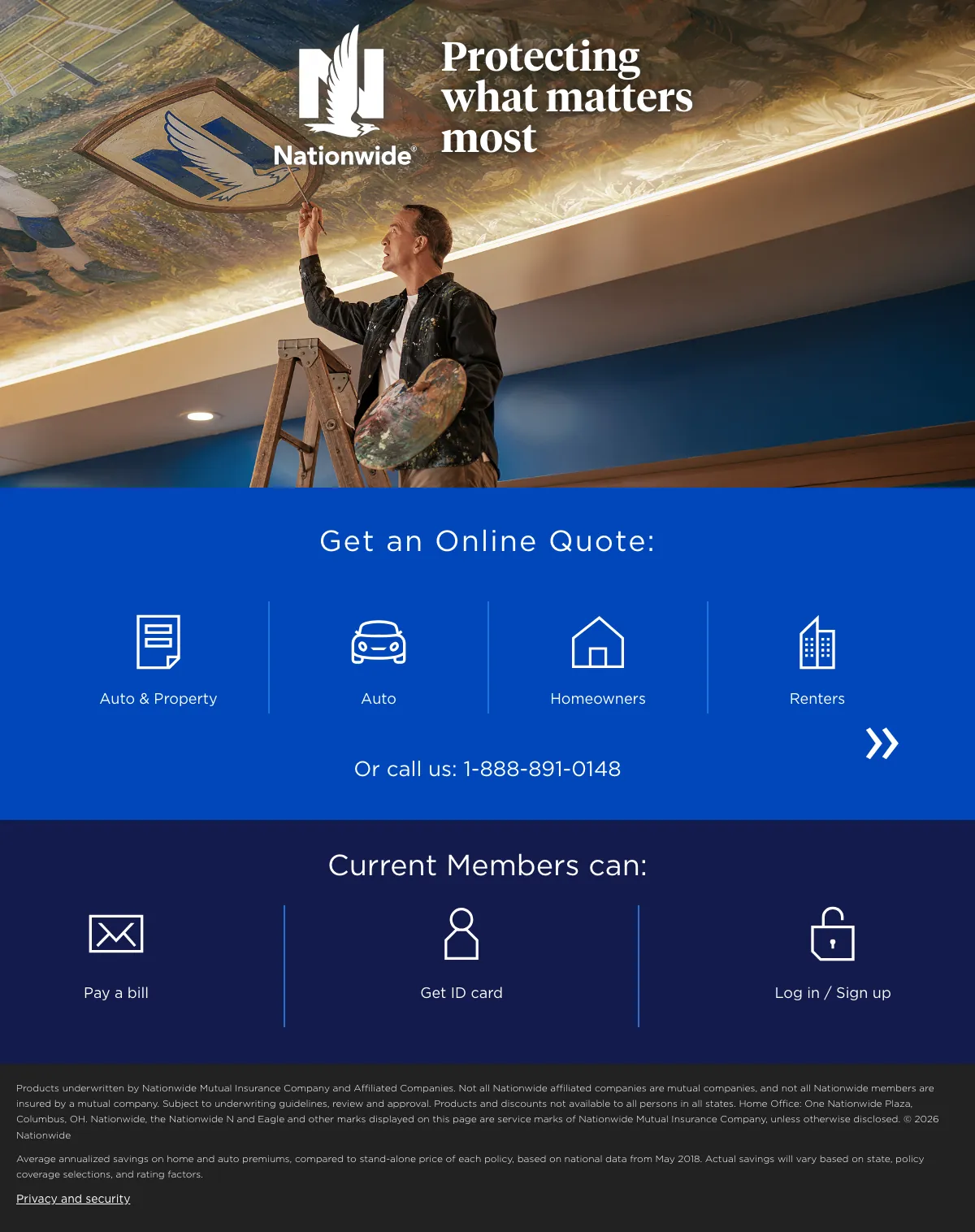
The search: city of phoenix nationwide

Sponsored nationwide.com

Nationwide® Insurance - Nationwide Is On Your Side

  1. 1

    What it gets wrong

    Ad line missing from the headline

    The ad said ‘Nationwide Is On Your Side’. The headline says ‘Protecting what matters most’, and home insurance isn't in either line.

  2. 2

    What makes it work

    Four choices to start a quote

    ‘Get an Online Quote’ is followed by Auto & Property, Auto, Homeowners and Renters. A buyer picks one and starts.

  3. 3

    What makes it work

    Phone number under the choices

    ‘Or call us: 1-888-891-0148’ is under the buttons. A buyer who wants to talk can call.

  4. 4

    What makes it work

    Existing customers have their own band

    The search was ‘city of phoenix nationwide’, so some visitors already have a policy. ‘Current Members can:’ lists links to pay a bill, get an ID card or log in.

What to try

Product choices as the first step

Nationwide asks Auto, Homeowners or Renters before any form. Put the choice buttons above everything else on your page.

See the original page

Wildcard #2: compareinsurequotes.com

compareinsurequotes.com/cheap-home-insurance

Home Insurance landing page example from compareinsurequotes.com

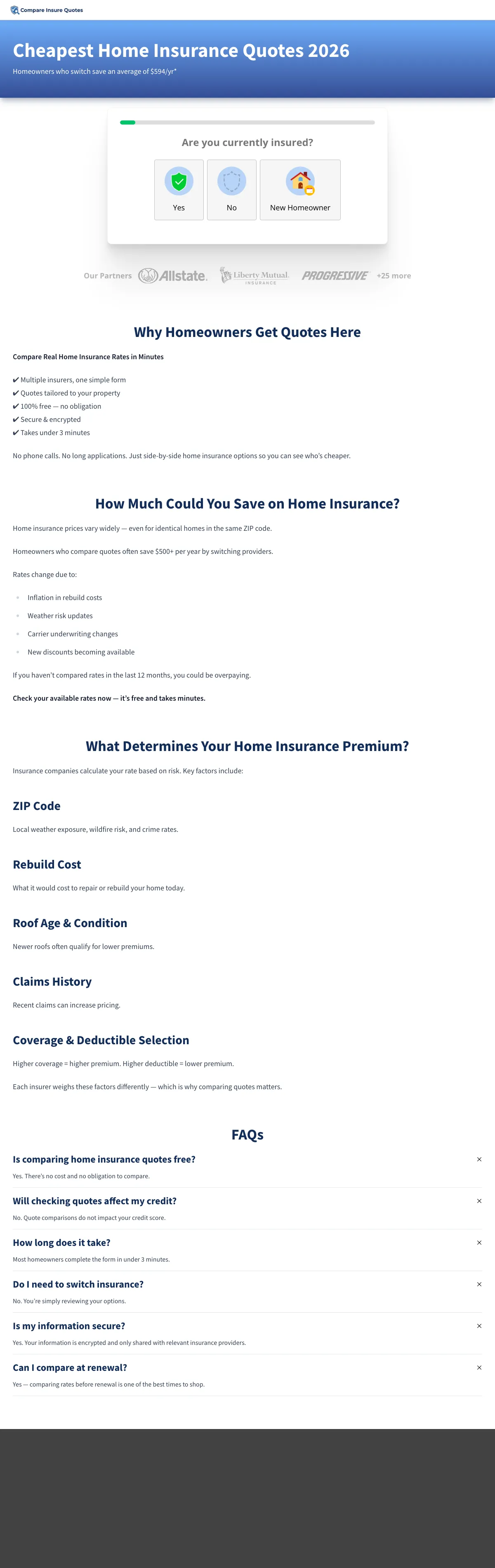
The search: mi basic insurance

Sponsored compareinsurequotes.com

Ranked | Home Insurance 2026 - Compare Home Insurance Options

  1. 1

    What it gets wrong

    Headline is cheapest, the ad said ranked

    The ad started with ‘Ranked’. The headline says ‘Cheapest Home Insurance Quotes 2026’ and the page doesn't show a ranking.

  2. 2

    What makes it work

    Savings figure under the headline

    The line says ‘Homeowners who switch save an average of $594/yr*’. A buyer sees a dollar figure before the form.

  3. 3

    What makes it work

    First step is a one-click question

    The form starts with ‘Are you currently insured?’ and three buttons: Yes, No and New Homeowner. A buyer answers before typing anything.

  4. 4

    What makes it work

    Carrier logos under the question

    Carrier logos run in one row, then ‘+25 more’. A buyer from an unknown site sees brands they know.

  5. 5

    What it gets wrong

    Long text blocks under the quiz

    Three text sections and a FAQ follow the quiz, starting with ‘Why Homeowners Get Quotes Here’. A buyer who came to compare has a lot to scroll past.

What to try

One question as the first step

Compare Insure Quotes asks ‘Are you currently insured?’ with three buttons before any field. Make the first step one click.

See the original page

Wildcard #3: erieinsurance.com

erieinsurance.com/home-insurance

Home Insurance landing page example from erieinsurance.com

The search: erie homeowners insurance quote

Sponsored erieinsurance.com

Home Insurance Quotes - Homeowners Insurance Quotes

  1. 1

    What it gets wrong

    Full site menu above the headline

    The top bar has five menu links, a Login link and ‘Find an Agent’. A paid click can leave the page from the first screen.

  2. 2

    What makes it work

    Headline matches the ad

    The ad said ‘Homeowners Insurance Quotes’ and the headline says ‘Homeowners Insurance’. The click matches the page.

  3. 3

    What makes it work

    ZIP box and one button in the hero

    The hero has an insurance type menu, a ZIP Code box and a ‘Request a Quote’ button. A buyer starts with one small answer.

  4. 4

    What makes it work

    Customer quotes with name and town

    Three customer quotes each show a first name, a last initial and a town. A buyer can see real people from real places.

  5. 5

    What makes it work

    Replacement cost line in large type

    The page says ‘Guaranteed replacement cost. No surprises.’ in one big line. It is the one coverage feature the page repeats.

What to try

Strongest claim as a full-width line

This page prints ‘Guaranteed replacement cost. No surprises.’ in one big line. Pick your strongest claim and put it in a full-width line.

See the original page

The copy bank.

Headlines

Offers

  • “Condo insurance starting at $30 a month”

    plymouthrock.com

  • “You could save up to 12% when you purchase online”

    libertymutual.com

  • “Join over 3,000,000 customers who received home insurance quotes from us”

    squareone.ca

Promises

Next steps

3 pages that waste the click.

  1. A search for the company’s own name

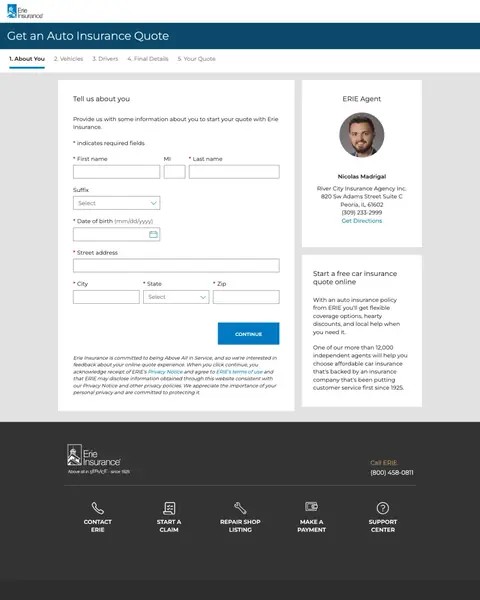
    Auto insurance quote form

    A homeowner who searched for the company by name sees ‘Get an Auto Insurance Quote’ at the top and a five-step car form.

    • Wrong productThe title bar says ‘Get an Auto Insurance Quote’.
    • Five stepsA bar lists About You, Vehicles, Drivers, Final Details and Your Quote.
    • Car copyThe side box says ‘Start a free car insurance quote online’.
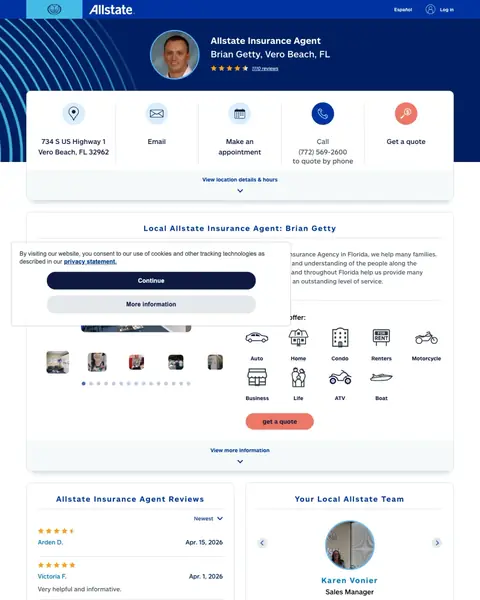
  2. insurance vero beach

    Agent profile for a Vero Beach search

    The first screen is an agent profile with a photo, a star rating and five options: address, email, appointment, call and get a quote.

    • Profile firstThe page starts with the agent's name and photo, with no offer or price.
    • Equal options‘Get a quote’ is one of five boxes in the same row.
    • Nine productsHome is one of nine product icons, and no price shows.
  3. A search for the company’s own name

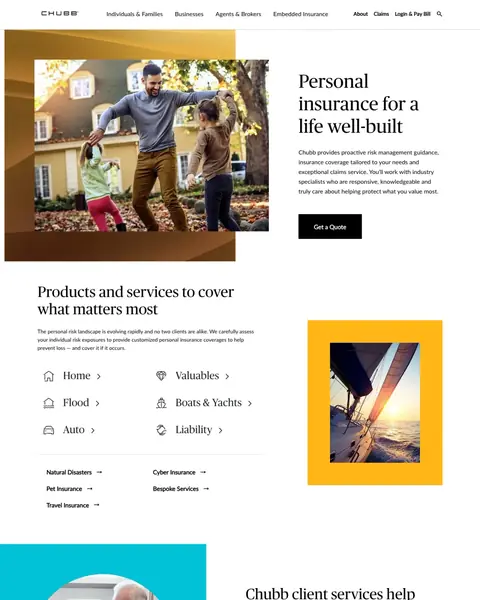
    Brand page with six product links

    A homeowner who searched for the company by name sees a brand headline and six product links before any quote step.

    • Brand headline‘Personal insurance for a life well-built’ is a brand line for every product.
    • Six productsHome is one of six product links, beside Valuables, Flood, Boats & Yachts, Auto and Liability.
    • No formThe first screen has a ‘Get a quote’ button and no field to start a quote.

What we learned.

  1. Start with one field

    Amica and Liberty Mutual ask for a ZIP code and TGS asks for an address. Plymouth Rock asks for five fields before a quote.

  2. Show a real price early

    TGS prints a sample policy at ‘$1,389/yr’ beside its address box. Plymouth Rock puts ‘$30 a month’ in its headline.

  3. Name the product and the state

    Square One prints ‘Alberta home insurance from $15/month’ and Plymouth Rock leads with ‘Condo insurance’. A California condo buyer should see the product and the state in the first line.

The bottom line

The home insurance pages here that win leads put a phone number on the page, ask for one field and show a number in the first screen. Brokers and carriers that run paid search can copy that, because the losers send clicks to an auto form, an agent profile and a brand page.

Postclick is live

Now point it at your quote page

Paste the URL your own ads point at. Postclick reads it the way we read these 42 pages, shows what is costing you quotes and draws new versions to look at. Your first audit and two design directions are free.

Audit my home insurance page

No card required.

Visit the live page