Free tool
Paste your keywords, one per line, and copy them back in broad, "phrase" and [exact] match. Or mix up to 3 lists into every combination first. It cleans the list as it goes: lowercase, no duplicates, and no symbols left over from an old export.
Match types
0 keywords
To build a list from parts, switch to Mix lists. Put services in one list, words like "emergency" in another and towns in the third, and the tool writes every combination.
| Match type | How you write it | What it can match |
|---|---|---|
| Broad | running shoes | Searches related to the keyword, including ones without its words |
| Phrase | "running shoes" | Searches that include the meaning of the keyword |
| Exact | [running shoes] | Searches with the same meaning as the keyword |
Google's page on keyword matching options has the full definitions. Broad match reaches the most searches and exact match the fewest. A broad keyword can match every search its phrase and exact versions match, plus more.
I pulled keyword spend by match type from the 59 US Google Ads accounts I can see that spent $1,000 or more on Search keywords and converted between 18 July and 16 October 2026. The median account put 29% of its keyword spend on broad match.
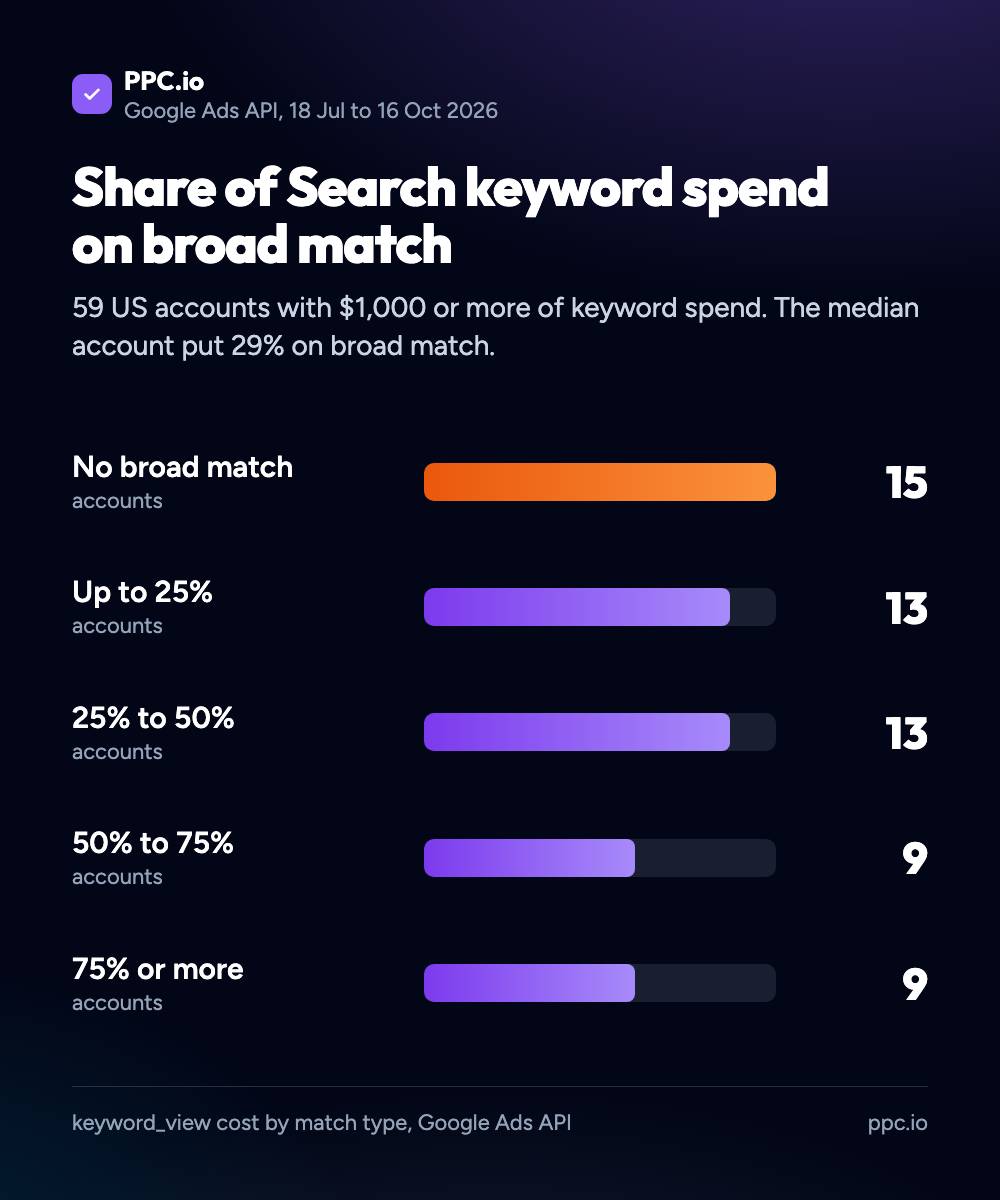
The accounts spread across the whole range. 15 used no broad match at all, and 9 put three quarters or more of their keyword spend on it. Broad match works best with Smart Bidding and good conversion tracking, because Google needs to know which searches turn into sales. Without that, phrase and exact keep the spend on searches you chose.
Whichever you pick, read the search terms report every week. In the same accounts, with brand campaigns left out, a broad match conversion cost a median 1.08 times an exact one. My guide to broad match vs exact match has the full comparison.
Negative keywords use the same symbols, but they don't match close variants. Google's negative keywords page gives the example: excluding "flowers" still lets your ad show for "red flower". Add the singular and the plural yourself.
To find negatives in the first place, my negative keyword tool reads your search terms, and the negative keyword examples post has lists by industry.
A keyword wrapper adds match type symbols to a list of keywords. It puts quotation marks around each keyword for phrase match and square brackets for exact match, so you can paste the list straight into Google Ads or Microsoft Ads instead of typing the symbols by hand.
Broad match has no symbols: running shoes. Phrase match goes in quotation marks: "running shoes". Exact match goes in square brackets: [running shoes]. Google Ads reads the symbols when you add the keywords and sets the match type for you.
No. Google stopped letting advertisers add broad match modifier keywords (+running +shoes) in 2021 and folded that behaviour into phrase match. This tool removes any plus signs you paste in.
Yes. Negative keywords use the same symbols. Negative keywords do not match close variants, so add the singular and plural yourself: excluding "flowers" does not exclude "flower".
It combines every line in one list with every line in the next. "emergency" and "24 hour" in list 1, "plumber" in list 2 and "leeds" and "york" in list 3 gives 4 keywords, such as emergency plumber leeds. Then it wraps them in the match types you pick.
 Our AI Tools